Building a Print Shop with Bolt? 5 Checks Before You Sell
September 29, 2026 · 1252 words
| Field | Detail |
|---|---|
| Example app | Photos by Nathan: a photographer's fine-art print store (paper, canvas, metal) |
| Builder | Nathan Rupert, photographer with a full-time tech day job; coding background not stated |
| AI tool | Bolt.new (build and hosting) |
| Stack | Bolt.new, Stripe payments, Printful print-on-demand, custom admin backend |
| Time to launch | 3–4 months of evenings and weekends; launched spring 2026 |
| Revenue | Not disclosed (live shop; build cost ~$400–500 vs an $8–10K agency quote) |
| Source | Bolt customer story, Aug 2026 |

San Diego photographer Nathan Rupert built his own print store with Bolt.new for about $400–500. An agency had quoted him $8,000–10,000. That's according to a Bolt customer story published in August 2026.
His store, Photos by Nathan, sells prints on archival paper, canvas and metal. Stripe takes payments. Printful, a print-on-demand service, prints and ships each order. He also built an admin backend to upload photos, set crops and track orders.
That combination is now a common vibe-coded app type: a small store with real payments, automated fulfillment and a home-made admin panel. This post uses it as the example of that category. It is not an audit of Nathan's site, and I haven't tested it.
The core point: in a store, the server must decide the price, confirm the payment and guard the admin, because the browser can't be trusted with any of them.
Building a store like Photos by Nathan?
Here's what makes this app type different from a simple portfolio site:
- Money moves. A checkout creates charges.
- Orders trigger real costs. Each Printful order costs the seller money to print and ship.
- There's an admin. Someone uploads products and changes prices.
- The product is the file. For a photographer, the full-resolution image is what customers pay for.
Each of these raises the stakes compared with a brochure site. A bug no longer means a broken page. It can mean a lost print, a free order or a leaked file.
The Bolt story shows good instincts. Nathan placed a test order before launch and caught a Printful bug: a placeholder image shipped instead of his photo. He then added end-to-end checkout testing. That habit is exactly what the checks below build on.
The 5 holes this kind of store often ships with
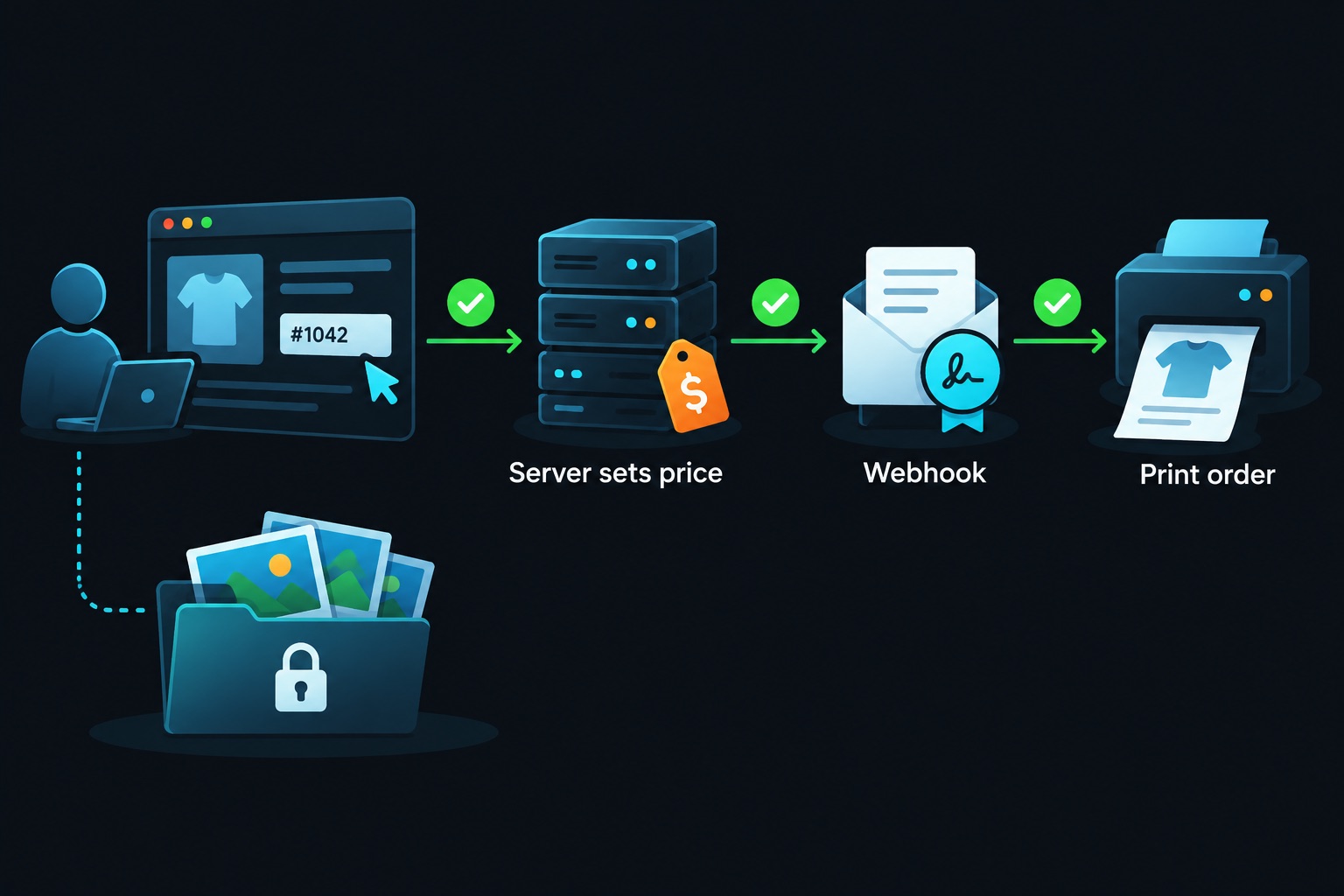
These are patterns I see across AI-built stores in general. AI tools build the happy path first: a checkout that works and looks finished. The holes show up when someone uses your store in a way you didn't plan.
1. Prices sent from the browser. The front end sends price: 4900 to your checkout API, and the server passes it to Stripe. (Stripe amounts are in cents, so that's $49.) Anyone can edit that request and pay $1 instead.
2. Fulfillment from the success page. The "Thanks for your order" page tells the server to create the Printful order. But anyone can load that URL without paying. Only Stripe's webhook, a signed message from Stripe to your server, proves payment. See Stripe webhook security.
3. Admin protected only in the UI. The admin link is hidden, or the page checks isAdmin in the browser. The admin API routes behind it don't check anything. See middleware auth bypass.
4. Secret keys in the front end. A Stripe secret key or Printful API token ends up in a public env variable. Public variables (like VITE_ or NEXT_PUBLIC_) ship to every visitor's browser. See environment variables security.
5. Full-resolution originals in a public bucket. Uploads land in public storage, so anyone with the URL can download the print-quality file for free. Serve smaller previews publicly and keep originals private. See storage bucket security and file upload security.
Before and after: let the server set the price
Hole #1 is the easiest to miss, so here's the fix. This example uses a Next.js route and Stripe Checkout.
Before — the server trusts the price from the browser:
// BEFORE: price comes from the request body
const { title, priceCents } = await req.json();
const session = await stripe.checkout.sessions.create({
  mode: "payment",
  line_items: [{ quantity: 1, price_data: {
    currency: "usd", unit_amount: priceCents,
    product_data: { name: title } } }],
  success_url: `${origin}/thanks`, cancel_url: `${origin}/shop`,
});
After — the browser sends only IDs, and the server looks up the price:
// AFTER: price comes from your database
const { variantId } = await req.json();
const variant = await db.variant.findUnique({ where: { id: variantId } });
if (!variant) return Response.json({ error: "Not found" }, { status: 404 });

const session = await stripe.checkout.sessions.create({
  mode: "payment",
  line_items: [{ quantity: 1, price_data: {
    currency: "usd", unit_amount: variant.priceCents,
    product_data: { name: variant.name } } }],
  metadata: { variantId: variant.id },
  success_url: `${origin}/thanks`, cancel_url: `${origin}/shop`,
});
Then create the Printful order only inside your verified webhook, using the variantId from metadata. Validate the request body with a schema too; see Zod input validation.
Test it with curl
Curl is a command-line tool for sending web requests. Run these against your own staging site only.
# 1. Does the server ignore a fake price? (expect the real price on Stripe)
curl -X POST https://your-staging-site.example/api/checkout \
  -H "Content-Type: application/json" \
  -d '{"variantId":"canvas-16x24","priceCents":100}'

# 2. Does the webhook reject unsigned requests? (expect 400)
curl -X POST https://your-staging-site.example/api/stripe-webhook \
  -H "Content-Type: application/json" -d '{"type":"checkout.session.completed"}'

# 3. Is the admin API closed when logged out? (expect 401 or 403)
curl -i https://your-staging-site.example/api/admin/products
If the first command returns a Stripe link for $1.00, your server trusts the browser. If the second returns 200, anyone can fake a paid order.
If you vibe-code this
Before you take your first real order, run this checklist:
- Server-side prices only. The browser sends product and size IDs, never amounts.
- Webhook-only fulfillment. Verify the Stripe signature, then create the print order. Make it idempotent (safe to run twice) because Stripe can retry.
- Admin checks on every API route, on the server. Hiding the button isn't protection.
- Secrets stay server-side. Stripe secret keys and Printful tokens never use a public prefix.
- Private originals, public previews. And customers should only see their own orders; see IDOR authorization.
Nathan's test-order habit is the best advice in the story. Do what he did, then add the three curl tests above.
Selling prints or products from a vibe-coded store? Email [email protected] for a security audit before launch.
Key takeaway
Bolt let a photographer build a real store for the price of a few prints. That's the upside of vibe coding. The trade-off is that a store handles money, costs and valuable files. Let the server set prices, let Stripe's webhook confirm payment, and lock the admin on the server.
More case studies: Vibe-coded apps making money · Full checklist: Vibe coding security guide
Sources
- Bolt blog, "Photos by Nathan" customer story (Aug 28, 2026): https://bolt.new/blog/photos-by-nathan-print-store
- Photos by Nathan store: https://photosbynathan.net