Supabase Storage Bucket Security: Your Public Bucket Ignores RLS — The Signed-URL Fix (With Code)
August 3, 2026 · 2441 words
Supabase storage bucket security is the hole that stays open after you've done everything else right. You turned on Row Level Security. You scoped every table to auth.uid(). Your database is locked down. And your users' passport scans, medical forms, and signed contracts are still sitting on a public web address that anyone can open — because your AI assistant created the bucket with public: true, and a public bucket does not care what your policies say.
This guide shows the exact bucket setup AI tools generate, why RLS policies on a public bucket are decorative, and the fix: a private bucket, folder-scoped policies, and short-lived signed URLs. There's a curl test at the end so you can prove your files are actually closed. Every API here was verified against Supabase's current documentation.
"I put in RLS for all types of actions, and I can still read everyone's files"
That's not a hypothetical — it's the opening line of a Supabase GitHub discussion from a developer who did what a careful person would do. They created a bucket, gave each user a folder named after their user ID, and wrote RLS policies for every action. Uploads were restricted. Deletes were restricted. Reads were not, and they could see everyone's avatars.
A Supabase collaborator answered in one line: you have to use a private bucket for that — a public bucket means anyone can read the files.
That reply is the whole article. But it's worth understanding why, because the same misunderstanding is baked into what your AI assistant writes.
What a "bucket" actually is, in plain language
A bucket is a folder in the cloud where your app stores files — profile pictures, PDFs, receipts, video. Supabase gives you buckets alongside your database, which is why AI-built apps reach for them constantly.
Every bucket has one setting that decides everything: public or private.
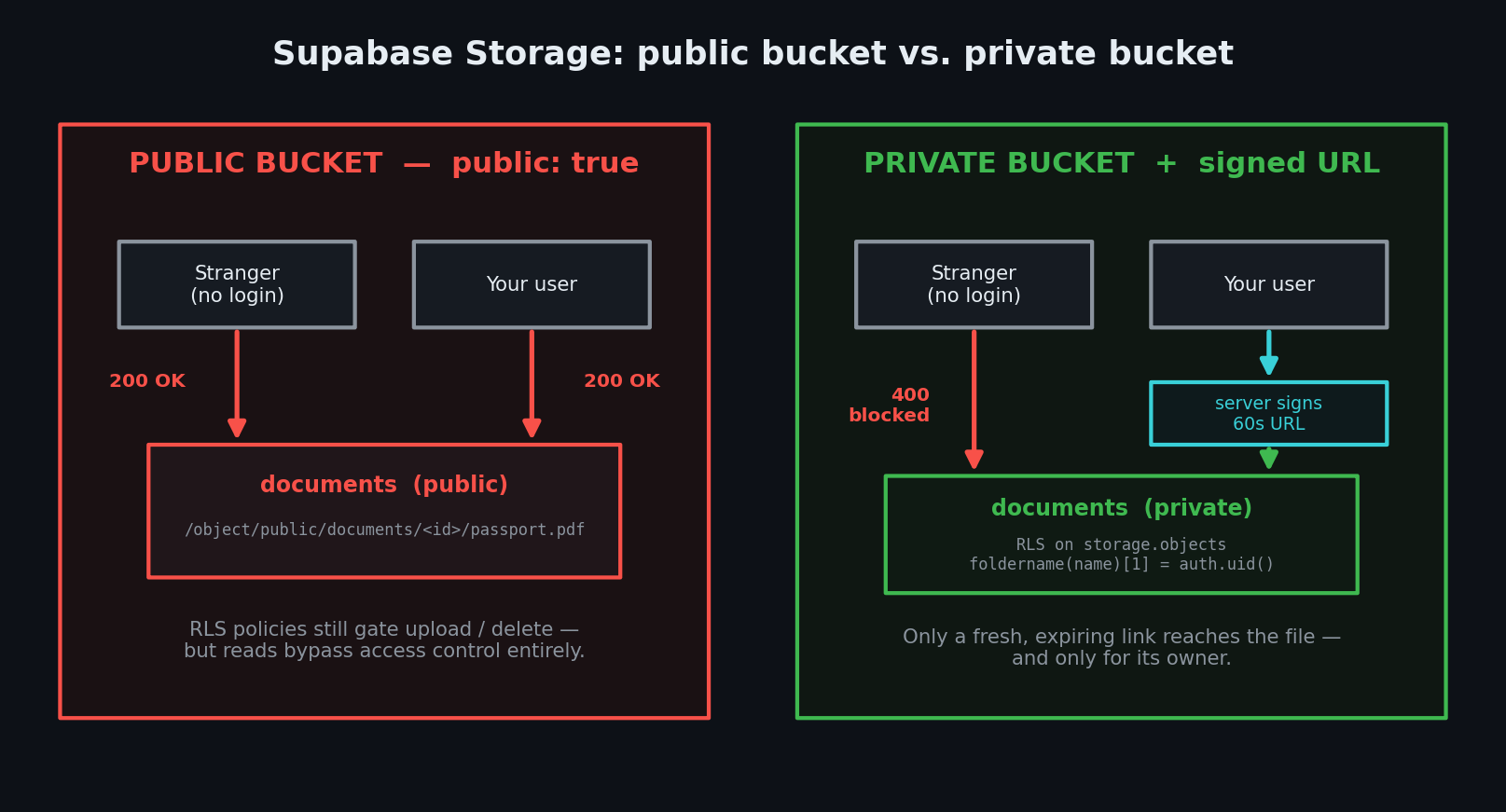
Private is the default. Per Supabase's bucket documentation, when a bucket is private, all operations — including downloading — go through access control. The only two ways to get a file out are a request carrying the user's login token, or a signed URL: a temporary web address with an expiry date baked into it.
Public means the opposite, and the docs are blunt about it: designating a bucket "Public" effectively bypasses access controls for retrieving and serving files. Anyone who has the asset URL can open the file. No login. No token. No policy check.
Here's the part that fools people. Access control is still enforced on public buckets — for uploading, deleting, moving, and copying. So when you write RLS policies and test them, three out of four operations behave exactly as you expect. Only reads are wide open. Your policies look like they work.
The code your AI writes
Ask Cursor or Claude Code for "let users upload their ID document," and you'll get some version of this. It works on the first try, which is exactly the problem.
// ❌ INSECURE — the bucket AI assistants create by default
const { data, error } = await supabase.storage.createBucket('documents', {
  public: true, // "so the images load in the browser"
})

// upload the user's file
await supabase.storage
  .from('documents')
  .upload(`${user.id}/passport.pdf`, file)

// hand the browser a URL to display it
const { data: urlData } = supabase.storage
  .from('documents')
  .getPublicUrl(`${user.id}/passport.pdf`)

// → https://abcxyz.supabase.co/storage/v1/object/public/documents/<user-id>/passport.pdf
Three things went wrong in nine lines.
1. public: true was chosen for convenience. The AI picked it because public URLs render in an <img> tag with zero extra work, and "it works" is what the model optimizes for. The bucket default is private; the AI overrode it.
2. The URL is permanent and guessable. Look at its shape: /storage/v1/object/public/[bucket]/[path]. The only unknown is the path — and your paths are structured (<user-id>/passport.pdf). Any user ID that leaks anywhere else in your app — a profile page, an API response, a shared link — becomes a working key to that person's files.
3. Public URLs live in caches. Public buckets are served through a CDN for speed, so a URL you meant to be seen once can persist in caches, browser history, and chat previews long after you've "removed" it from your app.
This is textbook broken access control — letting people reach data they shouldn't — which sits at number one in the OWASP Top 10, the industry's standard list of the most serious web risks. OWASP's core recommendation is the one Supabase bakes into private buckets: deny by default.
| The mistake | What a stranger can do | The fix |
|---|---|---|
public: true on user files | Open any file with a guessed or leaked URL | Set the bucket to private |
| RLS policies on a public bucket | Read everything; policies only gate writes | Private bucket + SELECT policy |
getPublicUrl() for private docs | Keep the URL forever, share it freely | createSignedUrl() with a short expiry |
| No upload restrictions | Push a 500 MB file or an executable | allowedMimeTypes + fileSizeLimit |
| Service key in frontend code | Bypass every policy in your project | Server-side only; rotate immediately |
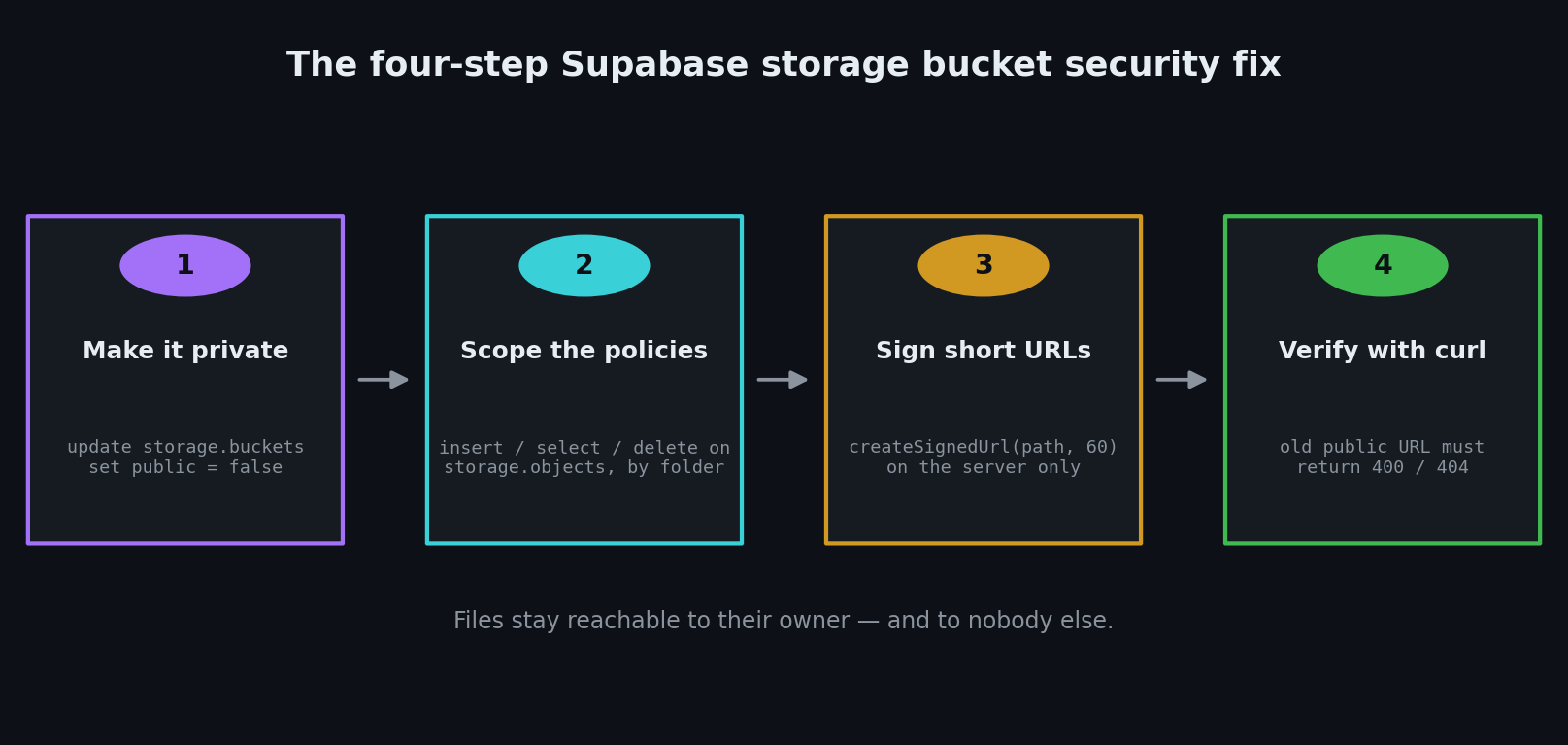
Step 1: Make the bucket private
You can flip this in the Supabase dashboard under Storage → your bucket → Settings, or run one line in the SQL Editor:
-- make an existing bucket private
update storage.buckets
set public = false
where id = 'documents';
The moment you do this, every getPublicUrl() link in your app stops working. That's the point — and it's also why you need Step 3.
For new buckets, keep the default and add upload limits while you're there. Supabase's bucket creation docs show the two options that matter:
// ✅ SECURE — private by default, with restrictions
const { data, error } = await supabase.storage.createBucket('documents', {
  public: false,               // this is the default; be explicit anyway
  allowedMimeTypes: ['application/pdf', 'image/png', 'image/jpeg'],
  fileSizeLimit: '5MB',
})
Uploads that don't match are rejected by Supabase before they ever reach your storage bill.
Step 2: Write the storage policies
Storage metadata lives in a Postgres table called storage.objects, so the rules are ordinary RLS policies — the same mechanism covered in our Supabase RLS guide, just pointed at files instead of rows.
By default, Supabase Storage allows no uploads at all without policies. You open specific doors. Run this in the SQL Editor, using a layout where every file lives under a folder named after its owner's user ID:
-- users can upload only into their own folder
create policy "Users can upload to their own folder"
on storage.objects for insert
to authenticated
with check (
  bucket_id = 'documents'
  and (storage.foldername(name))[1] = (select auth.uid()::text)
);

-- users can read only their own files
create policy "Users can read their own files"
on storage.objects for select
to authenticated
using (
  bucket_id = 'documents'
  and (storage.foldername(name))[1] = (select auth.uid()::text)
);

-- users can delete only their own files
create policy "Users can delete their own files"
on storage.objects for delete
to authenticated
using (
  bucket_id = 'documents'
  and (storage.foldername(name))[1] = (select auth.uid()::text)
);
storage.foldername(name) is a Supabase helper function that splits a file path into its folders. For a1b2c3/passport.pdf it returns ['a1b2c3'], so [1] is the top folder. The policy reads: the first folder in the path must equal the ID of whoever is logged in.
One note from the docs worth remembering: if you want to allow overwriting files with upsert, you need SELECT and UPDATE permissions as well as INSERT.
Step 3: Serve files with signed URLs
Now the files are locked, and your app still needs to show them. A signed URL is a temporary address Supabase generates on demand, valid for a number of seconds you choose. When it expires, the link is dead.
Generate it on the server, never in the browser, so the authorization decision happens somewhere the user can't tamper with. Here's a Next.js App Router route handler using the @supabase/ssr server client:
// app/api/documents/[name]/route.ts
import { createServerClient } from '@supabase/ssr'
import { cookies } from 'next/headers'
import { NextResponse } from 'next/server'

export async function GET(
  request: Request,
  { params }: { params: Promise<{ name: string }> }
) {
  const { name } = await params
  const cookieStore = await cookies()

  const supabase = createServerClient(
    process.env.NEXT_PUBLIC_SUPABASE_URL!,
    process.env.NEXT_PUBLIC_SUPABASE_PUBLISHABLE_KEY!,
    {
      cookies: {
        getAll() {
          return cookieStore.getAll()
        },
        setAll(cookiesToSet) {
          try {
            cookiesToSet.forEach(({ name, value, options }) =>
              cookieStore.set(name, value, options)
            )
          } catch {
            // called from a Server Component — safe to ignore
          }
        },
      },
    }
  )

  // verify who is asking — getClaims validates the JWT signature
  const { data: claimsData } = await supabase.auth.getClaims()
  const userId = claimsData?.claims?.sub
  if (!userId) {
    return NextResponse.json({ error: 'Not signed in' }, { status: 401 })
  }

  // 60-second link, scoped to this user's own folder
  const { data, error } = await supabase.storage
    .from('documents')
    .createSignedUrl(`${userId}/${name}`, 60)

  if (error || !data) {
    return NextResponse.json({ error: 'Not found' }, { status: 404 })
  }

  return NextResponse.json({ url: data.signedUrl })
}
Two details that matter. Supabase's docs are explicit that you should use getClaims() to protect pages and user data — never trust getSession() in server code, because the session comes from cookies that can be spoofed. And keep the expiry short: 60 seconds is plenty to load an image or start a download, and it means a leaked link is worthless a minute later.
One caveat straight from the serving docs: signed URLs are signed with a separate internal key, so they stay valid until they expire even if you rotate your Auth keys. You cannot revoke them yourself. Short expiries are your revocation.
Step 4: Prove it's fixed
Don't take the dashboard's word for it. Test like a stranger would — open a terminal, log out of nothing, and just ask.
# 1. The old public URL must now fail
curl -i "https://<project-ref>.supabase.co/storage/v1/object/public/documents/<user-id>/passport.pdf"
# BEFORE the fix: HTTP/2 200  ← anyone can read it
# AFTER the fix:  HTTP/2 400  {"error":"Bucket not found"} or 404 Object not found

# 2. An unauthenticated request to the authenticated endpoint must fail
curl -i "https://<project-ref>.supabase.co/storage/v1/object/authenticated/documents/<user-id>/passport.pdf"
# Expect: 400 / 401 — no token, no file

# 3. A fresh signed URL must work, and stop working after it expires
curl -i "<paste the signedUrl your route returned>"      # 200
sleep 65
curl -i "<same signed URL>"                              # 400 — expired
If test 1 still returns 200, the bucket is still public. If test 3 still returns 200 after the expiry, you're looking at a cached response or the wrong URL.
Ask your AI to fix it
Paste this into Cursor, Claude Code, or Copilot Chat. It's written to make the model check its own work instead of agreeing with you.
Audit how this project uses Supabase Storage. For every bucket: report whether it is public or private, and list every call to
getPublicUrl(). For any bucket holding user-specific or sensitive files, do the following:
- Change the bucket to private and show me the SQL to update an existing bucket.
- Write RLS policies on
storage.objectsfor insert, select, and delete, scoped so the first folder in the path equalsauth.uid()::textusingstorage.foldername(name).- Replace every
getPublicUrl()call for those files with a server-sidecreateSignedUrl()call with a 60-second expiry, behind an auth check usingsupabase.auth.getClaims().- Add
allowedMimeTypesandfileSizeLimitto the bucket configuration.Do not put the service role key anywhere that runs in the browser. List any file you were unsure about instead of guessing.
Your storage security checklist
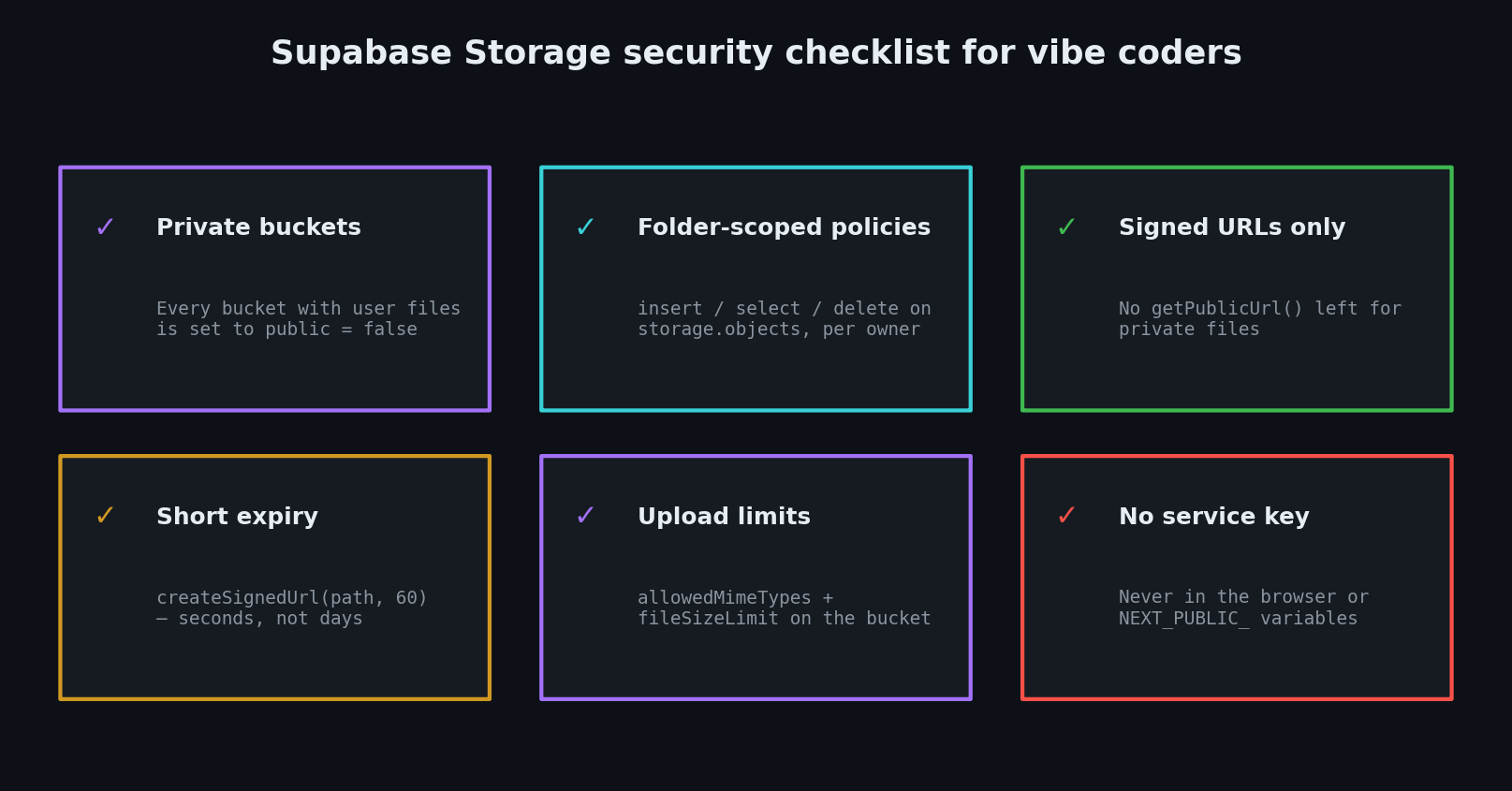
- Every bucket holding user-specific or sensitive files is set to private.
storage.objectshas explicit insert, select, and delete policies scoped to the owner's folder.- No
getPublicUrl()calls remain for private files — they'recreateSignedUrl()on the server. - Signed URLs use a short expiry (seconds or minutes, not days).
- Buckets have
allowedMimeTypesandfileSizeLimitset. - The service role key appears nowhere in client-side code or
NEXT_PUBLIC_variables. - You ran the curl tests above and the public URL returned an error.
Storage is the half of Supabase that survives an RLS cleanup untouched, because it lives in its own schema with its own access model. If you're also accepting uploads through your own API, pair this with our guide to Next.js file upload security — validating what comes in and controlling what goes out are two different jobs. For the full picture across your stack, start at our vibe coding security pillar guide.
Want a Second Pair of Eyes on Your Supabase Storage?
Not sure whether your uploaded files are actually private? I run hands-on vibe coding security audits — I'll check your buckets for public exposure, missing storage.objects policies, and leftover getPublicUrl() calls, then send you a plain-English list of exactly what to change. Email me at [email protected] and I'll take a look.
Key Takeaway
A public Supabase bucket ignores your read policies — that's the entire bug. RLS still gates uploads and deletes on a public bucket, which is why the setup looks correct right up until a stranger opens someone's passport scan. Set buckets holding user files to private, write storage.objects policies scoped to the owner's folder with storage.foldername(name), serve files through short-lived createSignedUrl() links generated on the server, and confirm with a curl that the old public URL is dead. Four steps, about twenty minutes, and the files your users trusted you with stop being a public web address.
Bucket access models, storage policy syntax, createSignedUrl behavior, and the @supabase/ssr client setup were verified against Supabase's official documentation in August 2026. Test your own buckets both signed in and signed out before you ship — the dashboard tells you the setting, but only a request tells you the truth.