Your Next.js Upload Route Will Store Anything: The File Validation Your AI Forgot (With Code)
July 22, 2026 · 2216 words
Next.js file upload security is the part of your app that fails quietly. Your upload button works. The image shows up. Nothing crashes. And meanwhile the route you shipped will happily accept a 200 MB file, a JavaScript payload wearing a .png costume, or a filename that overwrites something it shouldn't — because the only check your AI assistant wrote was file.type.startsWith('image/'), and that value is supplied by whoever is uploading.
If you've vibe coded a profile picture upload, a receipt uploader, or a "drop your CV here" form, this guide is the fix. We'll look at the exact route handler AI tools produce, why every one of its checks is decorative, and the corrected version that validates the file's actual bytes, renames it, and stores it somewhere strangers can't reach. Every API here was verified against the current Next.js, Supabase, and file-type docs.
The stakes aren't hypothetical. In July 2025 the Tea app left its user-verification images in an unsecured Firebase storage bucket; roughly 72,000 images including 13,000 selfies and government IDs were downloaded and posted publicly. The upload code worked fine. Where the files landed, and who could read them, did not.
The code your AI wrote
Ask Cursor or Claude Code to "add an image upload endpoint" and you'll get some version of this:
// app/api/upload/route.ts — the version your AI wrote (INSECURE)
import { writeFile } from 'node:fs/promises'
import path from 'node:path'
import { NextResponse } from 'next/server'

export async function POST(req: Request) {
  const form = await req.formData()
  const file = form.get('file') as File

  if (!file.type.startsWith('image/')) {
    return NextResponse.json({ error: 'Images only' }, { status: 400 })
  }

  const bytes = Buffer.from(await file.arrayBuffer())
  const dest = path.join(process.cwd(), 'public/uploads', file.name)
  await writeFile(dest, bytes)

  return NextResponse.json({ url: `/uploads/${file.name}` })
}
Ten lines, works on the first try, demo looks great. It also has four separate holes.
Why this is dangerous, in plain language
1. file.type is a claim, not a fact. When a browser uploads a file it attaches a Content-Type label. That label is just text in the request — anyone using curl or a proxy can set it to whatever they like. OWASP's File Upload Cheat Sheet is direct about it: "Validate the file type, don't trust the Content-Type header as it can be spoofed." Your if statement is asking the attacker whether the attacker is malicious.
2. file.name is also a claim. The uploader chooses it. A name like ../../.env.local can escape the folder you meant to write to. A name that collides with an existing file silently overwrites it. And a name ending in .html gets stored, and later served, as HTML.
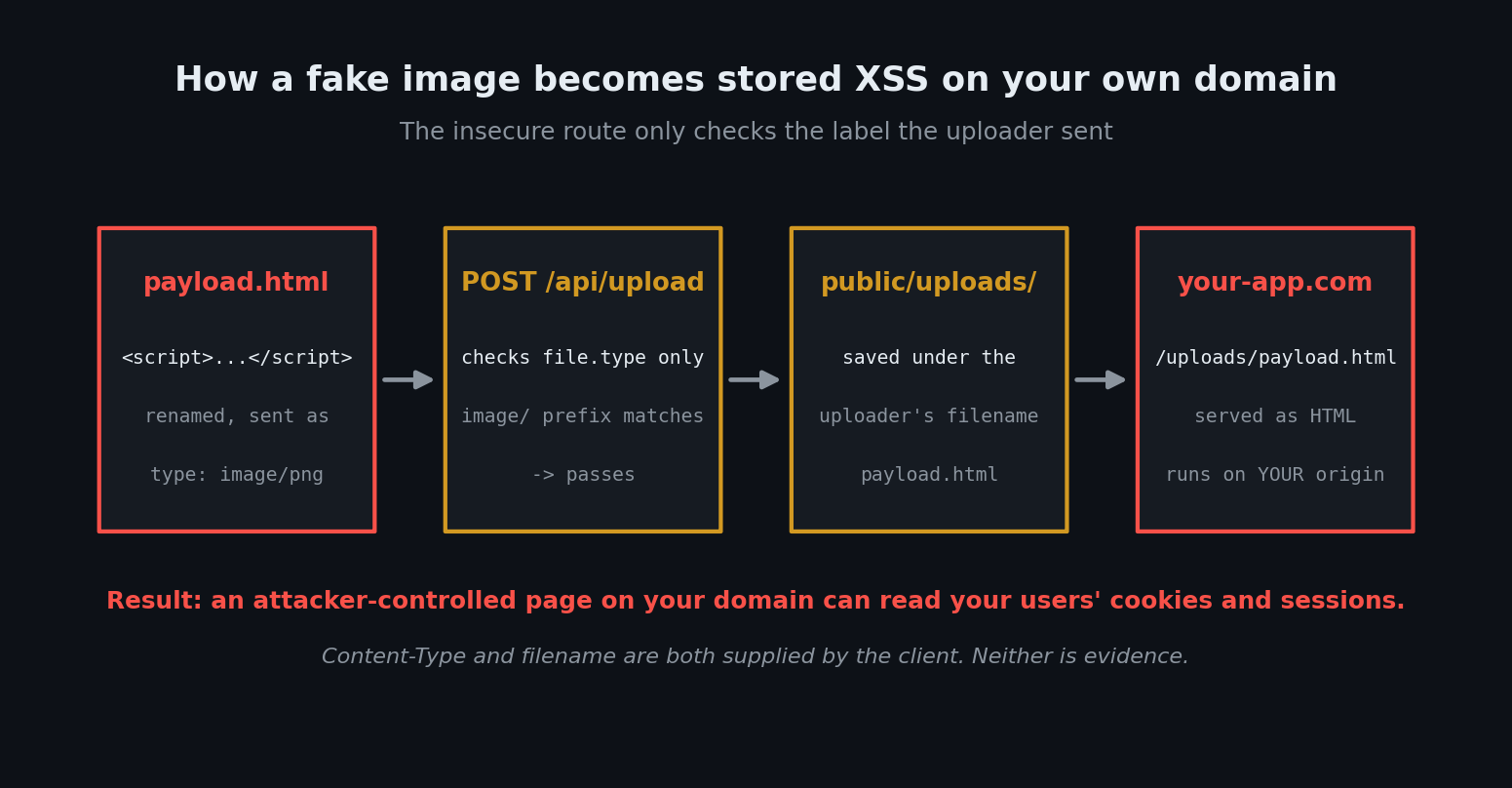
3. public/ is the internet. Anything in Next.js's public/ folder is served at your domain with no auth check. So this works:
# a "PNG" that is actually a script, uploaded to your own domain
printf '<script>alert(document.cookie)</script>' > payload.html
curl -X POST https://your-app.vercel.app/api/upload \
  -F "[email protected];type=image/png"
The declared type passes the check. The file lands at https://your-app.vercel.app/uploads/payload.html. Now an attacker has a page on your origin that runs their JavaScript — which means it can read your users' cookies and session storage. That's stored XSS, hosted by you, on a link you can't easily distinguish from your own pages. (On serverless hosts like Vercel the write to public/ won't even persist between deploys, so this pattern is broken and insecure.)
4. There's no size limit and no auth check. Anyone on the internet, logged in or not, can POST files in a loop. Vercel caps a function request body at 4.5 MB, which accidentally limits one attack while doing nothing about the others — and self-hosted apps don't even get that.
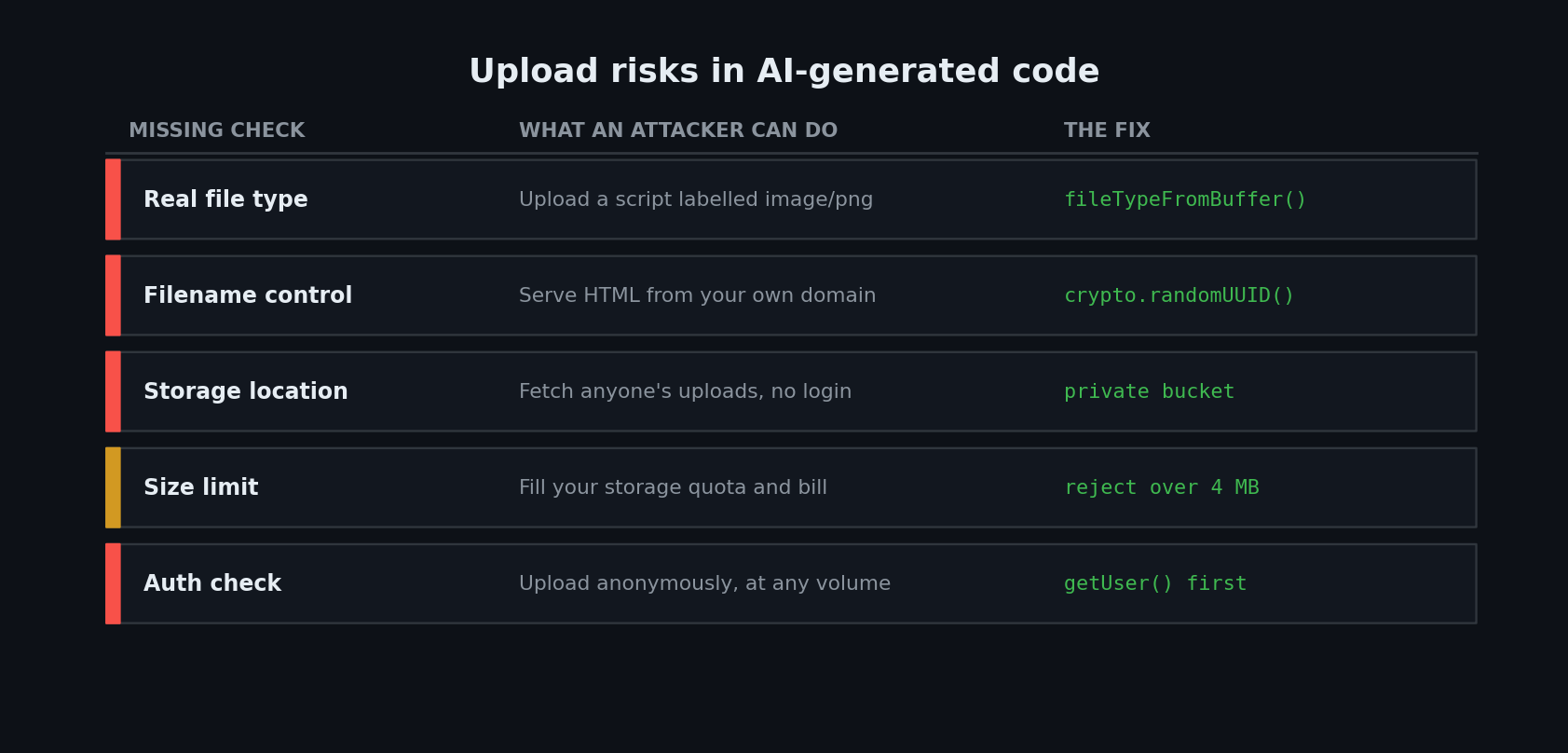
| Missing check | What an attacker can do | The fix |
|---|---|---|
| Real file type | Upload a script or executable labelled image/png | Read the magic bytes with file-type |
| Filename control | Overwrite files, escape the upload folder, serve HTML from your domain | Generate the name yourself (UUID) and derive the extension from the sniffed type |
| Storage location | Fetch any uploaded file, from anyone, with no login | Private bucket + short-lived signed URLs |
| Size limit | Fill your storage quota and your bill | Reject over N bytes before you touch the buffer |
| Auth check | Upload anonymously, at any volume | getUser() at the top of the handler |
The fix, step by step
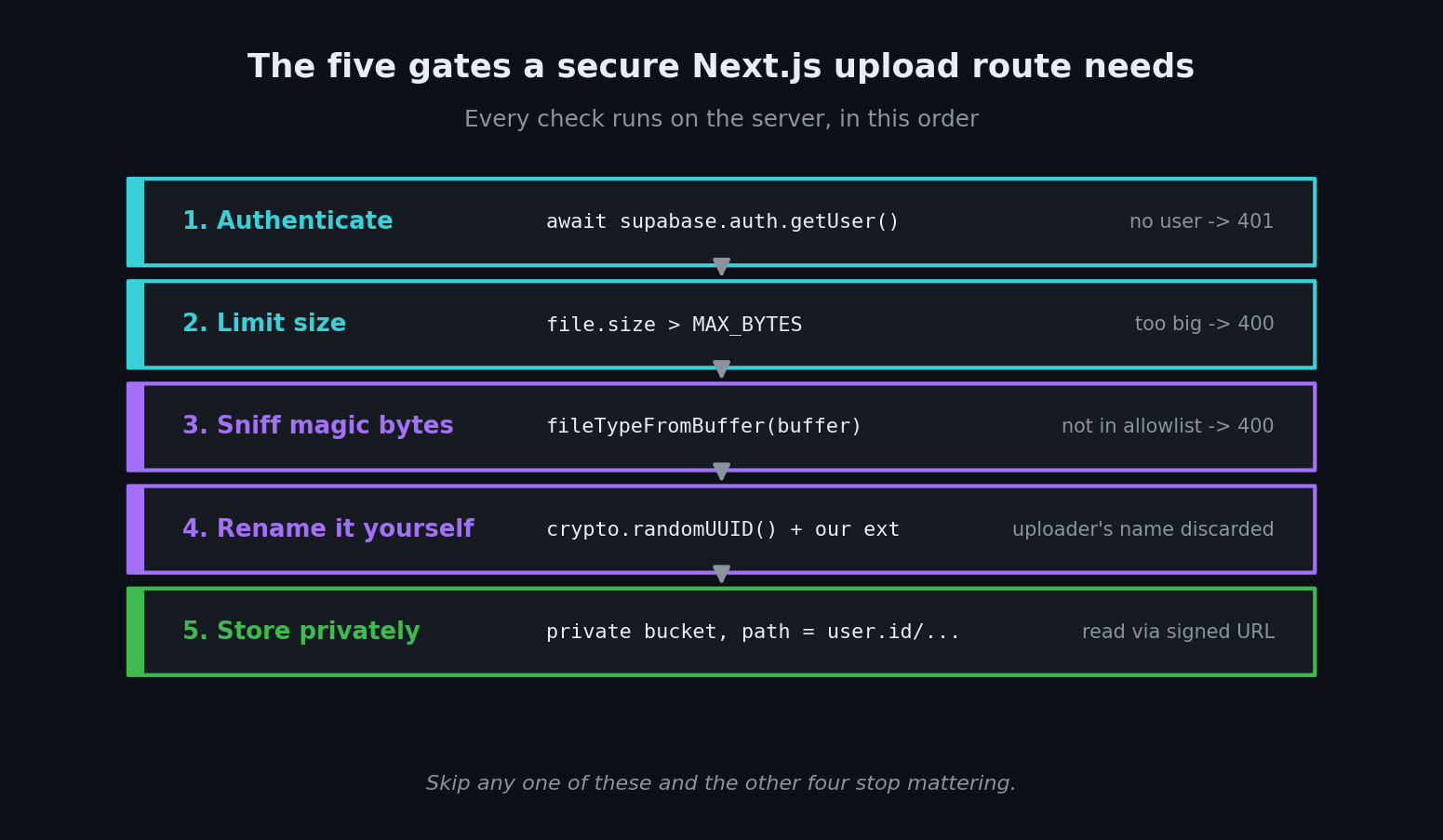
The secure version is five server-side gates, in this order.
Step 1: validate the bytes, not the label
Every binary file format starts with a fixed byte signature — a magic number. A real PNG begins with 89 50 4E 47. You can't fake that by renaming a file. The file-type package reads those first bytes and tells you what the file actually is.
npm install file-type
One gotcha your AI will get wrong: file-type is an ESM-only package. In a normal Next.js App Router project with TypeScript this just works; if you're in a CommonJS setup, you'll need a dynamic await import('file-type').
// lib/upload-guard.ts
import { fileTypeFromBuffer } from 'file-type'

const MAX_BYTES = 4 * 1024 * 1024 // 4 MB — stays under Vercel's 4.5 MB body limit

// The allowlist IS the security boundary. Keep it as small as your feature allows.
const ALLOWED = new Map([
  ['image/jpeg', 'jpg'],
  ['image/png', 'png'],
  ['image/webp', 'webp'],
])

export async function validateImage(file: File) {
  if (file.size === 0) return { ok: false as const, error: 'Empty file' }
  if (file.size > MAX_BYTES) return { ok: false as const, error: 'File too large' }

  const buffer = Buffer.from(await file.arrayBuffer())

  // Reads the magic bytes. Ignores the filename and the Content-Type entirely.
  const sniffed = await fileTypeFromBuffer(buffer)

  if (!sniffed || !ALLOWED.has(sniffed.mime)) {
    return { ok: false as const, error: 'Only JPEG, PNG or WebP images are allowed' }
  }

  return {
    ok: true as const,
    buffer,
    mime: sniffed.mime,
    ext: ALLOWED.get(sniffed.mime)!, // OUR extension, not theirs
  }
}
Note the shape of that allowlist: it maps a trusted MIME type to a trusted extension. You never carry the uploader's string forward.
Step 2: rewrite the route handler
Route Handlers in the App Router are built on the standard Web Request API, so req.formData() is all you need. Everything else is checks.
// app/api/upload/route.ts — the fixed version
import { NextResponse } from 'next/server'
import { createClient } from '@/lib/supabase/server' // your server-side Supabase client
import { validateImage } from '@/lib/upload-guard'

export async function POST(req: Request) {
  const supabase = await createClient()

  // 1. Who is this? Route handlers are public by default — nothing checks for you.
  const {
    data: { user },
  } = await supabase.auth.getUser()
  if (!user) {
    return NextResponse.json({ error: 'Unauthorized' }, { status: 401 })
  }

  // 2. Is there actually a file? Don't cast — check.
  const form = await req.formData()
  const file = form.get('file')
  if (!(file instanceof File)) {
    return NextResponse.json({ error: 'No file provided' }, { status: 400 })
  }

  // 3. Size + real file type
  const checked = await validateImage(file)
  if (!checked.ok) {
    return NextResponse.json({ error: checked.error }, { status: 400 })
  }

  // 4. YOU pick the path, the name, and the extension. Never the uploader.
  const objectPath = `${user.id}/${crypto.randomUUID()}.${checked.ext}`

  // 5. A PRIVATE bucket — not public/, not a public bucket.
  const { error } = await supabase.storage
    .from('user-uploads')
    .upload(objectPath, checked.buffer, {
      contentType: checked.mime, // our verified type, so it can never be served as HTML
      upsert: false, // never silently overwrite an existing object
    })

  if (error) {
    return NextResponse.json({ error: 'Upload failed' }, { status: 500 })
  }

  return NextResponse.json({ path: objectPath })
}
Two details worth pausing on. Prefixing the path with user.id means each user's files live in their own folder, which is what Supabase Storage RLS policies key off — the same idea as row-level security on your tables, covered in our Supabase RLS guide. And upsert: false is the default, but stating it makes the intent obvious to the next AI that edits this file.
Step 3: serve the files with short-lived links
Files in a private Supabase bucket aren't reachable by URL at all. To show one, sign a link on the server that expires:
const { data } = await supabase.storage
  .from('user-uploads')
  .createSignedUrl(objectPath, 3600) // valid for one hour

// data.signedUrl -> pass this to <Image src={...} />
A leaked signed URL stops working within the hour. A leaked public bucket URL works forever — which is the failure mode behind most "our uploaded IDs ended up on the internet" stories, per Supabase's own serving-assets docs.
How to test the fix in three minutes
Run these against your dev server. All three must fail.
# 1. No session at all — expect 401
curl -i -X POST http://localhost:3000/api/upload -F "[email protected]"

# 2. A script wearing a PNG costume — expect 400, not 200
printf '<script>alert(1)</script>' > fake.png
curl -i -X POST http://localhost:3000/api/upload \
  -H "Cookie: <paste your session cookie from DevTools>" \
  -F "[email protected];type=image/png"

# 3. A 10 MB file — expect 400 (or 413 from the platform)
head -c 10000000 /dev/urandom > big.png
curl -i -X POST http://localhost:3000/api/upload \
  -H "Cookie: <paste your session cookie>" \
  -F "[email protected]"
If test 2 returns 200, your validation is still reading the label instead of the bytes.
Ask your AI to fix it
Paste this into Cursor, Claude Code, or Copilot with your upload route open:
Audit my file upload route for these five issues and fix each one, showing me the diff:
- It trusts
file.typeor the filename extension instead of reading the file's magic bytes. Replace this withfileTypeFromBufferfrom thefile-typepackage and an explicit allowlist of MIME types.- It uses the uploader's filename. Replace it with
crypto.randomUUID()plus an extension derived from the sniffed MIME type.- It has no maximum file size. Add one and reject before buffering more than necessary.
- It has no authentication check. Add a server-side session check at the very top and return 401 if there's no user.
- It writes to
public/or a public bucket. Move storage to a private bucket, scope the object path by user ID, and serve files through short-lived signed URLs.Do not add client-side-only validation. Every check must run on the server.
Your upload security checklist
- Auth check is the first thing in the handler
- Maximum file size enforced server-side
- File type verified with magic bytes, against an allowlist (not a blocklist)
- Filename generated by you (UUID); extension derived from the verified type
- Object path scoped by user ID
- Files stored in a private bucket, never
public/ -
contentTypeset explicitly from the verified MIME type - Reads go through signed URLs with a short expiry
- Storage RLS policies restrict each user to their own folder
- Rate limiting on the upload endpoint
Uploads are one of a handful of places where AI-generated code is confidently wrong in a way that only shows up under attack — the same shape of bug as the missing server-side checks in our Server Actions guide. If you want the wider map of what else to check before you ship, start with our pillar: Vibe Coding Security.
Want a second pair of eyes on your upload code? If you've vibe coded a file upload — profile pictures, document uploads, anything users can send you — I'll review the route handler and your storage rules and send back the specific fixes, with code. Email me at [email protected] with your snippet.
Key takeaway
Next.js file upload security comes down to one rule: nothing the uploader sends you is a fact. Not the type, not the name, not the size they claim. Read the bytes, pick the name yourself, and put the result somewhere that requires a signed link to read. Ten extra lines, and your upload button stops being a way for strangers to host content on your domain.
Sources verified for this post (July 2026): OWASP File Upload Cheat Sheet · Next.js Route Handlers · Supabase Storage: standard uploads and serving assets · file-type on npm · Vercel Functions limits