Vibe Coding Security: Why Your Supabase Database Is Public — and How to Lock It Down with RLS
July 13, 2026 · 2030 words
Vibe coding security has one trap that scares beginners more than any other: you build an app with AI, it "just works," and then a stranger downloads your entire database from their browser. No hacking tools required — just your app's public address. If your app uses Supabase (and many AI-built apps do, often without you even knowing), this can happen the moment a table is created without Row Level Security (RLS) turned on. This guide explains, in plain language, why it happens and exactly how to fix it — in about 15 minutes, with copy-paste SQL.
This isn't hypothetical. On Hacker News, a post bluntly titled "Your Supabase is public if you turn off RLS" drew 60-plus comments from developers describing the same pattern: someone ships an AI-generated app, forgets one database setting, and their users' data is readable by anyone. As one commenter put it, "people just really do not comprehend what the 'public' schema means in Supabase." The good news: once you understand this one concept, locking it down is genuinely simple.
What is RLS (Row Level Security), in plain English?
Let's define the pieces first, because the jargon is where beginners get lost.
A database is the table of everything your app stores — users, posts, orders, messages. Supabase is a popular service that gives you a database plus a ready-made API (a web address your app talks to) so your app can read and write that data straight from the browser.
That convenience is also the risk. To let the browser talk to the database, Supabase hands your app a publishable key (older projects call it the anon key). This key ships inside your website's code, so anyone who opens your site can see it — that's by design, and Supabase says it's safe to expose. But it's only safe under one condition, spelled out in Supabase's own docs: the key is safe to expose with RLS enabled, because access is then checked against your rules and the logged-in user's identity.
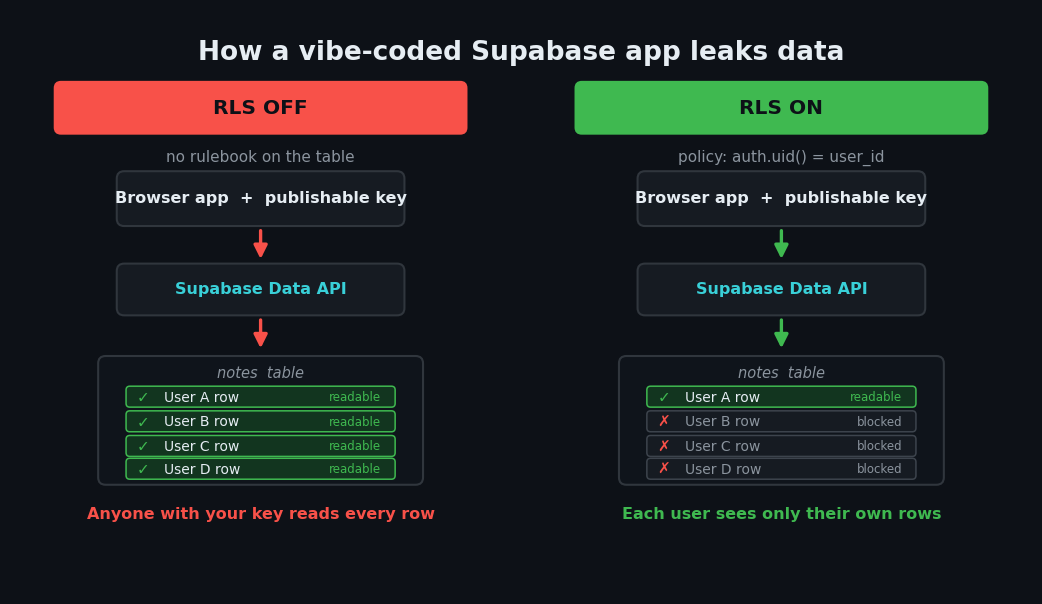
Row Level Security (RLS) is that rulebook. It's a built-in Postgres feature that decides, row by row, who is allowed to see or change each piece of data. Think of it as a bouncer standing over every table: without a rule that says "yes, this person can see this row," the answer defaults to no.
Here's the catch. Turn RLS off, and the bouncer goes home. Your publishable key — which is sitting in plain sight in your app — can now read and write every row in that table. That's what "your Supabase is public" means.
Why AI-built apps leak data this way
If Supabase requires RLS, why do so many vibe-coded apps miss it? Three reasons, and they stack up.
1. The default only protects you sometimes. Supabase's docs are clear: RLS is enabled automatically only for tables you create with the Table Editor in the dashboard. But if a table is created "in raw SQL or with the SQL editor, remember to enable RLS yourself." AI coding tools almost always create tables by writing SQL — the exact path where RLS is not automatic. So the AI builds your messages or profiles table with a SQL command, RLS stays off, and nothing stops it.
2. Nobody reads the warnings. Supabase does warn you in the dashboard when a table has no RLS. But when you're vibe coding, you're chatting with an AI, not reading a database console. AI app builders like Lovable, v0, and Bolt often use Supabase under the hood, and a non-technical user may not even realize a database exists to secure.
3. The AI optimizes for "works," not "safe." A prompt like "let users save their notes" gets you a working notes feature. "Secure" wasn't in the prompt, so it's rarely in the output. We covered this incentive mismatch in our vibe coding security pillar guide — the model gives you the shortest path to a feature, not the safest one.
This is a textbook case of what the security world calls broken access control — letting people reach data they shouldn't. It's not a niche bug. In the OWASP Top 10, the industry's standard list of the most serious web risks, Broken Access Control sits at number one, found in a tested-and-confirmed way across a huge share of applications. Their one-line fix is the same as ours: deny by default. RLS is deny-by-default for your database.
| The risk | What it means for you | The fix |
|---|---|---|
| RLS off on a public table | Anyone with your site's key can read/write every row | enable row level security + a policy |
| A "public users" table | Emails, names, tokens readable by anyone | RLS policy scoped to auth.uid() |
| Service key in frontend code | Full admin access leaked to every visitor | Move it server-side; rotate it now |
Policy trusts user_metadata | Users can edit that data to grant themselves access | Use app_metadata, never user_metadata |
Step 1: Check if your database is exposed (2 minutes)
Before fixing anything, find out where you stand. You don't need to be technical.
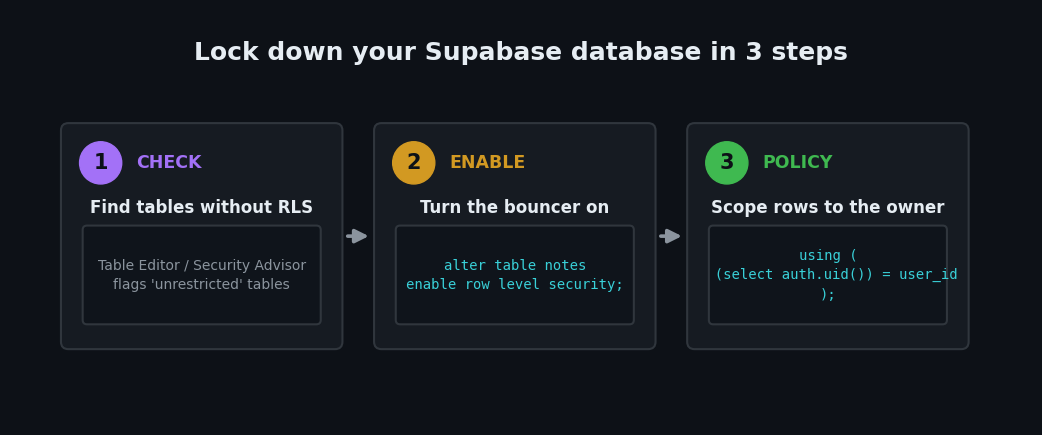
The easy way: open your Supabase dashboard, go to the Table Editor, and look at your tables. Supabase flags any table without RLS with a warning icon and an "unrestricted" label. It also surfaces this in the Database → Advisors / Security Advisor section, which lists tables missing RLS in plain language. Every table in your public schema should say RLS is enabled. If any say otherwise, that table is exposed.
The blunt way: because the risk is that anyone can read your data, you can test it like an outsider would. In your browser, the Data API responds to your project's public URL and key. If a table with RLS off returns rows to an unauthenticated request, that's your proof it's public. If you're not comfortable doing this, the dashboard check above is enough.
Step 2: Turn on RLS and write your first policy (10 minutes)
Here's the whole fix. Open the Supabase SQL Editor and run these commands, swapping in your real table name. We'll use a notes table where each row has a user_id column.
First, turn the bouncer back on:
alter table notes enable row level security;
The instant you run this, the table locks down completely. Per Supabase's docs, once RLS is enabled, no data is accessible via the API until you create policies. That's the "deny by default" state — safe, but useless until you add rules.
Now add a rule that lets each logged-in user see only their own notes:
create policy "Users can view their own notes"
on notes for select
to authenticated
using ( (select auth.uid()) = user_id );
In plain terms: auth.uid() is the ID of whoever is logged in. This policy quietly adds where auth.uid() = user_id to every read, so a user only ever gets rows they own. To let users create, edit, and delete their own notes too, add matching policies:
create policy "Users can insert their own notes"
on notes for insert
to authenticated
with check ( (select auth.uid()) = user_id );

create policy "Users can update their own notes"
on notes for update
to authenticated
using ( (select auth.uid()) = user_id )
with check ( (select auth.uid()) = user_id );

create policy "Users can delete their own notes"
on notes for delete
to authenticated
using ( (select auth.uid()) = user_id );
That's it. Your table now enforces ownership on every operation, straight from the database — even if a bug slips into your app code later. Supabase calls this "defense in depth": the protection lives in the data layer, so it holds even when something above it fails.
Four RLS mistakes that quietly reopen the hole
Turning RLS on is step one. These are the traps that let data leak even with RLS enabled — all documented in Supabase's own guidance.
1. The auth.uid() null trap. When no one is logged in, auth.uid() returns null, and in SQL null = user_id is always false — so the policy silently fails shut, which is usually fine. But if you write a looser policy expecting a real value, test it logged out. Supabase recommends being explicit: using ( auth.uid() is not null and auth.uid() = user_id ).
2. Views bypass RLS. A Postgres view (a saved query that looks like a table) does not automatically obey the RLS of its underlying tables. If your AI created a view over a protected table, it can leak the very data you locked down. On Postgres 15+, create views with security_invoker = true so they respect RLS.
3. Trusting user_metadata in a policy. Supabase warns that user_metadata can be edited by the user themselves. If your policy grants access based on it (for example, an is_admin flag stored there), a user can simply edit it and promote themselves. Store authorization data in app_metadata, which users can't change.
4. Shipping the service key. Supabase has a second key — the service_role / secret key — that bypasses RLS entirely for admin tasks. It must never touch the browser. If your AI pasted it into frontend code or a public .env, treat it as compromised: rotate it immediately and move it to server-side code only.
| Key | Where it belongs | Bypasses RLS? |
|---|---|---|
| Publishable / anon key | Frontend (safe only with RLS on) | No |
| Service role / secret key | Backend only, never in browser | Yes — full access |
Your secure-Supabase checklist
Run through this before you ship. Each item is a "yes/no" you can check today.
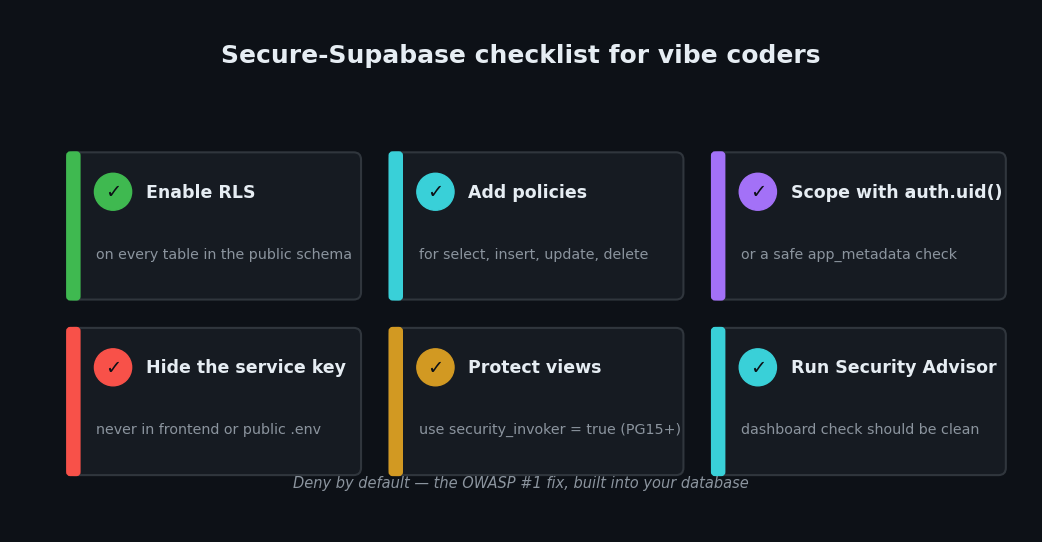
- Every table in the
publicschema has RLS enabled. - Each table has explicit policies for select, insert, update, and delete.
- Policies scope rows with
auth.uid()(or a safeapp_metadatacheck). - No service_role / secret key anywhere in frontend code or public config.
- Any views on protected tables use
security_invoker = true. - You've checked the Security Advisor in the dashboard and it's clean.
For broader coverage, RLS is the database half of secure vibe coding; the code half is catching leaked keys and insecure patterns before you deploy. Pair this with our roundup of free tools that catch leaked API keys, and if you're comparing backends, our guide to open-source Firebase alternatives covers the same access-control trade-offs across other platforms.
Want a Second Pair of Eyes on Your Supabase App?
Not sure whether your database is actually locked down? I run hands-on vibe coding security audits — I'll check your Supabase tables for missing RLS, exposed keys, and the risky policy patterns above, then send you a plain-English list of exactly what to fix. Email me at [email protected] and I'll take a look.
Key Takeaway
The scariest Supabase mistake — a wide-open, publicly readable database — comes down to one setting most vibe coders never see. Row Level Security is deny-by-default protection built into your database: turn it on for every table, write a policy that scopes each row to its owner with auth.uid(), keep your service key off the frontend, and check the dashboard advisor before you ship. Do that, and your publishable key becomes exactly what Supabase intends it to be — safe to expose. Skip it, and "it works" quietly means "anyone can read it."
RLS behavior, key handling, and policy syntax were verified against Supabase's official documentation in July 2026. Security features help, but always confirm what your own app exposes — test your policies both logged in and logged out before going live.