Next.js Server Actions Are Public Endpoints: The Auth Check Your AI Forgot (With Code)
July 19, 2026 · 1801 words
Next.js Server Actions security has one fact that surprises almost every vibe coder: every function you (or your AI) mark with 'use server' becomes a public HTTP endpoint. Not "public if you link to it." Public, period — anyone on the internet can call it directly with a tool like curl, without ever opening your app. If your AI assistant generated a deletePost or updateProfile action without an authentication check inside the function, a stranger can run it. This guide shows you the exact insecure pattern AI tools produce, why it's dangerous, and the fixed code you can paste in today.
This isn't a fringe worry. The official Next.js docs say it plainly: "when a Server Action is created and exported, it is reachable via a direct POST request, not just through your application's UI." And a widely shared hands-on breakdown demonstrated it end to end: grab the action ID from the browser's network tab, send one curl POST, and the server runs your function — no UI, no login page, nothing. Community threads about this realization tend to follow the same arc: "wait, my page has a login check… doesn't that protect the button?" It doesn't. Here's why, and here's the fix.
What is a Server Action, in plain English?
A Server Action is a Next.js feature that lets you write a server-side function — something that touches your database — right next to your page code, and wire it to a button or form. No separate API to build. You mark it with the 'use server' directive and Next.js does the plumbing.
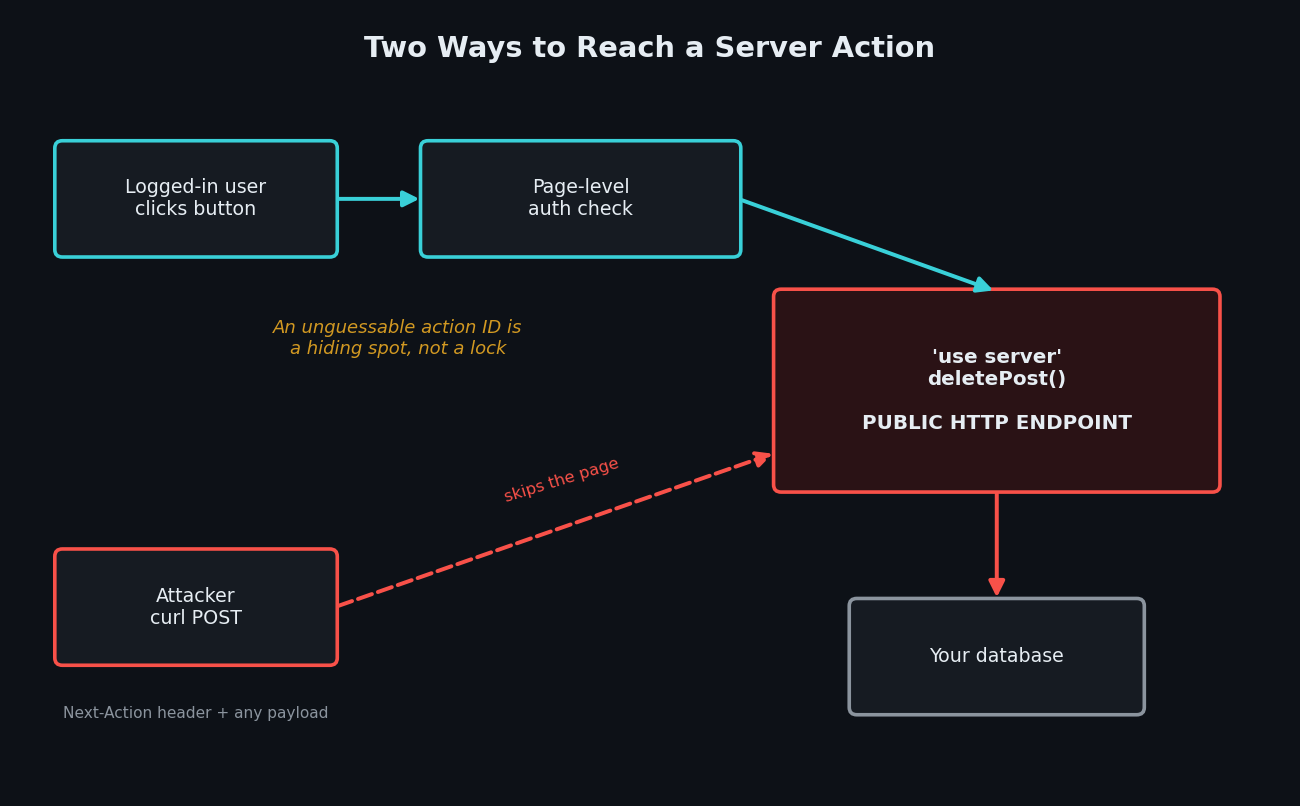
The plumbing is the part vibe coders never see: under the hood, Next.js turns each action into an HTTP POST endpoint (a web address that accepts requests) and gives it an encrypted ID. When someone clicks your button, the browser sends a POST request with a Next-Action header containing that ID. That means anyone who has the ID — and it's visible in your site's JavaScript and network traffic — can send the same request themselves, with any arguments they want.
Next.js does ship two built-in protections: action IDs are encrypted and re-generated between builds, and unused actions are stripped from the client bundle. But the docs themselves warn this only "reduces the risk in cases where an authentication layer is missing. However, you should still treat Server Actions as reachable via direct POST requests and verify authentication and authorization inside each one." An unguessable URL is not a lock — it's a hiding spot.
The code your AI wrote
Ask an AI assistant for "a server action to delete a post" and you'll very often get something like this:
// app/actions.ts — the version your AI wrote (INSECURE)
'use server'

import { db } from '@/lib/db'
import { revalidatePath } from 'next/cache'

export async function deletePost(postId: string) {
  await db.post.delete({ where: { id: postId } })
  revalidatePath('/posts')
}
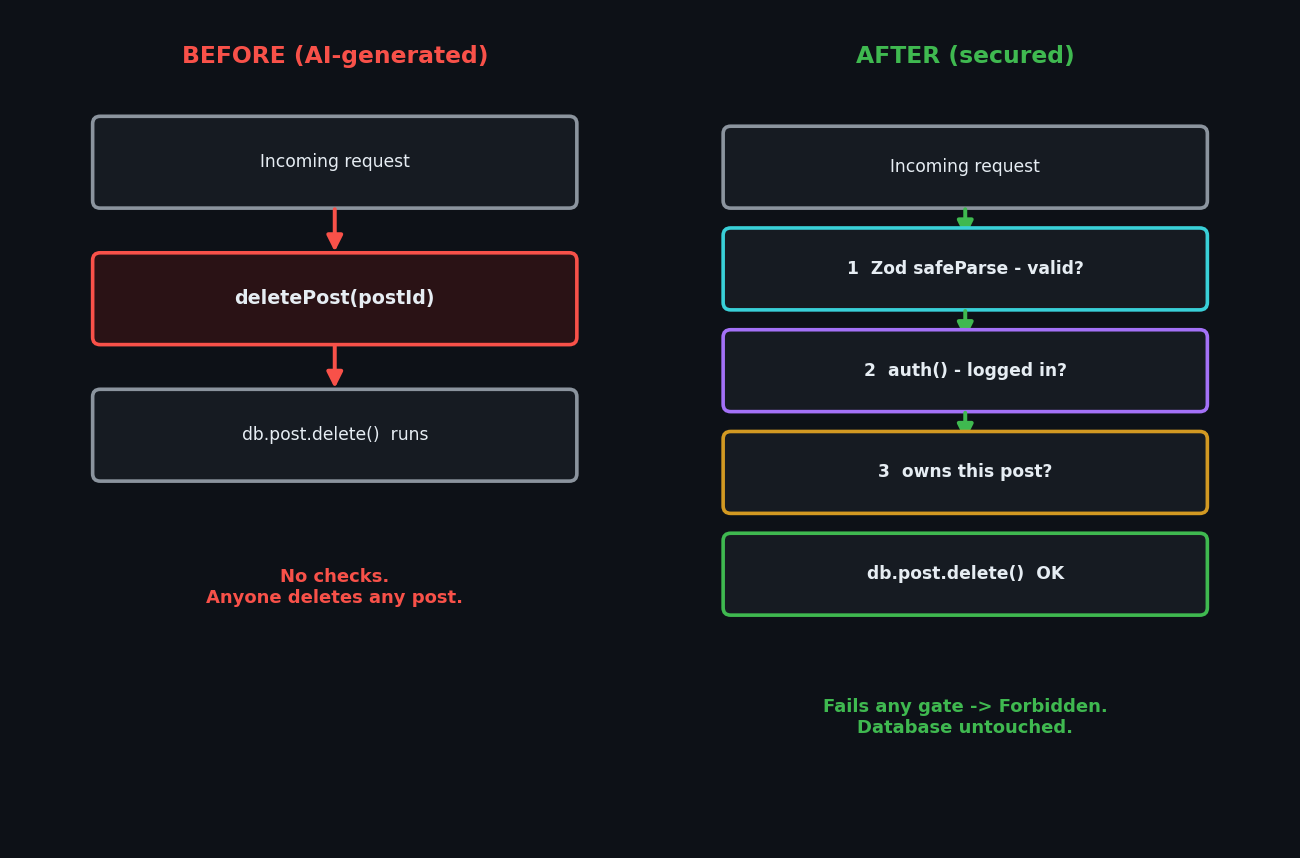
It works. The button only shows for logged-in post owners, the page redirects strangers to /login, and in your testing everything behaves. Shipped.
Why this is dangerous
Three separate holes are stacked in those six lines.
1. No authentication. Authentication means checking "is this a logged-in user at all?" The page that renders the delete button may check the session, but the Next.js data security guide is explicit: "a page-level authentication check does not extend to the Server Actions defined within it. Always re-verify inside the action." The action is a separate entrance to your building. You locked the front door and left the loading dock open.
2. No authorization. Authorization means "is this user allowed to touch this specific thing?" Even a logged-in user shouldn't delete someone else's post. Because the action accepts any postId the caller sends, any user can delete any post by changing one string. Security folks call this an IDOR — Insecure Direct Object Reference — and OWASP maintains a whole prevention cheat sheet for it. It's the same class of bug as the exposed-database problem we covered in our Supabase RLS guide — broken access control, the #1 risk on the OWASP Top 10.
3. No input validation. The function signature says postId: string, but TypeScript types vanish at runtime. The actual payload is attacker-controlled JSON. Someone can send a number, an object, or a 10 MB string, and your code will happily pass it to the database.
The demonstrated attack is one command:
curl -X POST "https://your-app.vercel.app/posts" \
  -H "Content-Type: text/plain;charset=UTF-8" \
  -H "Next-Action: 7f9a1c...the-id-from-devtools" \
  -d '["someone-elses-post-id"]'
No browser. No session. Post gone.
The fix: auth, ownership, and validation inside the action
Here's the same action the way the Next.js docs say to write it — with every check living inside the function, where it can't be bypassed. Validation uses Zod, the schema library your AI probably already installed:
// app/actions.ts — the fixed version (SECURE)
'use server'

import * as z from 'zod'
import { auth } from '@/lib/auth' // your session helper (NextAuth, Better Auth, etc.)
import { db } from '@/lib/db'
import { revalidatePath } from 'next/cache'

const DeletePostInput = z.object({
  postId: z.string().min(1).max(64),
})

export async function deletePost(input: unknown) {
  // 1. Validate the input — never trust the caller's payload
  const parsed = DeletePostInput.safeParse(input)
  if (!parsed.success) {
    return { error: 'Invalid input' }
  }

  // 2. Authentication — is anyone actually logged in?
  const session = await auth()
  if (!session?.user) {
    return { error: 'Unauthorized' }
  }

  // 3. Authorization — does THIS user own THIS post?
  const post = await db.post.findUnique({
    where: { id: parsed.data.postId },
  })
  if (!post || post.authorId !== session.user.id) {
    return { error: 'Forbidden' }
  }

  await db.post.delete({ where: { id: parsed.data.postId } })
  revalidatePath('/posts')

  // 4. Return only what the UI needs — never the raw DB record
  return { success: true }
}
Walk through the four numbered steps: validate the shape of the input with safeParse (it returns a result object instead of throwing), authenticate the session, authorize by checking ownership, and return the minimum. The last one matters more than it looks — Server Action return values are serialized and sent to the client, so returning a raw database record can leak internal fields like password hashes or email addresses.
For apps with many actions, the Next.js team recommends going one step further: move steps 2–3 into a Data Access Layer — a server-only module that owns every database call — so the checks live in one place instead of being copy-pasted into every action. If your auth setup itself is AI-generated, audit that too; our secure authentication guide covers the tools.
How to test the fix
Test it the way an attacker would. Open your deployed app in Chrome, log in, open DevTools → Network, click the delete button once, and click the request that appears. Copy the Next-Action header value. Then, from a terminal without any cookies:
curl -i -X POST "https://your-app.vercel.app/posts" \
  -H "Content-Type: text/plain;charset=UTF-8" \
  -H "Next-Action: <the-id-you-copied>" \
  -d '["<a-real-post-id>"]'
Before the fix: the action runs and the row disappears. After the fix: you get the Unauthorized result and the database is untouched. Then try it logged in as user B against user A's post ID — you should get Forbidden. If both tests fail to do damage, the loading dock is locked.
| Risk | What can happen | Fix |
|---|---|---|
| No auth check in action | Anyone on the internet runs your mutation via curl | Call auth() inside every action, not just the page |
| No ownership check (IDOR) | Any logged-in user edits/deletes other users' data | Compare resource.authorId to session.user.id |
| No input validation | Malformed or oversized payloads reach your DB | Zod safeParse at the top of the action |
| Returning raw DB records | Internal fields leak to the client | Return { success: true } or a minimal DTO |
| Auth only in middleware/layout | Direct POST skips the page entirely | Treat every action as a public API endpoint |
Copy-paste prompt: make your AI fix its own actions
Paste this into Cursor, Claude Code, or Copilot in your project:
Audit every
'use server'function in this codebase. Server Actions are public HTTP POST endpoints reachable without the UI, so for EACH action: (1) validate the raw input with a Zod schema using safeParse before using it; (2) verify the session inside the action body (page/layout/middleware checks don't count); (3) for any action touching a resource by ID, verify the logged-in user owns that resource before mutating it; (4) return only minimal result objects, never raw database records. List every action you changed and what was missing.
Server Actions security checklist
- Every
'use server'function validates input with Zod (safeParse) before using it - Every action calls your session helper (
auth()) inside the function body - Every action that takes an ID verifies ownership of that resource (no IDOR)
- Return values are minimal objects, never raw database records
- Expensive actions (email, uploads) are rate limited
- You tested at least one action with an unauthenticated
curlPOST - Database access lives in a
server-onlyData Access Layer (bonus, but the docs' recommendation)
Server Actions are just one entrance. The same "checks live on the server, inside the handler" rule applies to your API routes, your database rules, and your auth flows — the full map is in our vibe coding security pillar guide, and the scanners that catch what you miss are in the security tools roundup.
If you'd like a second pair of eyes on your actual code, I run hands-on security audits of vibe-coded Next.js apps — including every Server Action, the curl tests above, and a prioritized fix list. Email me at [email protected] with your repo or stack and I'll tell you what an attacker would try first.
Key Takeaway
'use server' doesn't mean "safe on the server" — it means "public endpoint on the server." Page-level login checks protect your UI, not your actions, so every Server Action needs its own three locks: Zod validation of the input, an authentication check for the session, and an ownership check on the resource. Add them inside the function body, prove it with one unauthenticated curl request, and the endpoint your AI quietly exposed becomes one an attacker can't use.