Vibe Coding Security: 6 Free Auth Tools So You Never Roll Your Own Login (2026)
July 16, 2026 · 2078 words
Vibe coding security has one failure that keeps founders up at night: you ship an app, and a total stranger logs in as someone else — or downloads another user's private data straight from their browser. No hacking tools needed. It happens because AI writes you a pretty login screen but forgets the security checks behind it. This guide explains, in plain language, why AI-generated authentication is so risky, and gives you six free, open-source auth tools that add secure sign-in for you — so you never have to build your own.
Here's why this matters right now. In early 2026, the AI app builder Lovable left thousands of user projects exposed for weeks through a broken authorization flaw: any free-tier account could pull other people's source code, database credentials, API keys, and private AI chats. As The Next Web reported, the bug sat open for 48 days, and security firm Halborn's writeup explains it was a textbook BOLA flaw — the app checked that you were logged in, but never checked whether the data was yours. That exact mistake is the number-one thing AI writes wrong. This post is part of our vibe coding security series, and today we lock down authentication.
Authentication vs. authorization (the two words you need)
Beginners mix these up, and attackers love that. Let's define them once, simply.
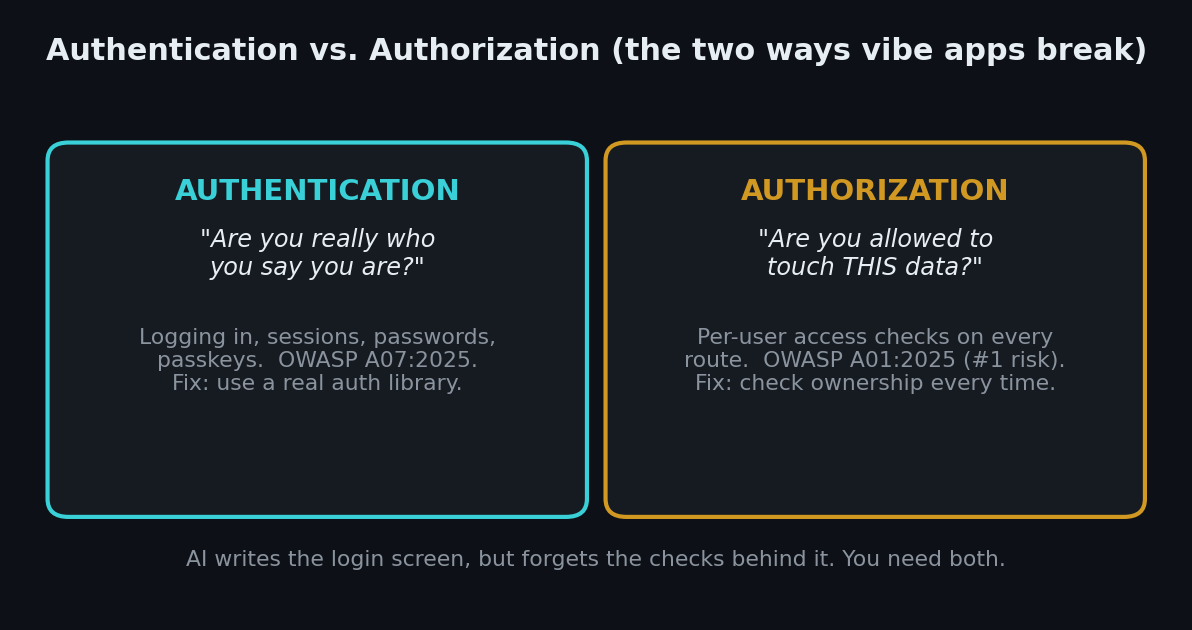
Authentication answers "are you really who you say you are?" — it's the login itself: passwords, sessions, passkeys. On the security industry's official risk list, this is OWASP A07:2025 — Authentication Failures.
Authorization answers "are you allowed to touch this piece of data?" — it's the check that runs after login, on every request. This is OWASP A01:2025 — Broken Access Control, and it sits at number one on OWASP's list of the most serious web risks. OWASP notes that a striking share of tested apps had some form of broken access control.
A few more terms you'll see below:
- A session is how the app remembers you're logged in after you enter your password (usually a cookie or token in your browser).
- A JWT (JSON Web Token) is a signed string that proves who you are. If your app doesn't verify its signature correctly, anyone can forge one.
- RBAC (Role-Based Access Control) means "admins can do X, normal users can't" — roles that decide what each person is allowed to do.
- MFA (Multi-Factor Authentication) is the second step — a code from your phone or an authenticator app — on top of your password.
- BOLA / IDOR is the Lovable-style bug: the app hands over a record just because you asked for its ID, without checking you own it.
Why vibe-coded apps get auth wrong
An AI model optimizes for code that works on the happy path. Ask it to "add login," and it will happily generate a form that authenticates a user. What it routinely skips is the boring, invisible part: verifying the session on every protected route, checking that the logged-in user actually owns the row they're requesting, validating tokens, and setting secure cookie flags. Independent security analyses of AI-built apps keep finding the same cluster — Security Boulevard's rundown of vulnerabilities in vibe-coded apps lists missing authorization on generated endpoints and weak token validation among the most common.
Here are the four auth mistakes AI makes most, and the plain-English fix for each.
| Risk (what AI does) | What it means for you | The fix |
|---|---|---|
| No access check on an API route | Anyone who guesses the URL reads or edits data | Require a valid session and an ownership check on every route |
| BOLA / IDOR (returns any record by ID) | A stranger swaps id=123 for id=124 and sees someone else's data | Always check "does this user own this record?" |
| Weak JWT validation | Forged tokens let attackers impersonate users | Let a library verify tokens; never hand-roll it |
| Rolled-your-own password code | Bad hashing, no rate limiting, no MFA | Use a maintained auth library, not custom code |
The single most effective habit is captured in one rule: don't roll your own login. Authentication is deceptively hard to get right, and it's the last thing you want an AI improvising. Instead, hand it to battle-tested, open-source code that thousands of apps already depend on.
The 6 auth tools at a glance
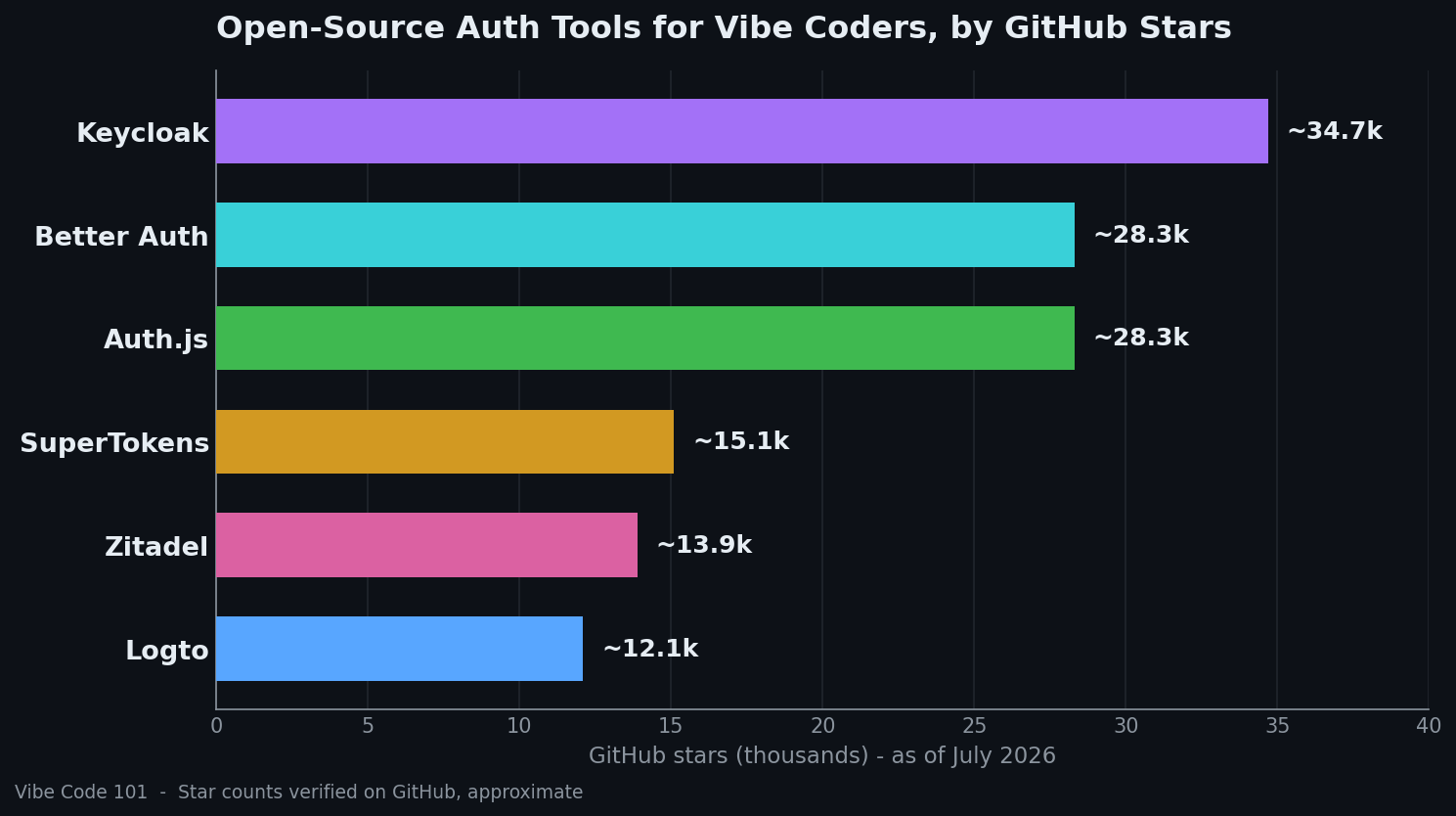
Every tool below is free, open-source, and verified as actively maintained on GitHub in July 2026 (recent releases, not archived). Star counts are approximate and dated.
| Tool | Stars (Jul 2026) | Type | Language | License |
|---|---|---|---|---|
| Keycloak | ~34.7k | Self-hosted identity server | Java | Apache-2.0 |
| Better Auth | ~28.3k | Auth library (in your app) | TypeScript | MIT |
| Auth.js | ~28.3k | Auth library (in your app) | TypeScript | ISC |
| SuperTokens | ~15.1k | Self-hosted + SDKs | Java | Apache-2.0 |
| Zitadel | ~13.9k | Identity platform (cloud/self-host) | Go | AGPL-3.0 |
| Logto | ~12.1k | Identity platform (cloud/self-host) | TypeScript | MPL-2.0 |
1. Better Auth — the modern default for TypeScript apps
Better Auth is a framework-agnostic authentication (and authorization) library for TypeScript, and it's become the go-to for new JavaScript apps. It gives you email/password, social login (Google, GitHub, Apple), passkeys, magic links, and even organizations and roles — as code that runs inside your own app and database, so you own all the data.
Which problem it solves: it replaces the hand-written, AI-improvised login with a maintained one that handles sessions, hashing, and MFA correctly out of the box.
When to use it: you're building with Next.js, Nuxt, Astro, SvelteKit, or plain TypeScript and want the least-friction secure login. Quick start:
npm install better-auth
Then follow the setup at better-auth.com to wire it to your database — most stacks are a few lines of config.
2. Auth.js (NextAuth) — the battle-tested classic
Auth.js, still widely known as NextAuth, is the long-standing open-source auth library for the web. It's secure by default: it uses CSRF tokens on sign-in routes, encrypts JSON Web Tokens, and follows OWASP guidance for cookies and sessions — exactly the details AI tends to skip.
Which problem it solves: safe sessions and social sign-in with sensible, secure defaults, so you don't have to know the details to get them right.
When to use it: you have an existing Next.js app already using it, or you want stateless sessions without a database. (Note: Auth.js has joined the Better Auth project; brand-new apps may prefer Better Auth, but Auth.js is mature and safe.)
npm install next-auth
3. SuperTokens — open-source alternative to Auth0
SuperTokens is an open-source alternative to paid providers like Auth0 and AWS Cognito. It splits into three pieces — a frontend widget, a backend SDK, and a core service — and gives you passwordless login, social login, session management, and MFA. You can self-host it for free with no user limit, keeping 100% of your user data in your own database.
Which problem it solves: a complete, pre-built login and session system without the complexity of raw OAuth — and without vendor lock-in.
When to use it: you want a self-hosted, drop-in login for a Node, Python, or Go backend and prefer ready-made UI widgets. Run it with Docker:
docker run -p 3567:3567 registry.supertokens.io/supertokens/supertokens-postgresql
4. Logto — the beginner-friendly identity platform
Logto is a modern, open-source auth infrastructure for SaaS and AI apps. It bundles pre-built sign-in screens, SDKs for 30+ frameworks, social login, MFA, enterprise SSO, and RBAC — and it's built on the OIDC and OAuth 2.1 standards so you don't have to learn the protocols yourself.
Which problem it solves: it takes the pain out of standards-based auth and gives you a polished, hosted login experience with per-user access control built in.
When to use it: you want the fastest path to a professional sign-in flow with roles, and you're comfortable running one Docker service (or using their cloud). Spin up the open-source version locally:
curl -fsSL https://raw.githubusercontent.com/logto-io/logto/HEAD/docker-compose.yml | docker compose -p logto -f - up
5. Keycloak — the enterprise-grade standard
Keycloak is the most-starred open-source identity and access management server, backed by the CNCF. It handles single sign-on, strong authentication, MFA, fine-grained authorization, and user federation with LDAP or Active Directory. It runs as a separate service that your app talks to over standard protocols.
Which problem it solves: a full, self-hosted identity provider — one central place that manages all your users, roles, and access rules across multiple apps.
When to use it: you have more than one app, need SSO across them, or want enterprise features and are willing to run a dedicated server. Try it in one command:
docker run quay.io/keycloak/keycloak start-dev
6. Zitadel — cloud or self-host, same code
Zitadel is an API-first identity platform written in Go, with SSO, MFA, passkeys, OIDC, SAML, and a strong multi-tenancy model. A standout feature for security-conscious builders: every change is written as an immutable event, giving you a complete audit trail — so you can see exactly who did what, which is invaluable if something ever goes wrong. Zitadel Cloud and the self-hosted version run the same codebase.
Which problem it solves: production-grade identity with built-in auditing and multi-tenancy, whether you self-host or use their managed cloud.
When to use it: you're building a B2B or multi-tenant SaaS and want audit logs and API-first control. Self-host with Docker Compose:
curl -LO https://raw.githubusercontent.com/zitadel/zitadel/main/deploy/compose/docker-compose.yml && docker compose up -d --wait
How to choose
You don't need all six — you need the one that fits your stack, because any of them beats AI-generated login code.
If you're building a TypeScript / Next.js app, start with Better Auth (or Auth.js if you're already on it). It lives inside your app, so there's the least to run and learn.
If you want a ready-made login service you self-host, pick Logto (most beginner-friendly), SuperTokens (great SDKs), or Keycloak (heaviest, most powerful).
If you're building multi-tenant B2B SaaS and want audit logs, choose Zitadel.
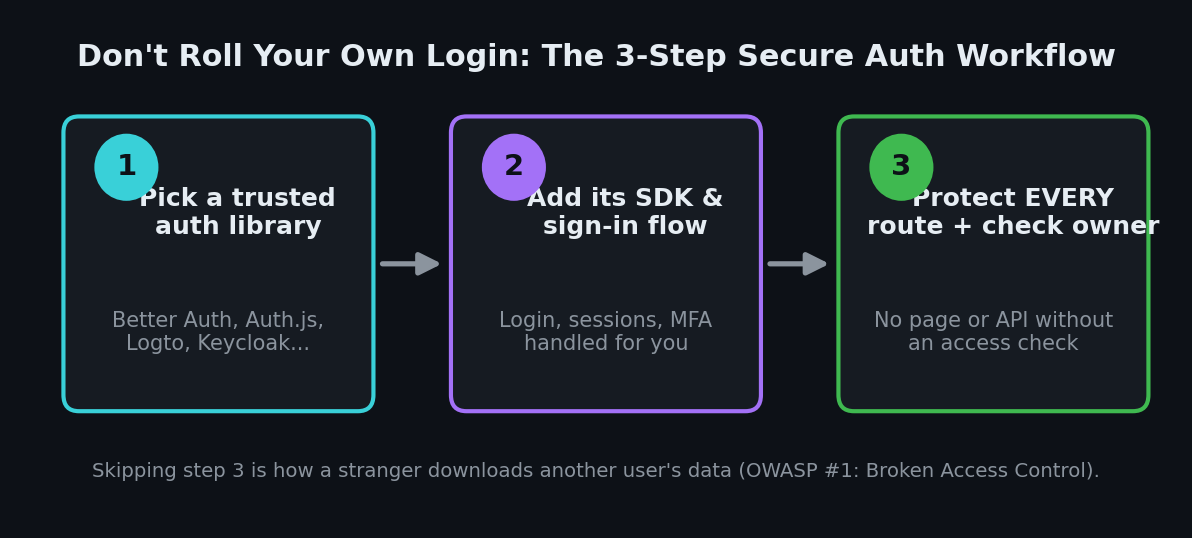
Whatever you pick, remember the workflow above: adding a login library is step two, not the finish line. Step three — an access check on every route and an ownership check on every record — is what actually stops the Lovable-style leak. Ask your AI assistant to "add an authorization check that confirms the current user owns this resource" on every endpoint, and review that it actually did. For the database layer of that same problem, pair this with our guide on locking down your database with Row Level Security, and let an AI code reviewer flag missing checks in your pull requests.
Want a Second Pair of Eyes on Your Code?
Not sure whether a stranger could log into your vibe-coded app as someone else? I run hands-on security audits — I'll check your authentication and access-control logic for the exact BOLA, IDOR, and missing-check patterns above, then send back a plain-English fix list. Email [email protected] to get started.
Key Takeaway
Secure vibe coding starts with one rule: never roll your own login. AI can write a working sign-in form, but it routinely forgets the checks that keep one user's data away from another — the mistake that just cost Lovable 48 days of exposed projects. Hand authentication to a maintained, open-source tool — Better Auth, Auth.js, SuperTokens, Logto, Keycloak, or Zitadel — then protect every route and verify ownership on every record. Do that, and you've closed the single biggest hole in AI-generated apps. For the bigger picture, keep working through our vibe coding security series.