Your Stripe Webhook Accepts Fake Payments: The Signature Check Your AI Skipped (Next.js, With Code)
July 21, 2026 · 1888 words
Stripe webhook signature verification is the one piece of your payment flow your AI assistant is most likely to get wrong — and the cost isn't a crashed page, it's strangers giving themselves your paid plan for free. When you vibe code a SaaS with Stripe Checkout, your app learns "this customer paid" from a webhook: a POST request Stripe sends to a URL like /api/stripe/webhook. That URL is public. If your handler doesn't prove the request actually came from Stripe, anyone can send a fake checkout.session.completed event and your own code will happily upgrade their account. This guide shows the insecure handler AI tools produce, the verified version using stripe.webhooks.constructEvent(), and how to test it in two minutes.
This is not a theoretical risk. Stripe's own webhook docs put it bluntly: "Without verification, an attacker could send fake webhook events to your endpoint to trigger actions like fulfilling orders, granting account access, or modifying records." And it fits a wider pattern — audits of vibe-coded apps keep finding the same missing server-side checks, like the Base44 platform flaw where exposed API endpoints let anyone register into private apps using a publicly visible ID. A webhook without a signature check is the same disease: a public door with no lock, just a hiding spot.
What a webhook is, in plain English
When a customer finishes paying on Stripe's checkout page, that happens on Stripe's servers, not yours. So Stripe calls you back: it sends an HTTP POST to a URL you registered, carrying a JSON event (for example checkout.session.completed, "this checkout was paid"). Your handler reads the event and does the important part — marks the user as pro, unlocks the download, starts the subscription.
Here's the catch: anything on the internet can POST JSON to that same URL. The request from Stripe and the request from an attacker's laptop look identical — unless you check the one thing an attacker can't forge. Stripe signs every event with a secret key only you and Stripe know (it starts with whsec_), and puts the signature in a Stripe-Signature header. Signature verification means recomputing that signature yourself and rejecting any request where it doesn't match. It's like checking the wax seal on a letter instead of trusting the return address.
The code your AI wrote
Ask an AI assistant to "handle the Stripe webhook and upgrade the user after checkout" and you'll often get some version of this:
// app/api/stripe/webhook/route.ts — the version your AI wrote (INSECURE)
import { NextResponse } from 'next/server'
import { db } from '@/lib/db'

export async function POST(req: Request) {
  const event = await req.json() // trusts whatever arrives

  if (event.type === 'checkout.session.completed') {
    const session = event.data.object
    await db.user.update({
      where: { email: session.customer_email },
      data: { plan: 'pro' },
    })
  }

  return NextResponse.json({ received: true })
}
It works in testing. Stripe's real events flow in, users get upgraded, the demo looks perfect. Shipped.
Why this is dangerous
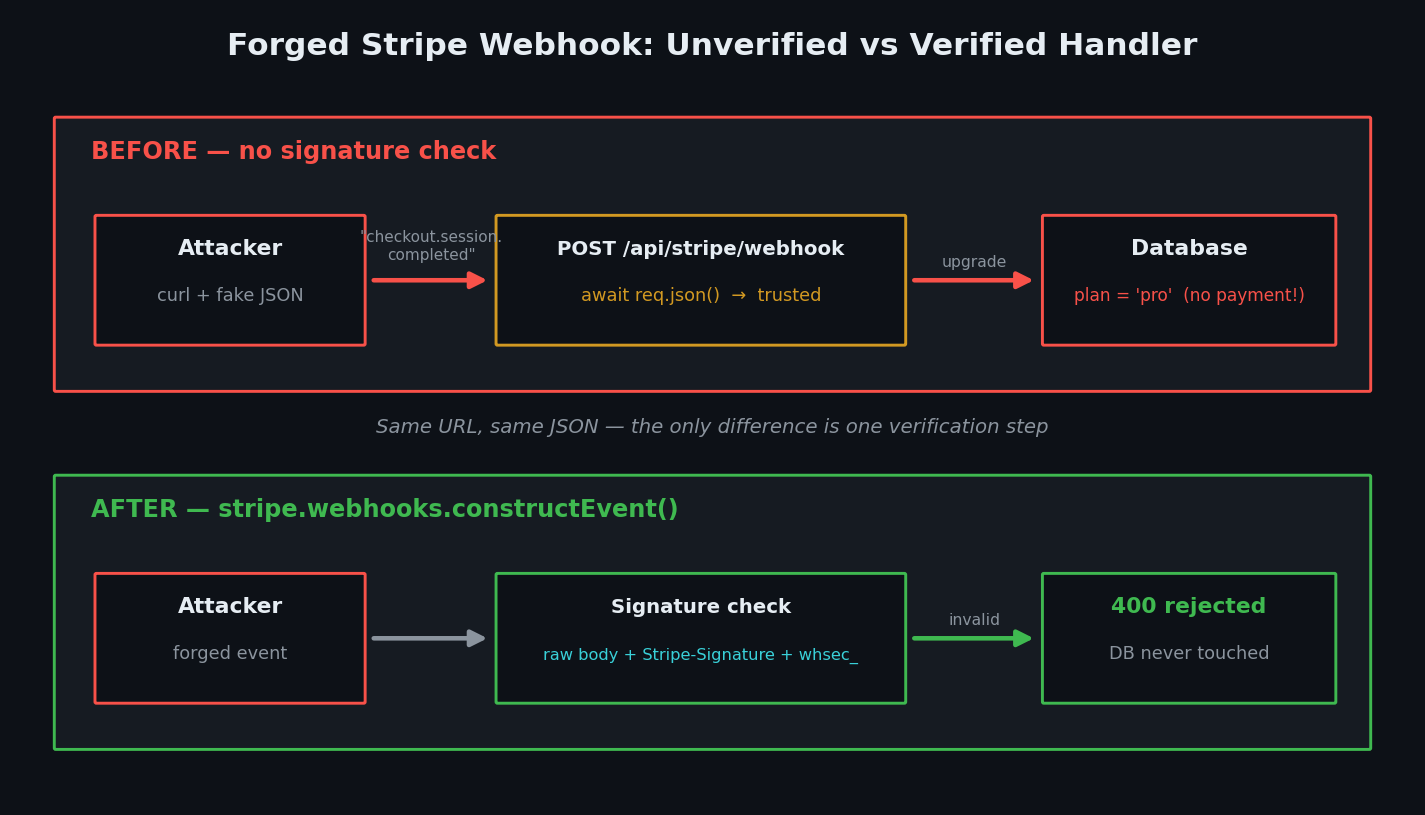
The handler believes any JSON that claims to be a Stripe event. Webhook URLs are also extremely guessable — /api/stripe/webhook is the first path anyone would try. So the attack is one command:
curl -X POST https://your-app.vercel.app/api/stripe/webhook \
  -H "Content-Type: application/json" \
  -d '{
    "type": "checkout.session.completed",
    "data": { "object": { "customer_email": "[email protected]" } }
  }'
No payment ever happened, but your database now says [email protected] is on the pro plan. Swap the email and an attacker can upgrade any account they know the address of — or trigger whatever else your handler does: fulfill orders, extend subscriptions, credit balances. It's the same root cause as the unauthenticated endpoints in our Next.js Server Actions guide: a public entrance with the security check missing on the server side.
There's a second, sneakier trap. Some AI-generated handlers do include verification — but read the body with req.json() first. Stripe signs the raw body, the exact bytes it sent. Parsing and re-serializing JSON changes those bytes, so verification fails with Webhook signature verification failed on every single event, including real ones. Stripe's troubleshooting guide lists mutated request bodies among the most common causes of this error. And what does a frustrated vibe coder (or their AI) do with a check that "never works"? Deletes it. That's how verified handlers quietly become unverified ones.
The fix: verify the signature with constructEvent
Three steps: read the raw body, grab the Stripe-Signature header, and let the official stripe library verify both against your whsec_ secret. In the App Router, await req.text() gives you the raw body — no config needed.
First, install the library and set your environment variables (server-side only — never with a NEXT_PUBLIC_ prefix):
npm install stripe
# .env.local
STRIPE_SECRET_KEY=sk_live_...
STRIPE_WEBHOOK_SECRET=whsec_...   # Dashboard → Webhooks → your endpoint → Reveal secret
Then the handler:
// app/api/stripe/webhook/route.ts — the fixed version (SECURE)
import Stripe from 'stripe'
import { NextResponse } from 'next/server'
import { db } from '@/lib/db'

const stripe = new Stripe(process.env.STRIPE_SECRET_KEY!)
const webhookSecret = process.env.STRIPE_WEBHOOK_SECRET!

export async function POST(req: Request) {
  // 1. Raw body — req.text(), NOT req.json(). Stripe signed these exact bytes.
  const body = await req.text()

  // 2. The signature Stripe attached
  const signature = req.headers.get('stripe-signature')
  if (!signature) {
    return NextResponse.json({ error: 'Missing signature' }, { status: 400 })
  }

  // 3. Verify. Throws if the signature is invalid or too old.
  let event: Stripe.Event
  try {
    event = stripe.webhooks.constructEvent(body, signature, webhookSecret)
  } catch (err) {
    console.error('Webhook signature verification failed.')
    return NextResponse.json({ error: 'Invalid signature' }, { status: 400 })
  }

  // 4. Only now do we trust the payload
  switch (event.type) {
    case 'checkout.session.completed': {
      const session = event.data.object as Stripe.Checkout.Session
      if (session.customer_email) {
        await db.user.update({
          where: { email: session.customer_email },
          data: { plan: 'pro', stripeCustomerId: session.customer as string },
        })
      }
      break
    }
    default:
      // Ignore event types you don't handle
      break
  }

  // 5. Return 2xx quickly — Stripe retries anything else for up to 3 days
  return NextResponse.json({ received: true })
}
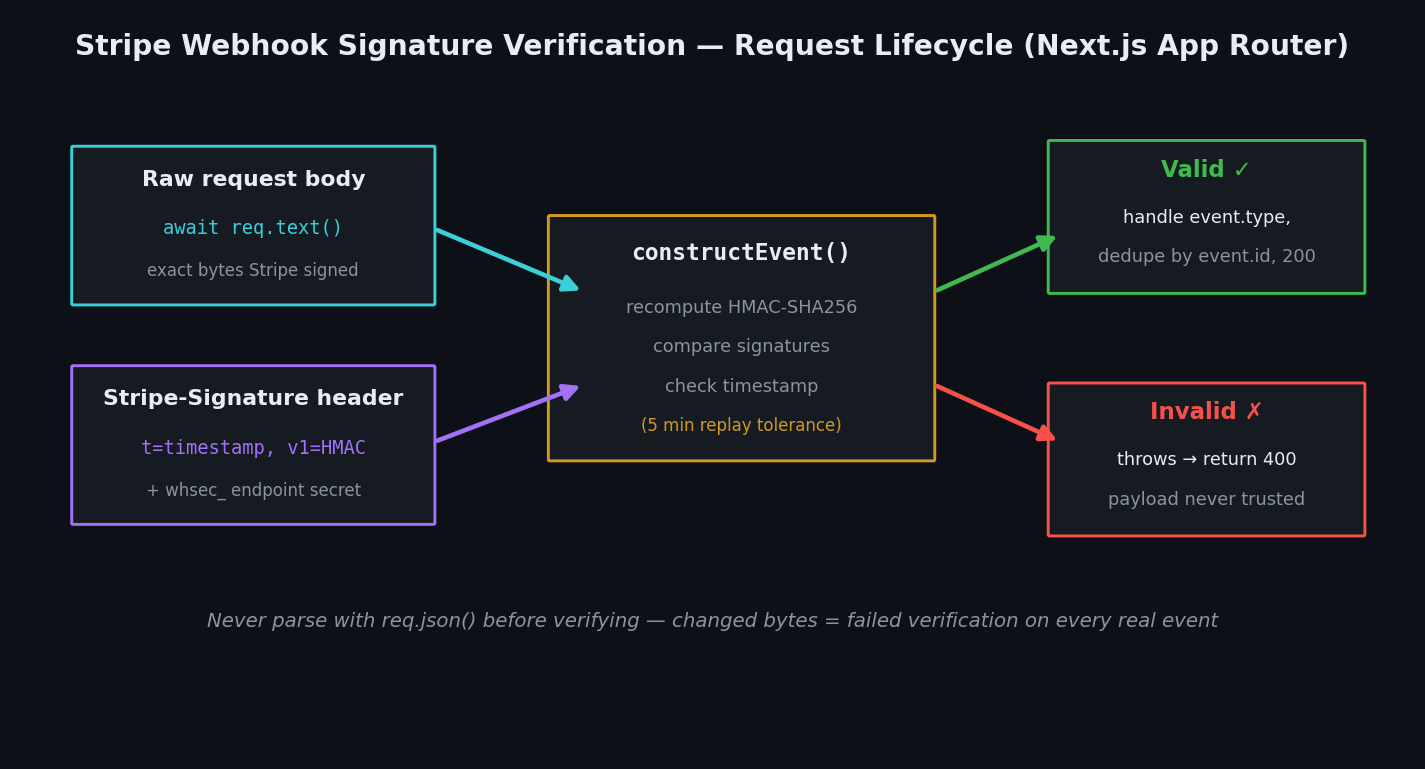
constructEvent(body, signature, secret) recomputes the HMAC-SHA256 signature from the raw body and your secret, compares it to the header, and also checks the embedded timestamp — by default it rejects anything older than 5 minutes, which blocks replay attacks (an attacker re-sending a captured real event later). Never set that tolerance to 0; Stripe warns that disables the recency check entirely.
Two more hardening notes from Stripe's best practices: log processed event.ids and skip duplicates (Stripe occasionally delivers the same event twice — you don't want double fulfillment), and subscribe your endpoint only to the event types you actually handle.
How to test the fix
1. The forged event must bounce. Run the curl command from earlier against http://localhost:3000/api/stripe/webhook. You should get 400 with {"error":"Invalid signature"}. If you get {"received":true}, the vulnerable code is still live.
2. Real events must pass. Use the Stripe CLI to forward properly signed test events to your local app:
stripe listen --forward-to localhost:3000/api/stripe/webhook
# copy the whsec_... it prints into STRIPE_WEBHOOK_SECRET, then:
stripe trigger checkout.session.completed
The CLI prints a whsec_ secret when it starts — use that one locally. The CLI secret and your Dashboard endpoint secret are different values, and mixing them up is the number-one cause of verification errors in Stripe's troubleshooting docs. Same rule in production: live mode and test mode sign with different secrets.
Risk table
| Risk | What can happen | Fix |
|---|---|---|
| No signature check | Anyone forges paid events; free upgrades, fake fulfillment | Verify with stripe.webhooks.constructEvent() |
Body read with req.json() | Verification fails on every real event — then gets deleted | Read the raw body with await req.text() |
Wrong whsec_ secret (CLI vs Dashboard, test vs live) | All events rejected in production | Use the matching secret per environment |
Replay tolerance set to 0 | Captured real events can be re-sent forever | Keep the default 5-minute tolerance |
| No idempotency (duplicate events) | Same purchase fulfilled twice | Record and skip processed event.ids |
| Secret leaked to the client | Attacker signs forged events that pass verification | Server-only env var, never NEXT_PUBLIC_; roll the secret if exposed |
Ask your AI to fix it
Paste this into Cursor, Claude Code, or Copilot:
Audit my Stripe webhook handler at app/api/stripe/webhook/route.ts.
1. Read the raw request body with `await req.text()` (never req.json() before verification).
2. Verify it with stripe.webhooks.constructEvent(rawBody, stripeSignatureHeader, process.env.STRIPE_WEBHOOK_SECRET) and return 400 if verification throws. Keep the default timestamp tolerance.
3. Only after successful verification, switch on event.type and handle checkout.session.completed.
4. Guard against duplicate deliveries by recording processed event.id values and skipping repeats.
5. Return a 2xx response quickly; move slow work out of the request path.
Do not remove or weaken the verification step to "make the error go away" — if verification fails, fix the secret or the raw-body handling instead.
That last line matters: it stops your AI from taking the shortcut a frustrated human would.
Webhook security checklist
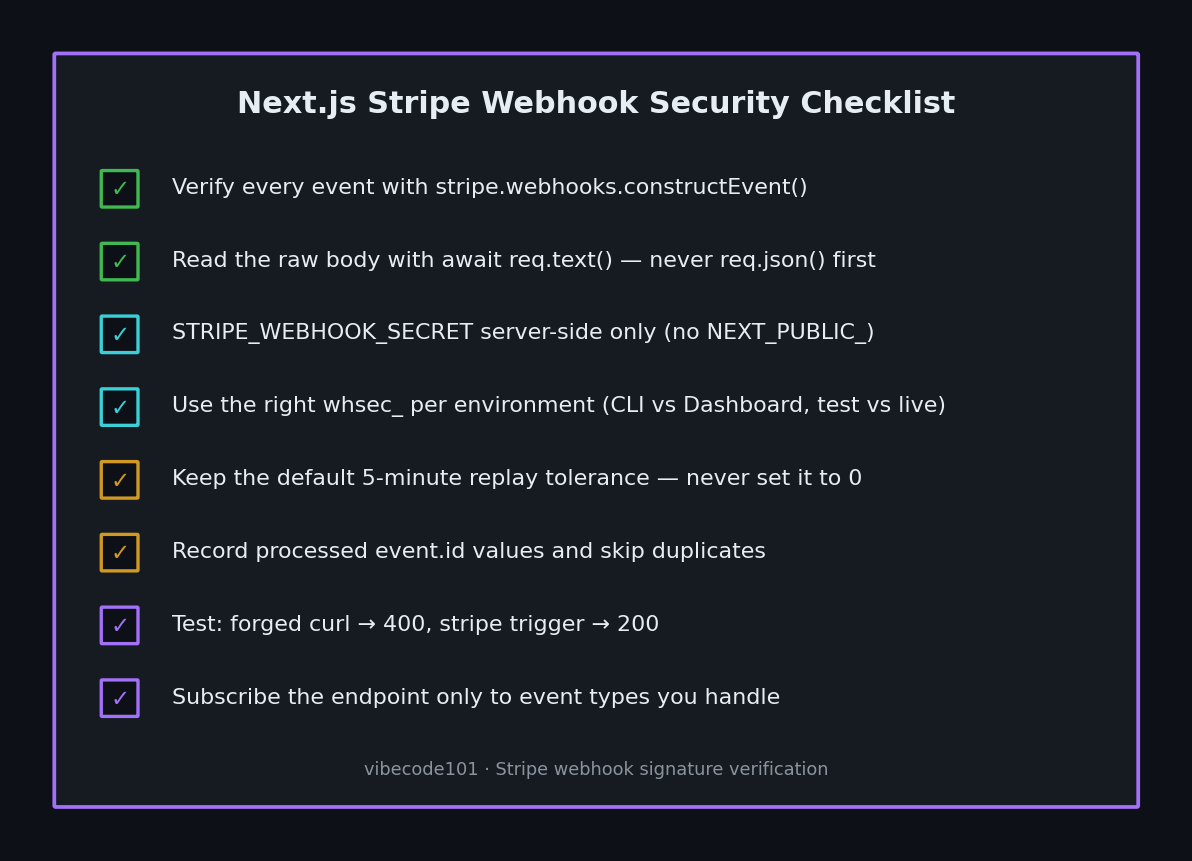
- Signature verified with
constructEvent()before any payload is trusted - Raw body via
await req.text()— no parsing before verification -
STRIPE_WEBHOOK_SECRETis server-side only and correct for the environment - Forged curl request returns
400;stripe triggerevents return200 - Default replay tolerance kept (never
0) - Processed
event.ids recorded to skip duplicates - Endpoint subscribed only to event types you handle
Webhooks are one door into your app. The pattern — every public entrance re-checks trust on the server — is the backbone of our vibe coding security pillar guide, and the same reason Server Actions need auth checks inside the function. If a whsec_ or sk_live_ key ever lands in your repo, the scanners in our secret-leak tools roundup will catch it before you ship.
Shipping a paid product with AI-generated Stripe code and not sure your webhook, checkout, or fulfillment flow would survive a forged request? I do hands-on payment-security audits of vibe-coded apps — real attack attempts against your endpoints, concrete fixes back. Email [email protected] with your stack and I'll take a look.
Key Takeaway
Your Stripe webhook is a public URL, and "it came from Stripe" is a claim you must verify, not assume. Read the raw body with req.text(), verify it with stripe.webhooks.constructEvent(), reject failures with a 400, and only then touch your database. One try/catch block is the difference between a payment system and an open door that hands out your paid plan for free.