Next.js Zod Input Validation for API Routes: One Extra JSON Field Makes Your User an Admin (With Code)
August 2, 2026 · 2351 words
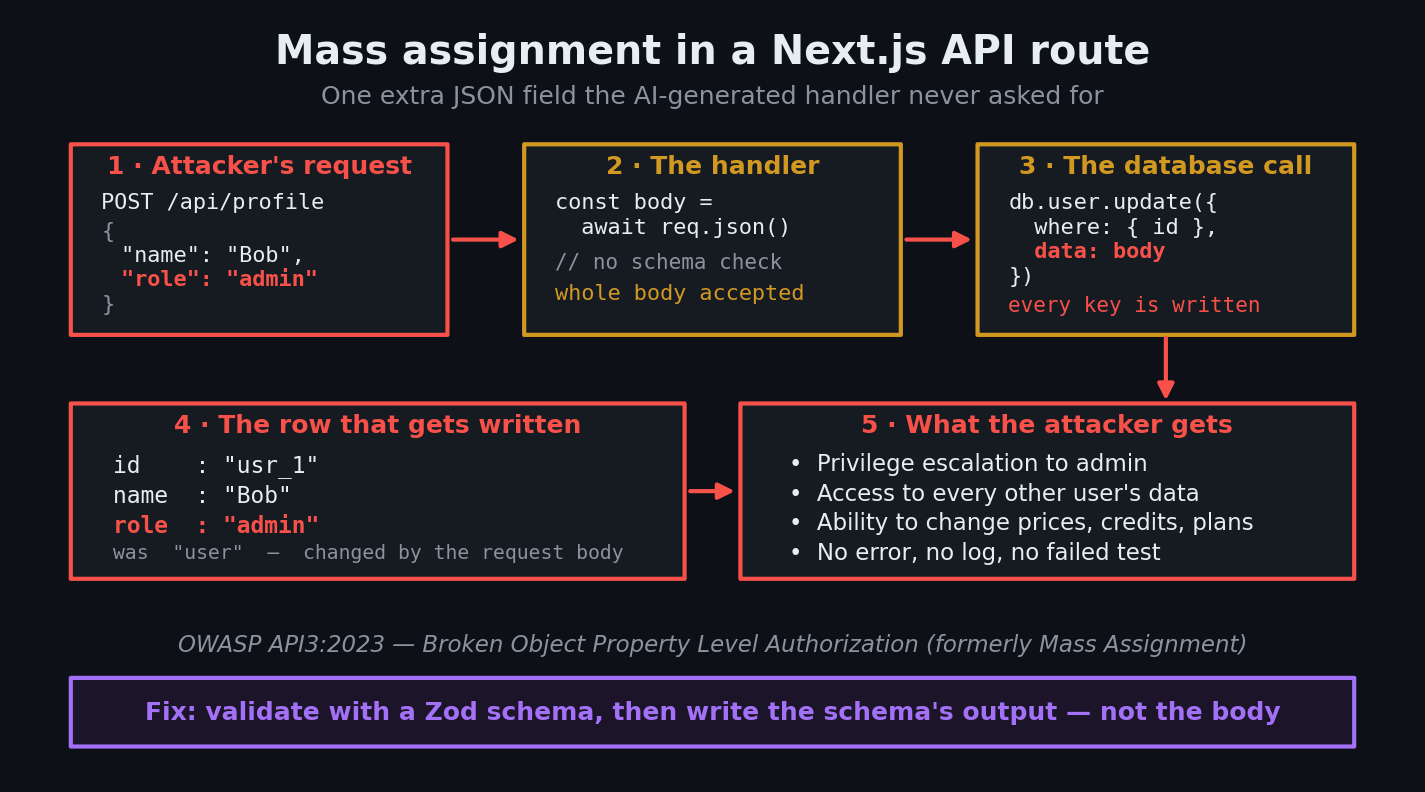
Next.js Zod input validation for API routes is the fix for a bug that looks like nothing at all. Ask Cursor or Claude Code for "an API route to update the user's profile," and you'll get four tidy lines: read the session, read the JSON body, write the body to the database, return the row. It works. Your form saves. You ship. And from that moment on, anyone who can send an HTTP request can add "role": "admin" to the JSON and become an admin — because your handler wrote every key the caller sent, including the ones your form never had.
This guide shows you the exact insecure pattern AI assistants generate, the one-line trap that catches people who did add Zod, and the fixed code you can paste into your project today.
What is input validation — and what is "mass assignment"?
Input validation means checking that data arriving from the outside world has the shape you expect before you do anything with it. Not "does it look right in the browser" — the browser is on the attacker's computer. Server-side.
Mass assignment is what happens when your code takes a whole object from the request and hands it wholesale to something that writes to the database. The caller controls the keys. If the caller invents a key that happens to match a real database column — role, credits, isPro, stripeCustomerId, emailVerified — that column gets written too.
OWASP tracks this as API3:2023 Broken Object Property Level Authorization, which merged the older "Mass Assignment" category. OWASP rates it Exploitability: Easy and Prevalence: Common, and their advice is blunt: "avoid using functions that automatically bind a client's input into code variables, internal objects, or object properties." Their own example is a booking API where a host replays a legitimate request with "total_stay_price": "$1,000,000" bolted on, and the server happily accepts it.
This is not a theoretical concern for vibe coders. Georgia Tech's Systems Software & Security Lab, which scanned over 43,000 security advisories to build its Vibe Security Radar, reported in April 2026 that of the confirmed AI-introduced cases found so far, 14 were critical and 25 high. The researcher's advice for anyone shipping AI output is worth pinning above your desk: review it like a junior developer's pull request, "especially anything around input handling and authentication."
The code your AI wrote
Here's the pattern, near-verbatim from what assistants produce for "let users update their profile":
// app/api/profile/route.ts — the version your AI wrote (INSECURE)
import { auth } from '@/lib/auth'
import { db } from '@/lib/db'

export async function PATCH(request: Request) {
  const session = await auth()
  if (!session?.user) {
    return Response.json({ error: 'Unauthorized' }, { status: 401 })
  }

  const body = await request.json()

  // Whatever the caller sent goes straight into the row
  const user = await db.user.update({
    where: { id: session.user.id },
    data: body,
  })

  return Response.json(user)
}
It has an auth check. It scopes the update to the logged-in user — so it isn't even the IDOR bug we covered previously. It passes every test you'd write, because your own form only ever sends name and bio.
But a Route Handler is a public door on the internet. Your React form is one client, not the only one. As the Next.js Route Handlers docs put it, these files are custom request handlers built on the Web Request and Response APIs — they answer anyone who knocks. Nothing about await request.json() restricts what keys can be in that object.
Why this is dangerous
Try it against the insecure handler above:
curl -X PATCH https://your-app.vercel.app/api/profile \
  -H "Content-Type: application/json" \
  -H "Cookie: session=<your-own-session-cookie>" \
  -d '{"name":"Bob","role":"admin"}'
Your own session. Your own account. One extra key. The response comes back 200, and your row now says role: "admin".
The severity depends entirely on what columns your table has, and vibe-coded schemas tend to have exactly the wrong ones sitting right there next to name:
| Column an attacker adds | What it buys them |
|---|---|
role / isAdmin | Full privilege escalation — the admin dashboard opens |
credits / balance / tokens | Free usage, forever |
plan / subscriptionTier | Your paid tier without paying |
emailVerified | Skips your verification flow entirely |
stripeCustomerId | Points billing at someone else's customer record |
organizationId / teamId | Moves their account into your tenant's data |
And notice what the attacker did not need: no stolen credentials, no SQL injection, no clever payload. They needed a free account and the DevTools Network tab, which shows them the exact request your own app sends. Guessing column names from there is a five-minute job.
The fix: schema first, then write
Zod is a validation library that lets you declare the shape of data once and check any unknown value against it. Zod 4 is stable and is what the current docs describe; install it with npm install zod.
Three things make the fixed version safe, and the third is the one people miss.
// app/api/profile/route.ts — fixed
import * as z from 'zod'
import { auth } from '@/lib/auth'
import { db } from '@/lib/db'

// 1. Declare exactly what a client is allowed to send.
//    `role` is not here, so `role` can never arrive.
const ProfileSchema = z.strictObject({
  name: z.string().trim().min(1).max(80),
  bio: z.string().max(280).optional(),
  website: z.url().optional(),
})

export async function PATCH(request: Request) {
  const session = await auth()
  if (!session?.user) {
    return Response.json({ error: 'Unauthorized' }, { status: 401 })
  }

  // 2. Parse the body defensively — malformed JSON shouldn't 500.
  let raw: unknown
  try {
    raw = await request.json()
  } catch {
    return Response.json({ error: 'Invalid JSON' }, { status: 400 })
  }

  const parsed = ProfileSchema.safeParse(raw)
  if (!parsed.success) {
    return Response.json(
      { error: 'Invalid input', details: z.flattenError(parsed.error).fieldErrors },
      { status: 400 }
    )
  }

  // 3. Write parsed.data — NEVER the original body.
  const user = await db.user.update({
    where: { id: session.user.id },
    data: parsed.data,
    select: { id: true, name: true, bio: true, website: true },
  })

  return Response.json(user)
}
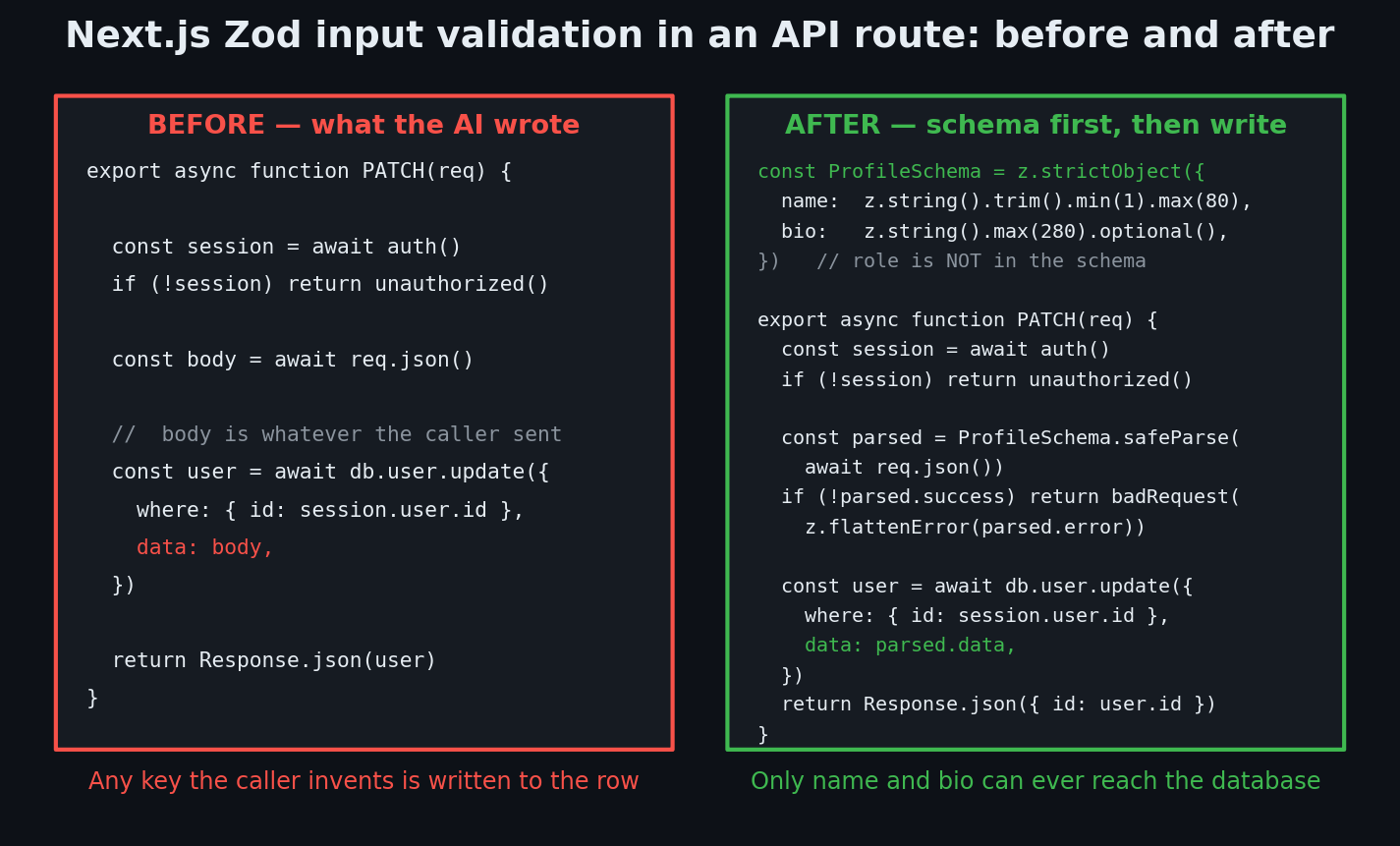
A few details worth understanding rather than copying:
safeParse vs parse. parse() throws on bad input, which in a route handler means an unhandled exception and a 500. safeParse() returns { success: true, data } or { success: false, error } — you control the response. Always safeParse at the network edge.
z.object() vs z.strictObject(). Per the Zod schema docs, a plain z.object() strips unrecognized keys from the result — that alone stops mass assignment, as long as you use the result. z.strictObject() goes further and rejects the request outright when unknown keys appear. For a public API, strict is better: it turns a silent attack attempt into a visible 400 you can log and alert on.
z.flattenError(). Zod 4 removed error.errors and .format(). The current API is z.flattenError(err) for flat schemas (giving you formErrors and fieldErrors), z.treeifyError(err) for nested ones, and z.prettifyError(err) for human-readable logs — all documented on the error formatting page. Return fieldErrors to the client so your form can highlight the right input.
select on the way out. OWASP's API3:2023 covers reads as well as writes. Returning the raw row leaks passwordHash, stripeCustomerId, and internal flags to anyone who calls the endpoint. Pick the fields the UI actually needs.
The trap: validating the body but still writing the body
This is the mistake I see most often in code that already has Zod in it, and it's why "we use Zod" is not the same as "we're safe":
// Looks validated. Is not validated.
const body = await request.json()
const parsed = ProfileSchema.safeParse(body)
if (!parsed.success) return Response.json({ error: 'Bad input' }, { status: 400 })

await db.user.update({ where: { id: session.user.id }, data: body })
//                                                            ^^^^ the raw body
safeParse does not modify the object you gave it. It returns a new, cleaned object in parsed.data. If you validate body and then write body, the schema confirmed that name was a string and did absolutely nothing else. The role: "admin" key is still sitting in that variable, and it goes into the database.
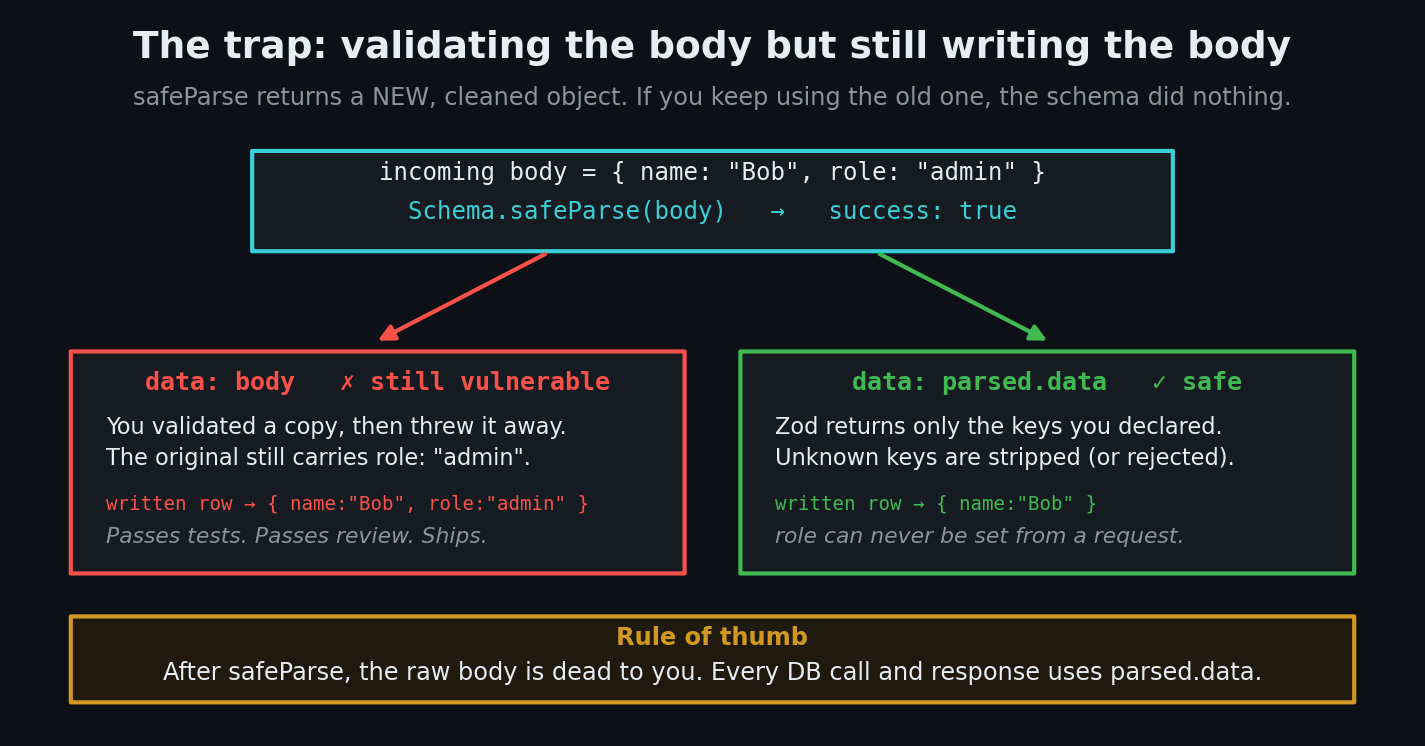
The rule: after safeParse, the raw body is dead to you. Every database call, every log line, every response uses parsed.data.
A close cousin of this bug is the shortcut data: { ...body, id: undefined } — a denylist. Denylists always lose, because you have to remember every dangerous column forever, including the one you add next month. Allowlist with a schema instead.
How to test the fix
You don't need a second account for this one. Log into your own app, grab your session cookie from DevTools → Application → Cookies, and send a key your form never sends:
# Should return 400 after the fix (200 before it)
curl -i -X PATCH https://your-app.vercel.app/api/profile \
  -H "Content-Type: application/json" \
  -H "Cookie: session=<your-session-cookie>" \
  -d '{"name":"Test","role":"admin","credits":999999}'
Before the fix: 200 OK, and querying your row shows role changed. After the fix with z.strictObject: 400 with Unrecognized key: "role". After the fix with plain z.object: 200, but check the row — role is untouched, because only parsed.data was written.
Then send garbage and confirm you get a clean 400 rather than a 500 stack trace:
curl -i -X PATCH https://your-app.vercel.app/api/profile \
  -H "Content-Type: application/json" -H "Cookie: session=<cookie>" \
  -d '{"name":""}'
| Risk | What can happen | Fix |
|---|---|---|
| Raw body written to the DB | Any column becomes user-editable — role, credits, plan | Validate with a Zod schema and write parsed.data |
Validated, then wrote body anyway | Schema runs but changes nothing; false sense of safety | Use parsed.data everywhere after safeParse |
z.object() where strict was needed | Extra keys silently ignored, attacks never surface | Use z.strictObject() on public endpoints and log the 400s |
parse() instead of safeParse() | Bad input throws → 500 and a leaked stack trace | safeParse() and return a 400 you control |
Denylisting fields (id: undefined) | The column you forget is the one they use | Allowlist via schema; never enumerate the bad keys |
| Returning the whole row | passwordHash, billing IDs, internal flags leak | Add select and return a minimal object |
| Unbounded strings/arrays | 10 MB bio, memory blowups, storage abuse | .max() on every string and array |
Copy-paste prompt: make your AI fix its own routes
Paste this into Cursor, Claude Code, or Copilot with your project open:
Audit every Route Handler under
app/api/**/route.tsthat reads a request body. For EACH one: (1) define a Zod v4 schema withz.strictObject()listing only the fields a client is allowed to send — never includerole,isAdmin,credits,plan,emailVerified,stripeCustomerId, or any other server-controlled column; (2) wrapawait request.json()in try/catch and return 400 on malformed JSON; (3) useschema.safeParse(), notparse(), and return 400 withz.flattenError(error).fieldErrorson failure; (4) passparsed.data— never the original body, and never a spread of it — into every database call; (5) add.max()bounds to every string and array field; (6) add aselectto the database call so the response returns only fields the UI needs. Use Zod 4 APIs (z.email(),z.url(),z.int(),z.flattenError()), not the deprecated Zod 3 ones. List every handler you changed and which fields were previously writable by the client.
Next.js Zod input validation checklist
- Every route handler that reads a body has a Zod schema
- Schemas use
z.strictObject()on public endpoints, so unknown keys 400 - No schema contains a server-controlled field (
role,credits,plan,emailVerified) -
safeParse()everywhere — no bareparse()in a route handler -
await request.json()is wrapped in try/catch - Every DB call after validation uses
parsed.data, notbodyor{...body} - Every string and array field has a
.max()bound - Responses use
selectand never return the raw row - You ran the
curltest with an extra key and got a 400
Input validation is one gate in a series. The same "never trust what arrives, check it on the server" rule governs your Server Actions — which are public endpoints too, and need the exact same schema treatment — your database rules, and your file uploads. The full map is in our vibe coding security pillar guide, and the scanners that catch what you miss are in the security tools roundup.
If you'd like a second pair of eyes on your actual code, I run hands-on security audits of vibe-coded Next.js apps — I'll walk every route handler that reads a body, run the extra-key curl test against each one, and hand you a prioritized list of every column a client can currently write. Email me at [email protected] with your repo or stack and I'll tell you what an attacker would try first.
Key Takeaway
await request.json() returns whatever a stranger decided to send you. Passing that object into a database call hands the stranger a pen and lets them fill in any column your table happens to have. Declare a Zod schema listing only the fields a client may set, safeParse the body, and write parsed.data — never the body itself. It's about eight lines per route, and it's the difference between a profile form and an admin signup form.