Next.js Environment Variables Security: NEXT_PUBLIC_ Ships Your API Key to Every Visitor (With Code)
July 29, 2026 · 2391 words
Next.js environment variables security comes down to one prefix, and almost every vibe coder gets it wrong at least once. You put your OpenAI key in .env.local, your app throws undefined in the browser, your AI assistant says "add the NEXT_PUBLIC_ prefix," it works instantly — and you just published that key to everyone who visits your site. This guide shows the exact code AI assistants generate, why that prefix is a one-way door, how to check your own build in 30 seconds, and the server-side fix.
This isn't a subtle bug. The Next.js docs describe the behavior plainly: Next.js can "inline" a value, at build time, into the js bundle that is delivered to the client, replacing all references to process.env.[variable] with a hard-coded value — and the NEXT_PUBLIC_ prefix is how you ask for exactly that (Next.js environment variables docs). Not hidden. Not encoded. Typed out in plain text in a JavaScript file anyone can open.
What NEXT_PUBLIC_ actually does, in plain English
Next.js runs code in two places: your server (a machine you control) and the browser (a machine your visitor controls). Environment variables live on the server by default — that's the safe default.
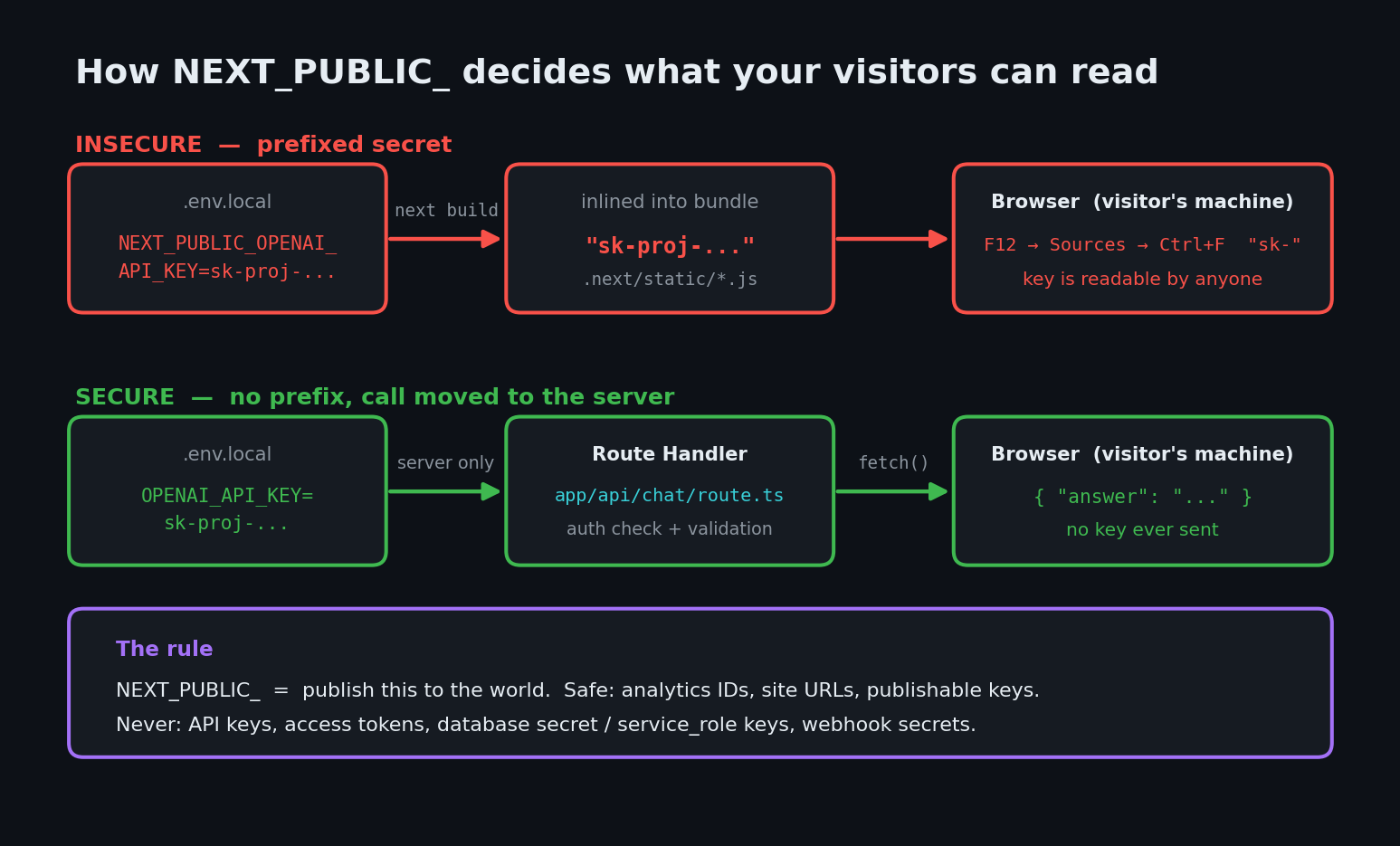
When your code runs in the browser, it can't reach your server's environment. So Next.js offers an escape hatch: prefix a variable with NEXT_PUBLIC_ and during next build it gets copied into the JavaScript files sent to browsers. Think of it less like a setting and more like find-and-replace: process.env.NEXT_PUBLIC_FOO literally becomes "the-actual-value" in the shipped file.
That is perfect for things that are meant to be public — a Google Analytics ID, your site URL, a Stripe publishable key. It's catastrophic for anything that grants access. And here's the part that trips people up: .env.local being in .gitignore protects nothing here. The secret never went to GitHub. It went to the internet, inside your own website.
The code your AI wrote
Ask Cursor or Claude Code to "add an AI chat feature to my Next.js app" and you'll frequently get something close to this:
// app/components/Chat.tsx — the version your AI wrote (INSECURE)
'use client'

import OpenAI from 'openai'
import { useState } from 'react'

const openai = new OpenAI({
  apiKey: process.env.NEXT_PUBLIC_OPENAI_API_KEY, // 🚨 shipped to the browser
  dangerouslyAllowBrowser: true,                  // 🚨 the SDK is warning you
})

export default function Chat() {
  const [answer, setAnswer] = useState('')

  async function ask(question: string) {
    const res = await openai.chat.completions.create({
      model: 'gpt-5.2',
      messages: [{ role: 'user', content: question }],
    })
    setAnswer(res.choices[0].message.content ?? '')
  }

  return <button onClick={() => ask('Hello?')}>Ask</button>
}
# .env.local
NEXT_PUBLIC_OPENAI_API_KEY=sk-proj-...
It runs. The chat works. You deploy.
Notice the SDK is shouting at you through the option name. OpenAI's official Node library ships with browser use disabled and only unlocks it via dangerouslyAllowBrowser, explaining that it "exposes your secret API credentials in the client-side code… any user with access to the browser can potentially inspect, extract, and misuse these credentials." AI assistants add that flag because it makes the error message disappear — not because it's safe.
Why this is dangerous
Anyone can open your site, press F12, search the JavaScript for sk-proj-, and copy your key. No hacking involved — the value is sitting in a static file your CDN serves to the world, in a format that is trivially greppable.
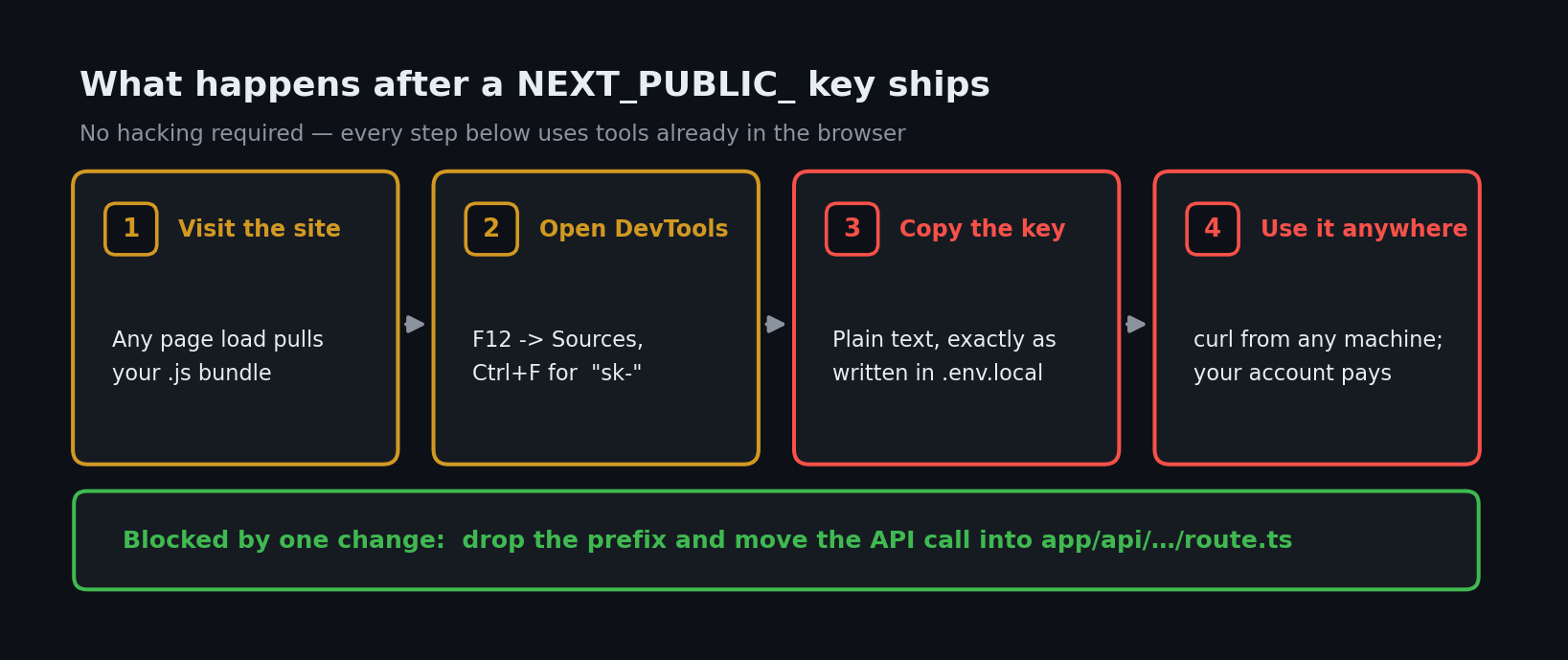
Three things follow:
- Your bill becomes their bill. An LLM key with no spend limit is a free API for whoever finds it. OWASP's Secrets Management Cheat Sheet opens by noting that many organizations keep secrets "hardcoded within the source code in plaintext, littered throughout configuration files" — and a bundled front-end file is shipped source code.
- Rotating is not instant. Because the value is baked in at build time, replacing the key means changing the env var and rebuilding and redeploying. The old bundle stays cached until then.
- It's rarely just one key. The same reflex that adds
NEXT_PUBLIC_to an AI key adds it to a database key. If you're on Supabase and that becomesNEXT_PUBLIC_SUPABASE_SERVICE_ROLE_KEY, you've handed out your whole database: per Supabase's API keys documentation, secret keys authorize access through the built-inservice_rolePostgres role, which "uses theBYPASSRLSattribute, skipping any and all Row Level Security policies you attach." Your carefully written RLS policies simply don't apply. The newersb_secret_keys add one guardrail — Supabase rejects them when the request carries a browserUser-Agent, always replying401— but the same docs warn that "it does not mean that attackers will not use it with other tools," and the legacyservice_roleJWT has no such protection at all.
| Risk | What can happen | Fix |
|---|---|---|
LLM key with NEXT_PUBLIC_ | Strangers run inference on your account until you notice the bill | Move the call into a Route Handler; drop the prefix |
dangerouslyAllowBrowser: true | SDK stops protecting you from shipping credentials | Delete the flag; instantiate the SDK server-side only |
Supabase secret / service_role key exposed | Full read/write on every table, RLS bypassed | Use the publishable key client-side; secret key server-only |
Secret in next.config.js env block | Also inlined into the client bundle | Read it from process.env on the server instead |
| Key rotated but not rebuilt | Old bundle keeps serving the leaked key | Rotate and redeploy |
| Server helper imported by a Client Component | Secret silently pulled into client code | import 'server-only' at the top of the module |
The fix: keep the key on the server
The rule is short: if a value grants access to anything, it never gets the NEXT_PUBLIC_ prefix. Instead, put the code that uses it behind a Route Handler — a small server endpoint your browser code calls. The browser talks to your server; your server talks to OpenAI holding the key.
Step 1 — Rename the variable
# .env.local
OPENAI_API_KEY=sk-proj-...   # no NEXT_PUBLIC_ prefix = server only
Step 2 — Create the Route Handler
Next.js Route Handlers use the route.ts file convention and run on the server, where process.env is fully available. (auth() below is the Auth.js / NextAuth v5 helper — swap in whatever your app already uses.)
// app/api/chat/route.ts — the fixed version
import { NextResponse } from 'next/server'
import { auth } from '@/lib/auth'
import { openai } from '@/lib/openai'

export async function POST(req: Request) {
  // 1. Only logged-in users can spend your API budget
  const session = await auth()
  if (!session?.user) {
    return NextResponse.json({ error: 'Unauthorized' }, { status: 401 })
  }

  // 2. Parse defensively — a malformed body should be a 400, not a 500
  let body: unknown
  try {
    body = await req.json()
  } catch {
    return NextResponse.json({ error: 'Invalid JSON' }, { status: 400 })
  }

  // 3. Validate the input instead of forwarding it blindly
  const question = (body as { question?: unknown })?.question
  if (typeof question !== 'string' || question.length === 0 || question.length > 2000) {
    return NextResponse.json({ error: 'Invalid input' }, { status: 400 })
  }

  const res = await openai.chat.completions.create({
    model: 'gpt-5.2',
    messages: [{ role: 'user', content: question }],
  })

  // 4. Return only what the UI needs
  return NextResponse.json({ answer: res.choices[0].message.content ?? '' })
}
Those auth and validation checks are not optional extras. A Route Handler is a public URL — the Next.js backend guide says so directly: "Route Handlers are public HTTP endpoints. Any client can access them." Without the session check you've swapped a stolen key for a free proxy to your key, which costs you exactly the same. (Same lesson, different door, as our Server Actions guide.)
Step 3 — Call your own endpoint from the client
// app/components/Chat.tsx — the fixed version
'use client'

import { useState } from 'react'

export default function Chat() {
  const [answer, setAnswer] = useState('')

  async function ask(question: string) {
    const res = await fetch('/api/chat', {
      method: 'POST',
      headers: { 'Content-Type': 'application/json' },
      body: JSON.stringify({ question }),
    })

    if (!res.ok) {
      setAnswer(res.status === 401 ? 'Please sign in first.' : 'Something went wrong.')
      return
    }

    const data = await res.json()
    setAnswer(data.answer ?? '')
  }

  return (
    <div>
      <button onClick={() => ask('Hello?')}>Ask</button>
      <p>{answer}</p>
    </div>
  )
}
The openai import is gone from the client entirely. No key, no dangerouslyAllowBrowser.
Step 4 — Add a tripwire with server-only
The Route Handler above imports its client from @/lib/openai. That's the module holding your secret, so give it a guard: one line, and the build fails instead of silently leaking if a Client Component ever imports it.
// lib/openai.ts
import 'server-only'

import OpenAI from 'openai'

export const openai = new OpenAI({ apiKey: process.env.OPENAI_API_KEY })
Per the Next.js data security guide, this "ensures that proprietary code or internal business logic stays on the server by causing a build error if the module is imported in the client environment." That same guide adds a rule worth memorizing: only your data-access layer should touch process.env.
How to test the fix
Two checks, one minute. Build your app, then grep the client bundle for your secret:
npm run build

# Search the shipped browser JavaScript for anything key-shaped
grep -rE "sk-proj-|sk_live_|sk_test_|sb_secret_|service_role" .next/static .next/server \
  || echo "✅ No secrets found in the build output"
Use the full prefixes, not a bare sk- — minified JavaScript is full of task- and risk-, and a check that cries wolf is a check you'll ignore. .next/static is what your CDN serves; scan .next/server too, since inlined values also reach the client through server-rendered payloads. Using output: 'export'? Scan out/.
Any match is a leak. For a site that's already live, open it, press F12 → Sources, and Ctrl+F for the first 10 characters of your key.
Second, confirm your new endpoint isn't an open proxy:
# Logged out, this must NOT return an answer
curl -s -o /dev/null -w "%{http_code}\n" -X POST https://your-app.vercel.app/api/chat \
  -H "Content-Type: application/json" \
  -d '{"question":"hello"}'
# expected: 401
If you see 200, your key is safe but your wallet isn't — go back and add the session check. Pair that with rate limiting so one logged-in account can't drain the budget either.
Already leaked a key? Do this now
Order matters, and rebuilding is the step people forget:
- Revoke the old key in the provider dashboard. Revoke first — rotating without revoking leaves the old one live.
- Create a new key and store it without the
NEXT_PUBLIC_prefix. - Rebuild and redeploy. The leaked value stays in the old bundle until a fresh build replaces it.
- Check usage and billing for the exposure window, and set a hard spend cap.
- Scan your repo with the tools in our secret-leak roundup — if it was in a bundle, it may be in git history too.
Ask your AI to fix it
Paste this into Cursor, Claude Code, or Copilot:
Audit this Next.js app for leaked environment variables.
1. List every env var prefixed with NEXT_PUBLIC_ and flag any that is an API key, secret,
   token, service_role/secret database key, or webhook secret. Non-secrets like analytics
   IDs, publishable keys, and public URLs can stay.
2. For each flagged one: remove the NEXT_PUBLIC_ prefix and move the code that uses it into
   a server Route Handler under app/api/, called from the client with fetch().
3. In every new Route Handler, add a session/auth check that returns 401 for anonymous
   requests, and validate the request body before use.
4. Remove any `dangerouslyAllowBrowser: true` flags and any SDK instantiated in a
   'use client' file with a secret key.
5. Add `import 'server-only'` to any module that reads a secret from process.env.
Do not "fix" undefined env vars in client code by adding the NEXT_PUBLIC_ prefix —
move the code to the server instead.
That final instruction is the important one: it blocks the exact shortcut that created the problem.
Next.js environment variables security checklist
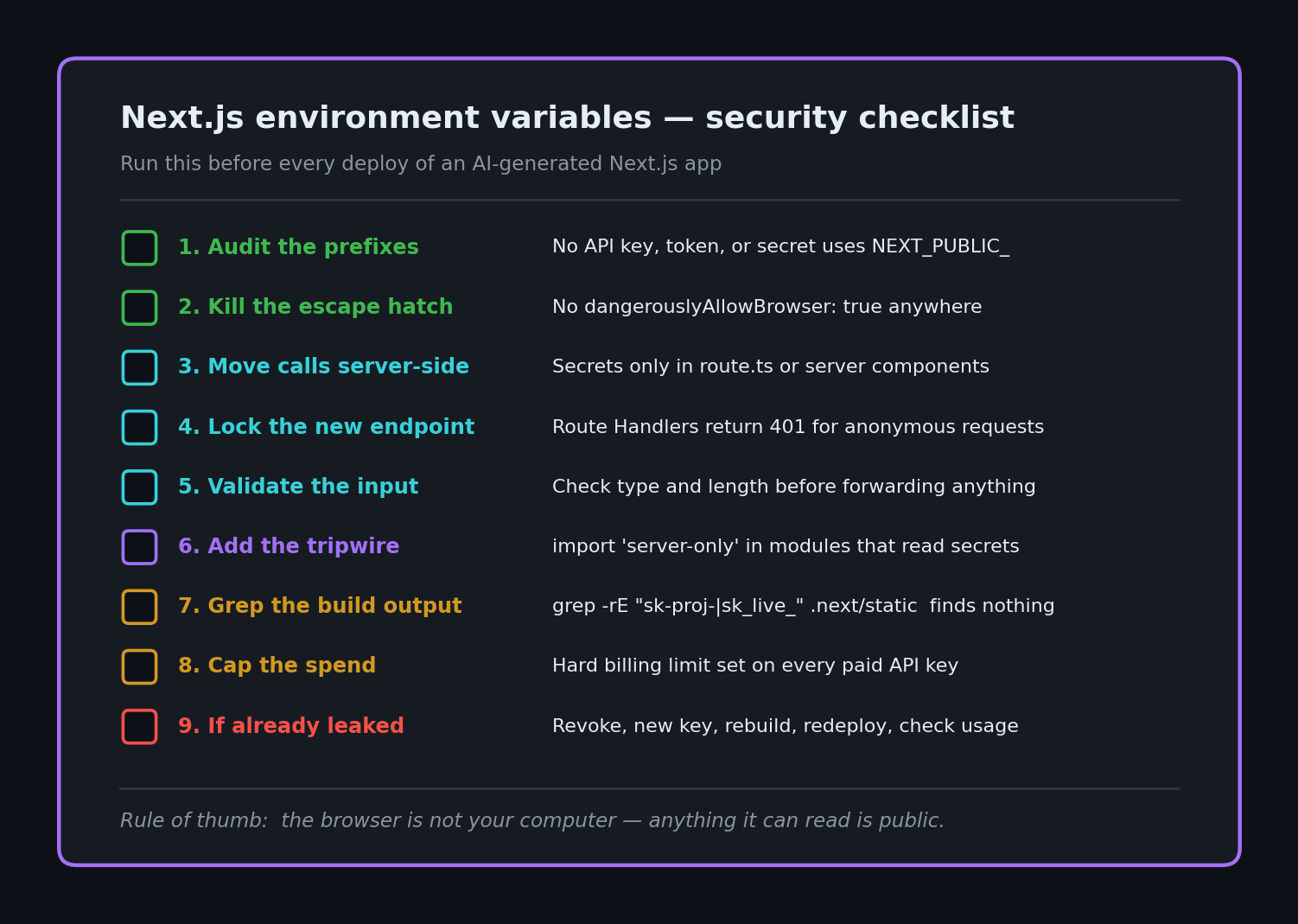
- No API key, token, or secret carries a
NEXT_PUBLIC_prefix - No
dangerouslyAllowBrowser: trueanywhere in the codebase - Every secret-using call lives in a Route Handler, Server Action, or server component
- Every Route Handler checks auth and validates input before doing work
- Modules reading
process.envsecrets start withimport 'server-only' -
grep -rE "sk-proj-|sk_live_|sb_secret_" .next/static .next/serverreturns nothing after a build -
.env*files are in.gitignore(the defaultcreate-next-apptemplate does this) - Spend caps set on every paid API key
- Any previously exposed key revoked, rotated, and redeployed
Everything here is one instance of the pattern behind our vibe coding security pillar: the browser is not your computer, so anything the browser can read is public. The same reasoning is why middleware alone can't protect your routes and why React Native apps leak keys through the JS bundle.
Shipped an AI feature with a key you're no longer sure about? I do hands-on secret-exposure audits of vibe-coded Next.js apps — I pull your production bundle apart the way an attacker would, tell you exactly what's readable, and send back the fixed route handlers. Email [email protected] with your stack and deployed URL.
Key Takeaway
NEXT_PUBLIC_ is not a convenience prefix — it's a publishing decision. Anything wearing it gets typed in plain text into a file every visitor downloads, and .gitignore won't save you. Keep secrets unprefixed, move the code that uses them into a Route Handler with an auth check, and run one grep over .next/static/ before you ship. That single command is the cheapest security test in your whole stack.