Your AI-Built API Has No Rate Limit: The $2,000 Bill Waiting to Happen (Next.js, With Code)
July 25, 2026 · 2294 words
Next.js API rate limiting is the security feature your AI assistant almost never writes unprompted — and unlike a broken page, you don't find out it's missing until the invoice arrives. You vibe code an AI app. It works. You post it somewhere. Then someone writes a ten-line script that hits /api/chat a few thousand times an hour, and every one of those requests spends your money at OpenAI, Anthropic, Resend, or Twilio. Nothing crashes. Nothing looks hacked. Your balance just quietly goes to zero.
This guide shows the unlimited route handler AI tools produce by default, the fixed version using @upstash/ratelimit, and a curl loop that proves the limit works in about thirty seconds.
The pattern is well documented: OWASP lists it as API4:2023 Unrestricted Resource Consumption, rating its prevalence "widespread" and its detectability "easy" — meaning attackers find these endpoints without trying hard. OWASP's own example scenario is a "forgot password" flow that called a paid SMS provider at $0.05 per message; an attacker scripted the endpoint tens of thousands of times and, in their words, it led "the company to lose thousands of dollars in a matter of minutes." Swap SMS for LLM tokens and you have the modern vibe-coding version.
What rate limiting actually is
Rate limiting means counting how many requests each caller makes in a time window and refusing the extras. "Ten messages per minute per user." That's it.
The important word is per caller. To count per caller you need an identifier — something that tells one user apart from another. A logged-in user's ID is the good one. An IP address is the fallback for anonymous traffic. Without an identifier, you're either limiting nobody or limiting everybody together (one heavy user then locks out your whole app).
When someone goes over, you return HTTP status 429 Too Many Requests — the standard "slow down" response — instead of doing the expensive work.
The code your AI wrote
Ask Cursor or Claude Code for "an API route that sends the user's prompt to OpenAI and returns the answer" and you get something like this:
// app/api/chat/route.ts — the version your AI wrote (NO LIMITS)
import { NextResponse } from 'next/server'
import OpenAI from 'openai'

const openai = new OpenAI({ apiKey: process.env.OPENAI_API_KEY })

export async function POST(req: Request) {
  const { prompt } = await req.json()

  const completion = await openai.chat.completions.create({
    model: 'gpt-4o-mini',
    messages: [{ role: 'user', content: prompt }],
  })

  return NextResponse.json({ reply: completion.choices[0].message.content })
}
This is correct code. It does exactly what you asked. The problem is what you didn't ask: nothing here caps how often it can run, who can run it, or how long the prompt is allowed to be.
Why this is dangerous
Your route is a public URL. Anyone who opens your site's network tab sees it. From there, the attack is not clever — it's a for loop:
# an attacker's entire toolkit
for i in $(seq 1 5000); do
  curl -s -X POST https://your-app.vercel.app/api/chat \
    -H "Content-Type: application/json" \
    -d '{"prompt":"write a 2000 word essay about anything"}' &
done
Three things happen at once, and none of them page you:
- Your API credits burn. Every request is a real, billed model call on your key. Long prompts and long outputs cost more, so attackers ask for long outputs.
- Your app becomes a free proxy. People genuinely do this — find an unauthenticated AI endpoint and wire it into their own product. Your key, their users.
- Real users get slow or broken responses while your provider throttles you for hitting their rate limits.
The same missing-limit problem shows up outside AI apps too: login routes get credential-stuffed, "forgot password" routes get used to spam someone's inbox, signup routes get filled with bot accounts, and search endpoints get scraped. It's the resource-consumption cousin of the missing authorization checks in our Next.js IDOR guide — a public entrance where the server forgot to ask a question.
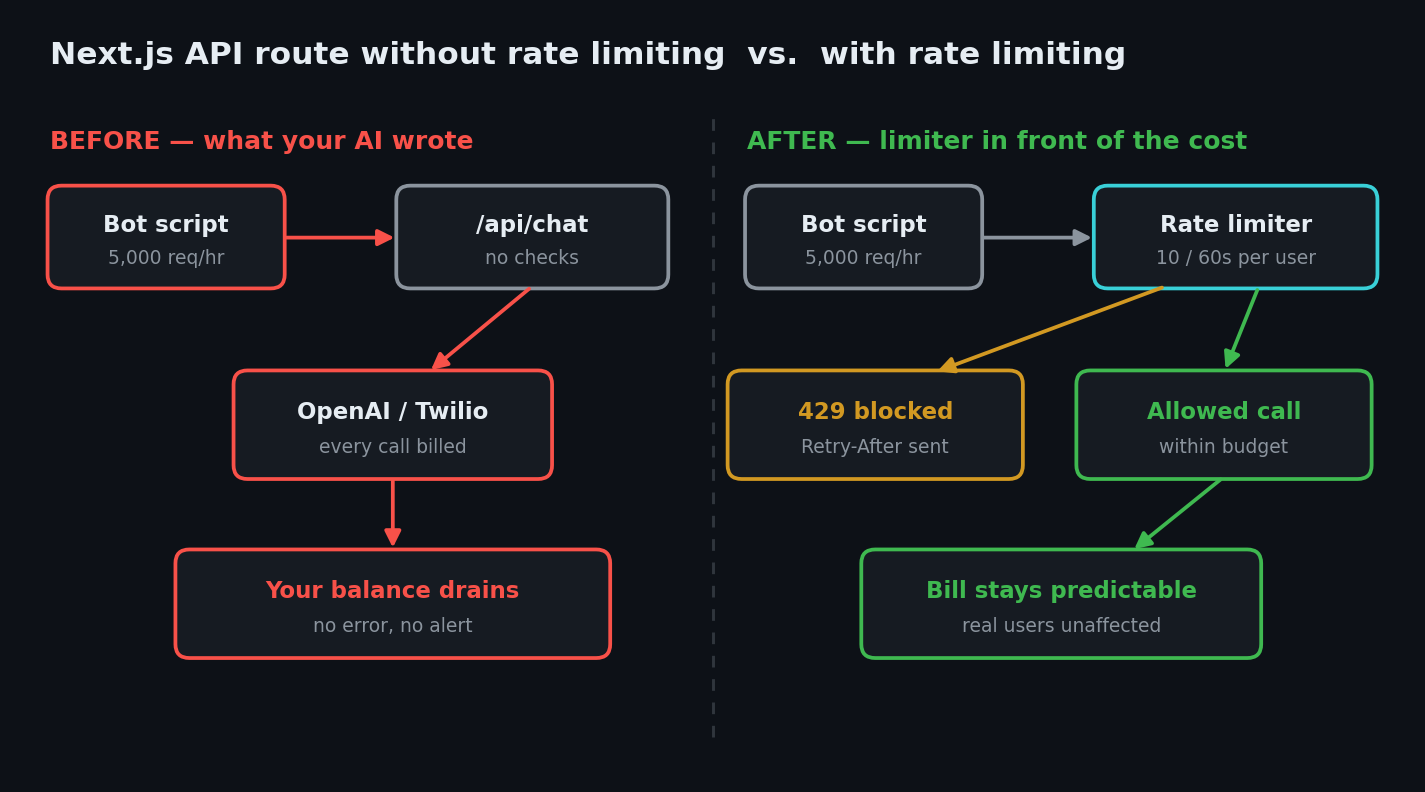
The fix: rate limit the route in three steps
We'll use @upstash/ratelimit, because it talks to Redis over HTTP instead of a TCP connection — which is what you need on Vercel and other serverless platforms where your function may be a brand-new instance on every request. An in-memory counter (const counts = new Map()) looks like it works locally and then silently does nothing in production, because each serverless instance gets its own empty Map.
Step 1 — Install and configure
npm install @upstash/ratelimit @upstash/redis
Create a Redis database in the Upstash console and put its two values in .env.local. The names matter — Redis.fromEnv() reads exactly these:
UPSTASH_REDIS_REST_URL=****
UPSTASH_REDIS_REST_TOKEN=****
Now define your limiters in one shared file, outside the request handler, so the instance is reused:
// lib/ratelimit.ts
import { Ratelimit } from '@upstash/ratelimit'
import { Redis } from '@upstash/redis'

const redis = Redis.fromEnv()

// Expensive AI calls: 10 per minute per user
export const chatLimiter = new Ratelimit({
  redis,
  limiter: Ratelimit.slidingWindow(10, '60 s'),
  analytics: true,
  prefix: 'ratelimit:chat',
})

// Auth endpoints deserve a much tighter limit
export const authLimiter = new Ratelimit({
  redis,
  limiter: Ratelimit.slidingWindow(5, '300 s'),
  analytics: true,
  prefix: 'ratelimit:auth',
})
slidingWindow(10, '60 s') means ten requests per rolling sixty seconds. The prefix keeps each limiter's keys separate in Redis so your chat limit and your login limit don't share a counter.
Step 2 — Get a real identifier
Here's a trap specific to Next.js 15 and later: request.ip no longer exists. Vercel removed ip and geo from NextRequest in Next.js 15, so any AI-generated snippet using req.ip is out of date and will give you undefined — which quietly rate-limits every visitor as one shared bucket. Read the header instead:
// lib/identify.ts
import { headers } from 'next/headers'

export async function getClientIp() {
  const h = await headers() // headers() is async in Next.js 15+
  const forwarded = h.get('x-forwarded-for')
  return forwarded?.split(',')[0]?.trim() ?? '127.0.0.1'
}
Prefer a user ID whenever the user is logged in — IPs are shared by offices, schools, and phone networks, and a determined attacker rotates them. Use the IP only as the anonymous fallback.
Step 3 — Enforce it in the route
// app/api/chat/route.ts — the fixed version
import { NextResponse, after } from 'next/server'
import OpenAI from 'openai'
import { auth } from '@/lib/auth'
import { chatLimiter } from '@/lib/ratelimit'
import { getClientIp } from '@/lib/identify'

const openai = new OpenAI({ apiKey: process.env.OPENAI_API_KEY })

export async function POST(req: Request) {
  // 1. Require a logged-in user (auth first, always)
  const session = await auth()
  if (!session?.user) {
    return NextResponse.json({ error: 'Unauthorized' }, { status: 401 })
  }

  // 2. Rate limit per user, falling back to IP
  const identifier = session.user.id ?? (await getClientIp())
  const { success, limit, remaining, reset, pending } =
    await chatLimiter.limit(identifier)

  // Let analytics finish after the response is sent
  after(async () => { await pending })

  if (!success) {
    return NextResponse.json(
      { error: 'Too many requests. Please wait a moment.' },
      {
        status: 429,
        headers: {
          'Retry-After': Math.ceil((reset - Date.now()) / 1000).toString(),
          'X-RateLimit-Limit': limit.toString(),
          'X-RateLimit-Remaining': remaining.toString(),
          'X-RateLimit-Reset': reset.toString(),
        },
      },
    )
  }

  // 3. Cap the input size too — cost scales with prompt length
  const { prompt } = await req.json()
  if (typeof prompt !== 'string' || prompt.length > 2000) {
    return NextResponse.json({ error: 'Invalid prompt' }, { status: 400 })
  }

  const completion = await openai.chat.completions.create({
    model: 'gpt-4o-mini',
    messages: [{ role: 'user', content: prompt }],
    max_tokens: 800, // cap the output too
  })

  return NextResponse.json({ reply: completion.choices[0].message.content })
}
Three things to notice. Auth runs before the limiter, so unauthenticated junk is rejected before it costs you a Redis call. after() — stable since Next.js 15.1 — lets the pending promise finish its analytics write after the response is sent, which matters on serverless where the runtime otherwise shuts down mid-write. And the input and output caps are part of the same defence: OWASP explicitly lists maximum payload sizes alongside request-frequency limits, because a single enormous prompt can cost more than a hundred small ones.
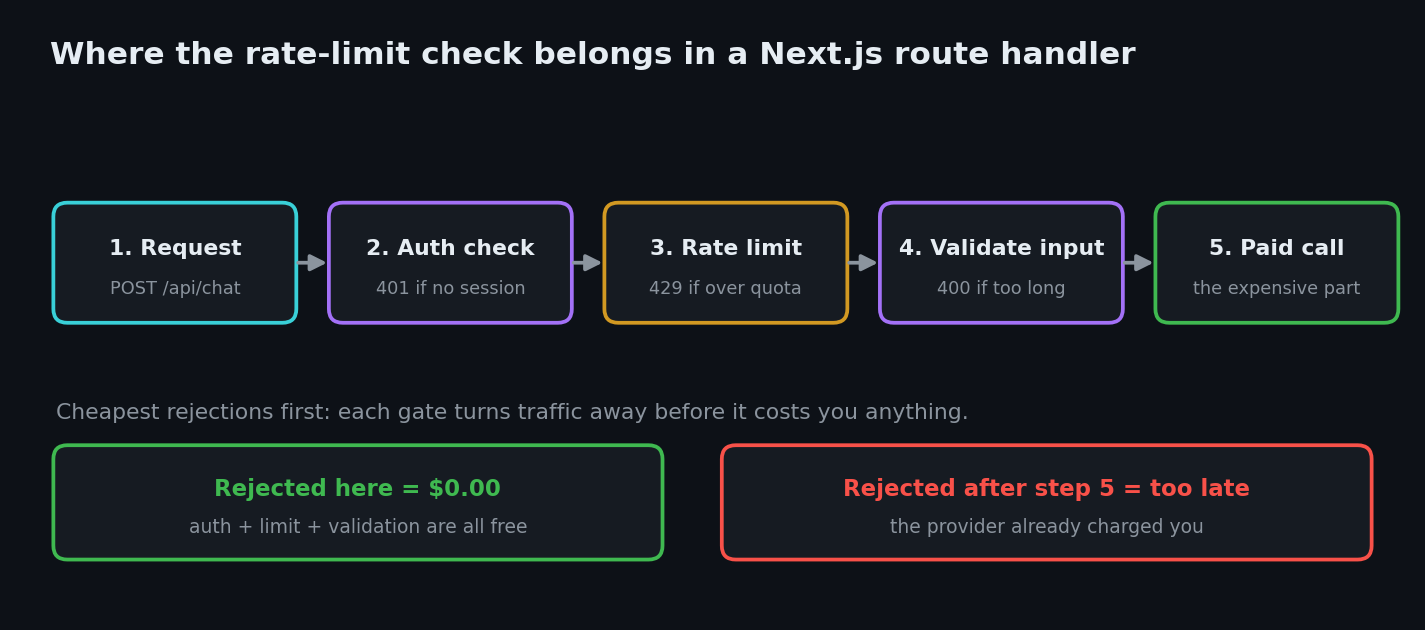
How to test it in 30 seconds
Run npm run dev, then fire fifteen requests at a limit of ten and watch the status codes flip:
for i in $(seq 1 15); do
  curl -s -o /dev/null -w "%{http_code} " -X POST http://localhost:3000/api/chat \
    -H "Content-Type: application/json" \
    -d '{"prompt":"hi"}'
done; echo
You want to see roughly 200 200 200 ... 429 429 429. If you get fifteen 200s, the limiter isn't wired up. If you get fifteen 429s, your identifier is probably undefined and everyone is sharing one bucket — check getClientIp().
To confirm it survives a deploy, run the same loop against your production URL from two different networks (your laptop and your phone's hotspot). Each should get its own allowance when logged in as different users.
Risk table
| Risk | What can happen | Fix |
|---|---|---|
| No rate limit on a paid API call | One script drains your OpenAI/Twilio balance overnight | @upstash/ratelimit with a per-user identifier |
In-memory counter (Map) on serverless | Limit silently does nothing in production | Use Redis-backed limiting shared across instances |
Using req.ip on Next.js 15+ | undefined identifier — everyone shares one bucket | Read x-forwarded-for, or ipAddress() from @vercel/functions |
| Limiting by IP only | Offices share IPs; attackers rotate them | Prefer the session user ID, IP as fallback |
| No auth on the endpoint | Your app becomes a free public AI proxy | Check the session before the expensive call |
| Unbounded prompt or response length | One request costs as much as hundreds | Validate input length and set max_tokens |
| No spending cap at the provider | Nothing stops the bill mid-attack | Set hard usage limits and billing alerts in the provider dashboard |
| Same limit on login and on search | Brute-force gets the same generous allowance as browsing | Separate, stricter limiters for auth routes |
That last row is worth acting on today, separately from any code: OWASP's prevention list ends with "configure spending limits for all service providers/API integrations." Rate limiting is your lock; the provider's spending cap is your insurance. Set both.
Ask your AI to fix it
Paste this into Cursor, Claude Code, or Copilot:
Add rate limiting to my Next.js App Router API routes.
1. Install @upstash/ratelimit and @upstash/redis. Create lib/ratelimit.ts exporting
   separate Ratelimit instances (Redis.fromEnv(), Ratelimit.slidingWindow) with distinct
   `prefix` values: 10/60s for AI or other paid calls, 5/300s for auth routes.
2. In each route handler, check the session FIRST and return 401 if missing, then call
   limiter.limit(identifier) where identifier is the session user id, falling back to the
   first entry of the x-forwarded-for header. Do NOT use req.ip — it was removed in Next.js 15.
3. On failure return status 429 with Retry-After, X-RateLimit-Limit, X-RateLimit-Remaining
   and X-RateLimit-Reset headers.
4. Pass the `pending` promise to after() from next/server so analytics complete on serverless.
5. Also validate request body size / string length and set an output token cap on model calls.
Do not use an in-memory Map or a module-level counter — it does not work across serverless
instances. Show me the diff before applying it.
The last two lines matter most: an in-memory counter is the single most common thing an AI will hand you here, and it passes local testing perfectly while doing nothing in production.
Rate limiting checklist
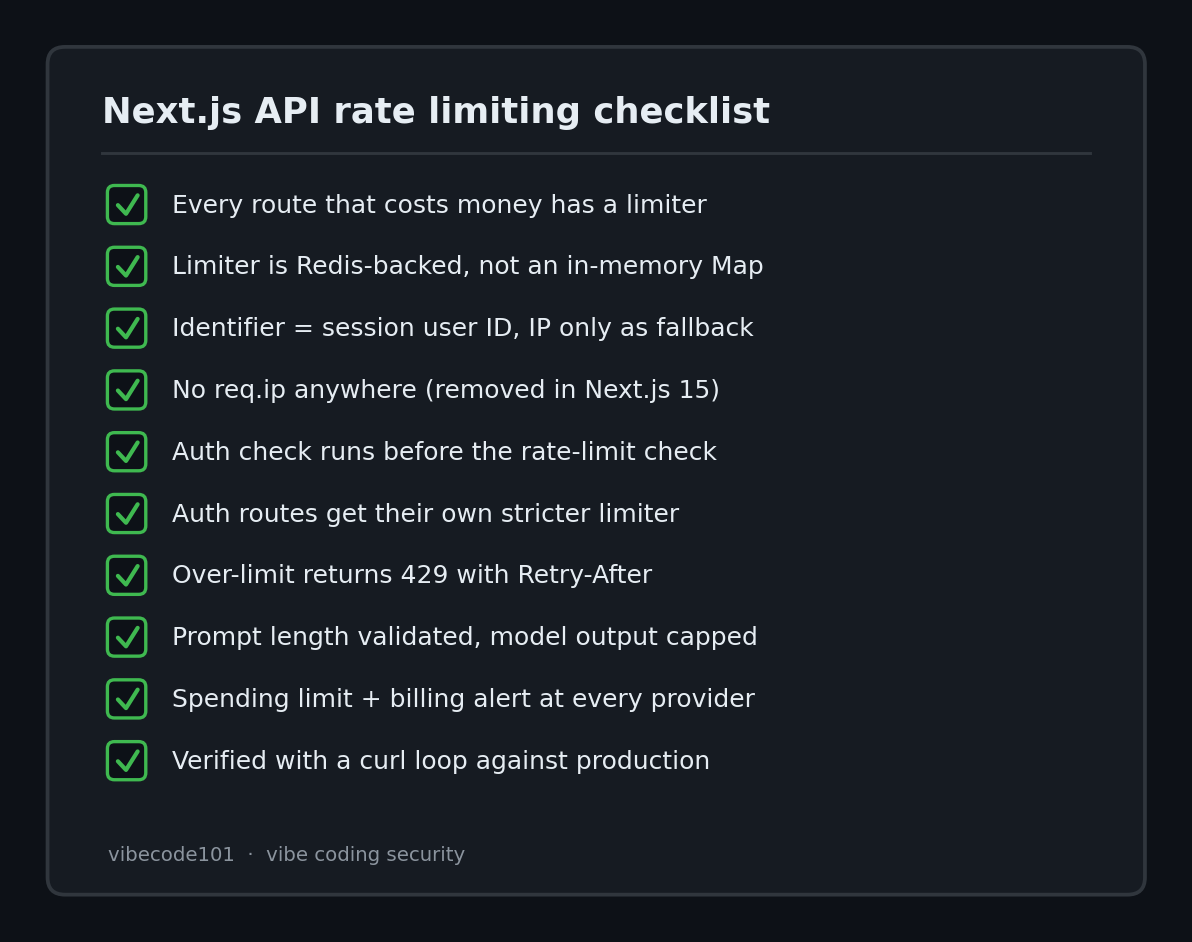
- Every route that costs money or sends email/SMS has a limiter
- Limiter is Redis-backed, not an in-memory
Map - Identifier is the session user ID, with IP only as fallback
- No
req.ipanywhere (removed in Next.js 15) - Auth check runs before the rate-limit check
- Login, signup, and password-reset routes have their own stricter limiter
- Over-limit returns
429with aRetry-Afterheader - Prompt/body length validated and model output capped
- Hard spending limit + billing alert set at every paid provider
- Verified with a curl loop against the deployed URL, not just localhost
Rate limiting is one of the checks every public entrance to your app needs to make on the server — the same principle behind our vibe coding security pillar guide. Pair it with real authentication (see our auth tools roundup) and server-side authorization checks, because a limiter only slows an attacker down; it doesn't decide whether they were allowed in at all.
Shipping an AI app built with Cursor or Claude Code and unsure which of your endpoints would survive a scripted loop? I do hands-on code-security audits of vibe-coded apps — I run the abuse scripts against your routes and send back the specific fixes. Email [email protected] with your stack and I'll take a look.
Key Takeaway
Your AI writes routes that work, not routes that survive strangers. Any endpoint that spends money — model calls, emails, SMS, image generation — needs a Redis-backed limit keyed to a real user, an auth check ahead of it, a cap on input and output size, and a spending limit at the provider. That's an afternoon of work against a bill you can't undo.