Next.js Middleware Is Not Enough to Protect Your Routes: The Auth Bypass Your AI Set Up (With Code)
July 21, 2026 · 2046 words
Next.js middleware authentication feels like a solved problem when your AI writes it. You ask Cursor or Claude Code to "protect my dashboard", it drops a middleware.ts file that checks for a login cookie and redirects everyone else to /login, the page stops loading when you're logged out, and you move on. It looks locked. It isn't. Next.js middleware is not enough to protect your routes — and if it's the only place your AI put the auth check, a stranger can walk straight past it and read your users' data.
This isn't a hypothetical. In March 2025, a real vulnerability — CVE-2025-29927, rated 9.1 out of 10 — showed that attackers could bypass Next.js middleware entirely by adding one HTTP header to their request. Every "protect the route in middleware" app was exposed until it was patched. But here's the part that matters even after the patch: the official Next.js docs have always said middleware should not be your only line of defense. This guide shows the exact insecure pattern AI assistants generate, why middleware alone fails, and the fix — a Data Access Layer — that you can paste in today.
What is middleware, in plain English?
Middleware is a file (middleware.ts) that Next.js runs before a request reaches your page. Think of it as a bouncer standing at the front door of your app. Every request walks up, the bouncer peeks at it, and decides: let you in, or send you to the login page.
The problem is that a bouncer at the front door doesn't guard the back door, the windows, or the fire escape. In a Next.js app, your data has many entrances — pages, Server Actions, Route Handlers, React Server Component requests — and middleware only reliably stands at one of them. Worse, as CVE-2025-29927 proved, the bouncer can be told "I'm staff, let me through" and he'll step aside.
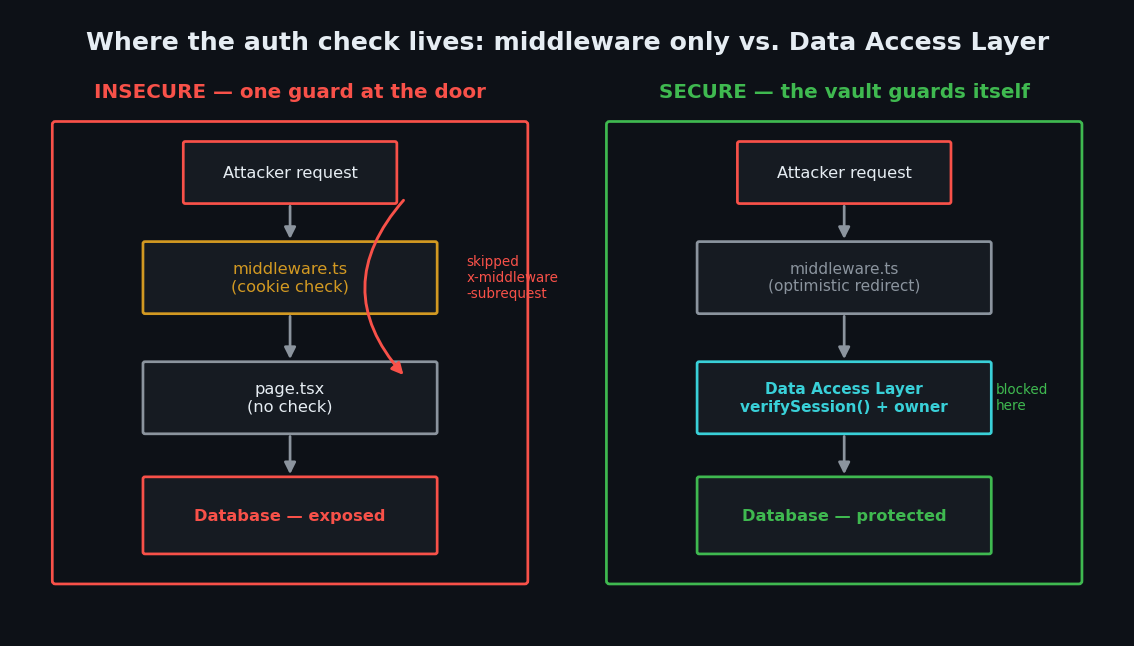
The official Next.js authentication docs put it plainly: middleware checks should be optimistic only — quick, cookie-based filters for redirecting obvious guests — and "it should not be your only line of defense in protecting your data. The majority of security checks should be performed as close as possible to your data source."
The code your AI wrote
Ask an AI assistant to secure your app and you'll almost always get something like this — auth logic living only in middleware:
// middleware.ts — the ONLY auth check in the app (insecure)
import { NextRequest, NextResponse } from 'next/server'
import { cookies } from 'next/headers'
import { decrypt } from '@/app/lib/session'

const protectedRoutes = ['/dashboard', '/admin']

export async function middleware(req: NextRequest) {
  const path = req.nextUrl.pathname
  const isProtected = protectedRoutes.some((r) => path.startsWith(r))

  const cookie = (await cookies()).get('session')?.value
  const session = await decrypt(cookie)

  // If no valid session, bounce to login
  if (isProtected && !session?.userId) {
    return NextResponse.redirect(new URL('/login', req.nextUrl))
  }

  return NextResponse.next()
}

export const config = {
  matcher: ['/((?!api|_next/static|_next/image|.*\\.png$).*)'],
}
// app/dashboard/page.tsx — trusts that middleware already checked (insecure)
export default async function DashboardPage() {
  // No auth check here — "middleware handles it"
  const secrets = await db.query.secrets.findMany()
  return <SecretList items={secrets} />
}
It runs. It even feels safe: log out, visit /dashboard, and you get redirected. Ship it, right?
Why it's dangerous
There are three separate ways this pattern leaks your data, and a vibe coder will not spot any of them by clicking around the app.
1. The middleware can be skipped entirely. CVE-2025-29927 abused an internal header called x-middleware-subrequest. Next.js used this header behind the scenes to avoid running middleware twice on itself. The bug: it never checked that the header came from inside Next.js. So an attacker could send a normal request with that header set, and Next.js would think "middleware already ran" and skip it completely — walking straight into /admin. Vercel's own postmortem confirms the mechanism and notes it affected self-hosted apps using next start or output: 'standalone'. It's patched now (in 12.3.5, 13.5.9, 14.2.25, and 15.2.3), but it's a permanent lesson: a single choke point is a single point of failure.
2. Pages render without their layout. Even with no CVE at all, Next.js can serve a page's content without running the parent layout — and the same idea applies to any auth check that isn't attached to the data itself. A maintainer spelled this out in an official Next.js discussion: "adding an auth check to a layout is not enough to protect its contents... If you are trying to protect page contents by adding auth to a layout, this is a security vulnerability and you should patch it as quickly as you can." You can reproduce it by adding an RSC=1 header to a request and watching protected content come back with no auth check.
3. Middleware can't safely reach your database. Middleware runs on every single request, including prefetches, so the docs warn you to keep it to cheap cookie reads and avoid database lookups. That means middleware can confirm a cookie exists, but not that the user actually owns the specific record they're requesting. A logged-in user can still read another user's data — a flaw called IDOR (Insecure Direct Object Reference) — because the only "guard" never looked at the database.
Put simply: a cookie is not a permission slip, and the front door is not the vault.
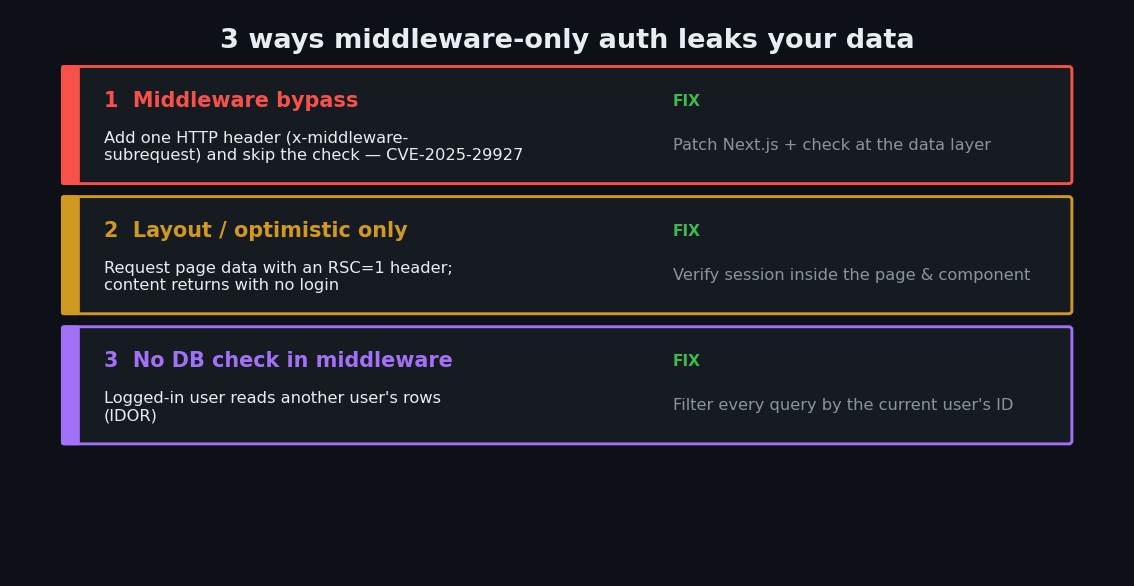
| Risk | What an attacker can do | The fix |
|---|---|---|
| Middleware bypass (CVE-2025-29927) | Add one header, skip auth, open /admin | Patch Next.js and check auth at the data layer |
| Layout/optimistic-only checks | Fetch page data with an RSC=1 header, no login | Verify the session inside the page/component |
| No DB check in middleware | Read another user's records (IDOR) | Verify ownership where you query the database |
| Cookie exists but is forged/expired | Slip past a shallow "cookie present?" test | Decrypt and validate the session server-side |
The fix: a Data Access Layer (DAL)
The Next.js team's recommended fix is to stop treating middleware as your lock and instead put the real check next to your data. You do this with a Data Access Layer — a small server-only file that every database call goes through, so the auth check can never be forgotten.
Step 1 — Build the DAL. This file verifies the session on the server, close to the data. The server-only import guarantees this code can never accidentally ship to the browser, and React's cache avoids re-checking on every call in one render.
// app/lib/dal.ts — the fix
import 'server-only'
import { cache } from 'react'
import { cookies } from 'next/headers'
import { redirect } from 'next/navigation'
import { decrypt } from '@/app/lib/session'

export const verifySession = cache(async () => {
  const cookie = (await cookies()).get('session')?.value
  const session = await decrypt(cookie)

  if (!session?.userId) {
    redirect('/login')
  }

  return { isAuth: true, userId: session.userId }
})
Step 2 — Query through the DAL, and check ownership. Every data read verifies the session first, then only returns rows that belong to the current user. This is what closes the IDOR hole middleware can't.
// app/lib/data.ts — the fix
import 'server-only'
import { verifySession } from '@/app/lib/dal'
import { db } from '@/app/lib/db'

export async function getMySecrets() {
  const session = await verifySession() // auth check lives WITH the data

  // Only rows owned by THIS user — ownership check, not just "logged in?"
  return db.query.secrets.findMany({
    where: (s, { eq }) => eq(s.userId, session.userId),
  })
}
Step 3 — Use it in the page. The page no longer trusts middleware. The check travels with the query.
// app/dashboard/page.tsx — the fix
import { getMySecrets } from '@/app/lib/data'

export default async function DashboardPage() {
  const secrets = await getMySecrets() // verifies session + ownership
  return <SecretList items={secrets} />
}
Step 4 — Keep middleware, but demote it. Middleware is still useful for the fast, friendly redirect (sending logged-out visitors to /login before a page even renders). Just treat it as a convenience layer, never the security layer. And guard the specific mutations too — the docs are explicit that Server Actions and Route Handlers must "be treated with the same security considerations as public-facing API endpoints," so each one calls verifySession() on its own. If your login system itself was AI-generated, harden it with our secure authentication guide, and if your data lives in Supabase, layer database-level rules on top with our Supabase RLS guide.
How to test the fix
You don't need special tools. Two checks catch most of this.
Check 1 — Are you patched against the bypass? Confirm your Next.js version is current:
npm ls next
# Must be >= 12.3.5, 13.5.9, 14.2.25, or 15.2.3 (newer is better)
Check 2 — Does your data leak without a login? Log out (or use a fresh private window with no cookies) and hit a protected page directly, simulating the "skip the middleware" trick with a raw request:
# No session cookie. If protected data comes back in the HTML, you're exposed.
curl -s https://your-app.com/dashboard \
  -H 'RSC: 1' | grep -i "secret"
If that returns your private content, your auth still lives only at the front door. With the DAL in place, the request should redirect or return nothing sensitive, because the page can't fetch data without a valid session.
Ask your AI to fix it
Paste this into Cursor, Claude Code, or Copilot:
"Right now auth is only checked in
middleware.ts. Refactor so security does not depend on middleware. Create aserver-onlyData Access Layer (app/lib/dal.ts) with a cachedverifySession()that decrypts the session cookie and redirects to/loginif there's no validuserId. Route every database read through functions that callverifySession()first and filter results by the current user's ID (ownership check to prevent IDOR). Add averifySession()check inside every Server Action and Route Handler too. Keep middleware only for the optimistic logged-out redirect. Show me the diff."
Your Next.js middleware security checklist
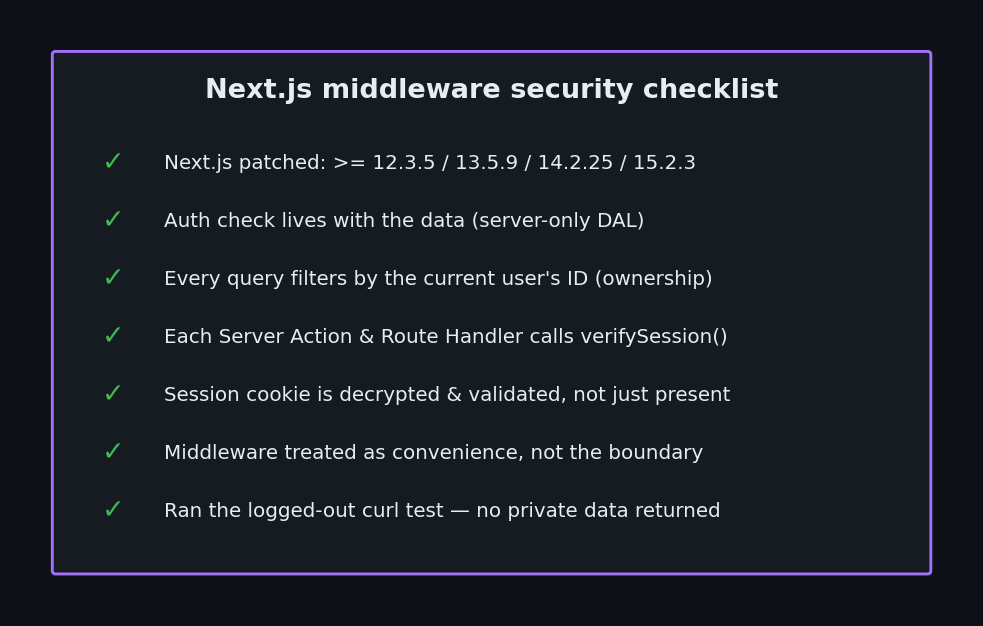
- Next.js is patched — version ≥ 12.3.5 / 13.5.9 / 14.2.25 / 15.2.3 (
npm ls next). - Auth check lives with the data, in a
server-onlyData Access Layer — not only in middleware or a layout. - Every DB query filters by the current user's ID (ownership check), not just "is someone logged in?".
- Each Server Action and Route Handler calls
verifySession()itself. - The session cookie is decrypted and validated, not just checked for existence.
- Middleware is treated as convenience, not the security boundary.
- You ran the logged-out
curltest and no private data came back.
If you'd like a second pair of eyes on your actual code, I run hands-on security audits of vibe-coded Next.js apps — I trace every route, Server Action, and database query, run the logged-out bypass tests above, and hand you a prioritized fix list. Email me at [email protected] with your repo or stack, and I'll tell you where an attacker would slip past your middleware first.
Key Takeaway
Middleware is a bouncer at the front door, not a lock on the vault. AI assistants love to put your only auth check there because it looks protected in the browser — but pages, Server Actions, and RSC requests are separate entrances, and CVE-2025-29927 proved the front door itself can be skipped. Move the real check next to your data with a Data Access Layer that verifies the session and checks ownership on every query. Keep middleware for the friendly redirect, and let the vault guard itself.
For the bigger picture on shipping AI-generated code safely, start with our pillar guide on vibe coding security.