React Native Secure Storage: Your API Key Is Sitting in the App Bundle (Here's the Fix, With Code)
July 19, 2026 · 1987 words
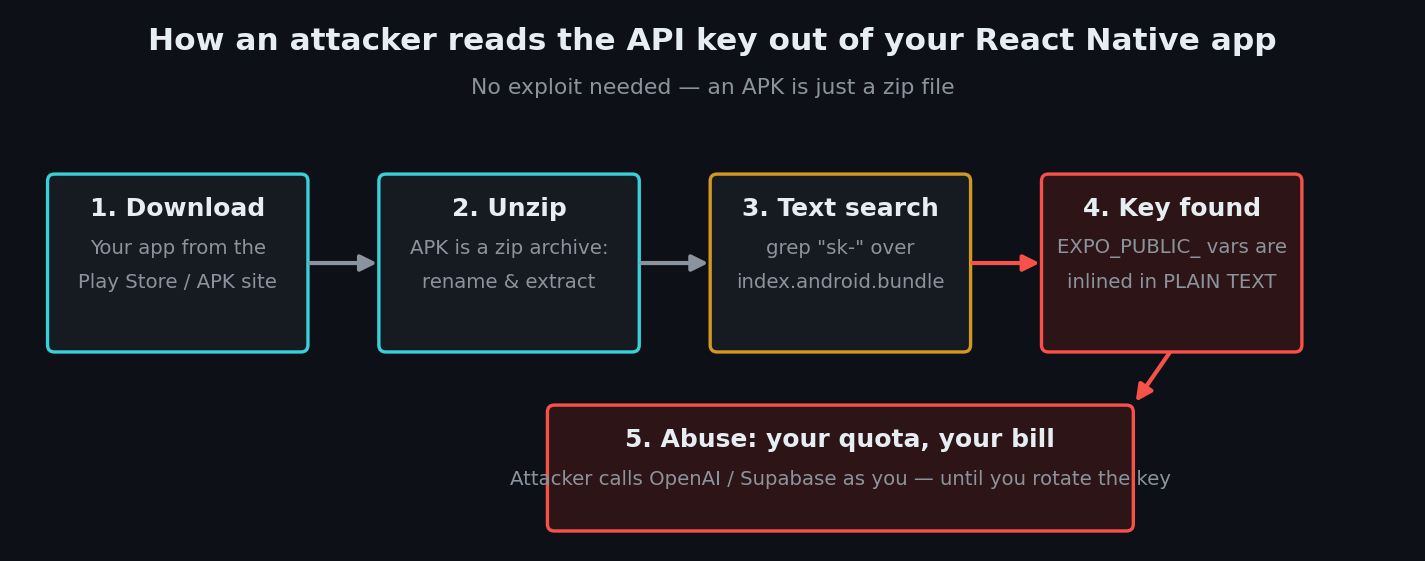
React Native secure storage is the topic most vibe coders meet the hard way: someone downloads your app, unzips it like a regular file, reads your OpenAI or Supabase key in plain text, and starts running up your bill. No hacking tools, no exploit — just a text search inside the bundle you shipped to the app store. If you built your app with Cursor, Claude Code, or Copilot and asked it to "add my API key", there is a very good chance that key is extractable right now. Security researchers keep demonstrating exactly this: one recent XDA investigation found vibe-coded apps leaking user data and API keys "without even looking for it," with roughly one in ten examined apps exposing data it shouldn't.
The good news: this is one of the most fixable problems in mobile security. This guide shows the exact insecure pattern AI assistants produce in Expo / React Native apps, why it's dangerous, and the two fixes — expo-secure-store for tokens on the device, and a backend proxy for provider keys — with code you can paste in today.
First, the rule your AI never told you: there are two kinds of secrets
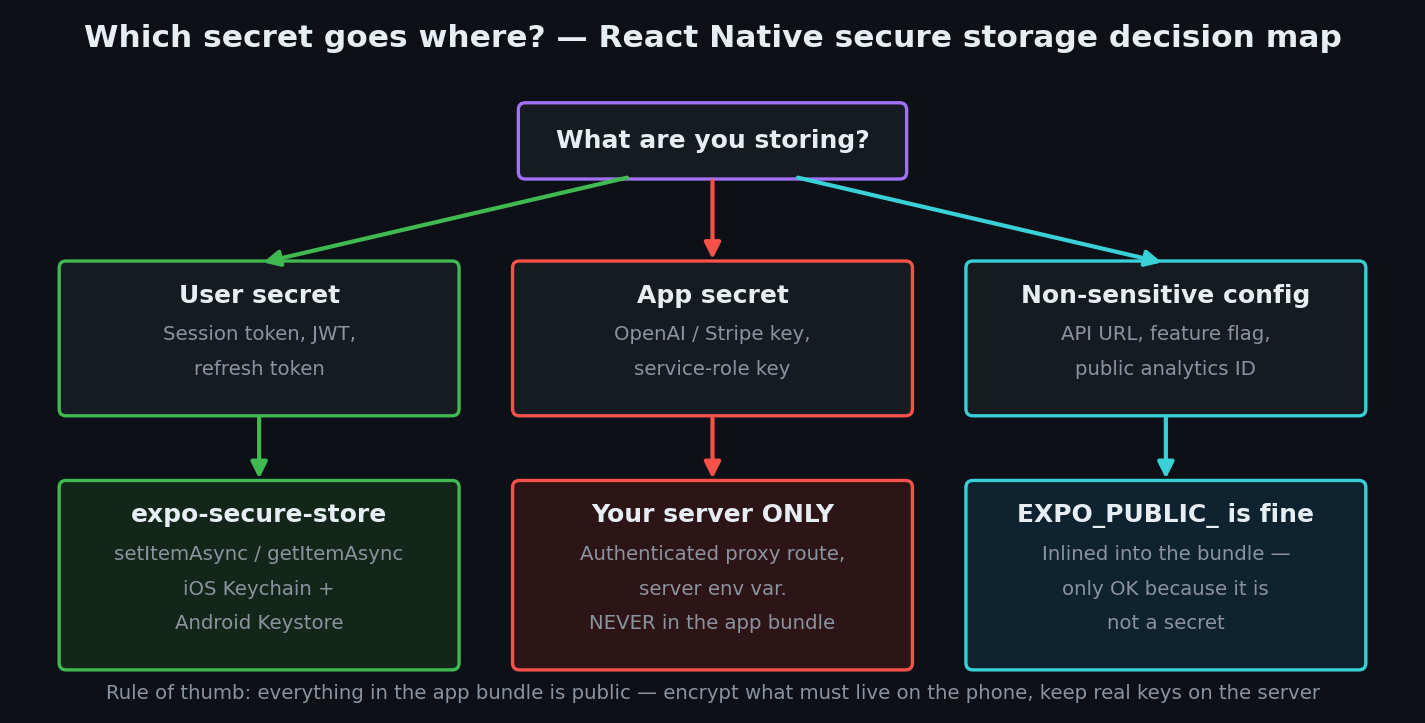
Almost every "where do I put my API key?" mistake comes from mixing these up:
User secrets are things like a session token or JWT (a signed string proving "this user is logged in"). They belong on the device — but in encrypted storage, not plain files.
App secrets are things like your OpenAI key, Stripe secret key, or a service-role database key. They never belong in the app at all. Not in code, not in .env, not obfuscated. The official React Native security docs put it bluntly: "Never store sensitive API keys in your app code. Anything included in your code could be accessed in plain text by anyone inspecting the app bundle."
AI assistants blur this constantly: they put both kinds into environment variables, wire them into fetch calls, and everything works in testing. Which brings us to the code.
The code your AI wrote
Ask an AI assistant to "connect my Expo app to OpenAI" and you'll very often get this:
# .env — the version your AI wrote (INSECURE)
EXPO_PUBLIC_OPENAI_API_KEY=sk-proj-abc123...
// lib/ai.ts — INSECURE: calls the provider straight from the phone
export async function askAI(question: string) {
  const res = await fetch('https://api.openai.com/v1/chat/completions', {
    method: 'POST',
    headers: {
      'Content-Type': 'application/json',
      Authorization: `Bearer ${process.env.EXPO_PUBLIC_OPENAI_API_KEY}`,
    },
    body: JSON.stringify({
      model: 'gpt-4o-mini',
      messages: [{ role: 'user', content: question }],
    }),
  })
  return res.json()
}
And for the login flow, the session token usually lands here:
// INSECURE: plaintext storage for a sensitive token
import AsyncStorage from '@react-native-async-storage/async-storage'

await AsyncStorage.setItem('session_token', token)
It works. The app chats with the AI, users stay logged in, and nothing looks wrong. Shipped.
Why this is dangerous
1. EXPO_PUBLIC_ means public — literally. Expo's bundler takes every variable with that prefix and inlines the raw value into your JavaScript bundle at build time. The Expo environment variables guide warns: "Do not store sensitive info, such as private keys, in EXPO_PUBLIC_ variables. These variables will be visible in plain-text in your compiled application." An Android APK is just a zip archive; anyone can rename it, extract it, and run a text search over the JS bundle. Your sk-proj-... key is right there, exactly as you typed it.
2. "Secret" settings don't un-ship a shipped secret. A common vibe-coder assumption is that marking a variable as "secret" in EAS (Expo's build service) protects it. It doesn't — that setting only hides the value from logs and dashboards. The EAS docs are explicit: "anything that is included in your client-side code should be considered public" and secrets "do not provide any additional security for values that you end up embedding in your application itself."
3. AsyncStorage is a plain, unencrypted file. The React Native docs describe AsyncStorage as "an asynchronous, unencrypted, key-value store" and list token storage and secrets explicitly under "don't." A session token stored there sits on disk in plain text — readable by anyone with access to the device's filesystem, a malicious backup, or certain classes of malware.
This whole class of bug — hardcoded and mishandled credentials — is ranked M1: Improper Credential Usage, the number one risk in the OWASP Mobile Top 10. It's the mobile cousin of the exposed-database problem we covered in our Supabase RLS guide.
Fix 1: session tokens go in expo-secure-store
expo-secure-store wraps the two real vaults your phone already has: the iOS Keychain (Apple's encrypted credential store) and the Android Keystore (which encrypts entries so keys are hard to extract from the device). Per the official SecureStore docs, values on Android are stored in SharedPreferences encrypted with the Keystore, and on iOS as Keychain items.
npx expo install expo-secure-store
// lib/session.ts — SECURE: token lives in Keychain/Keystore
import * as SecureStore from 'expo-secure-store'

const TOKEN_KEY = 'session_token'

export async function saveToken(token: string) {
  await SecureStore.setItemAsync(TOKEN_KEY, token, {
    // iOS: readable after the first unlock — safe default for background refresh
    keychainAccessible: SecureStore.AFTER_FIRST_UNLOCK,
  })
}

export async function getToken(): Promise<string | null> {
  return SecureStore.getItemAsync(TOKEN_KEY)
}

export async function clearToken() {
  await SecureStore.deleteItemAsync(TOKEN_KEY)
}
Swap every AsyncStorage call that touches tokens for these three functions. Two beginner-relevant caveats from the docs: keep values small (some iOS releases rejected values above roughly 2048 bytes — store a token, not a JSON blob), and on iOS, Keychain entries can survive app uninstall, so clear the token on logout rather than assuming deletion cleans up.
Fix 2: provider API keys go behind a backend proxy
There is no client-side trick that makes an app secret safe — not obfuscation, not encryption inside the bundle (the app would need the decryption key, which ships in the same bundle). The fix the React Native docs recommend is an orchestration layer: a tiny server endpoint that holds the key and forwards requests. Your app talks only to your server; your server talks to OpenAI.
If you already have a Next.js app (most vibe coders do), one route handler is enough:
// app/api/ai/route.ts — runs on YOUR server; the key never ships in the app
import { verifySession } from '@/lib/auth' // your existing session check

export async function POST(request: Request) {
  // 1. Only YOUR logged-in users may use your quota
  const token = request.headers.get('authorization')?.replace('Bearer ', '')
  const user = await verifySession(token)
  if (!user) {
    return Response.json({ error: 'Unauthorized' }, { status: 401 })
  }

  // 2. Validate input so nobody abuses the endpoint
  const { question } = await request.json()
  if (typeof question !== 'string' || question.length > 2000) {
    return Response.json({ error: 'Invalid input' }, { status: 400 })
  }

  // 3. The key comes from a SERVER env var — no EXPO_PUBLIC_, no NEXT_PUBLIC_
  const res = await fetch('https://api.openai.com/v1/chat/completions', {
    method: 'POST',
    headers: {
      'Content-Type': 'application/json',
      Authorization: `Bearer ${process.env.OPENAI_API_KEY}`,
    },
    body: JSON.stringify({
      model: 'gpt-4o-mini',
      messages: [{ role: 'user', content: question }],
    }),
  })
  return Response.json(await res.json())
}
And the app-side call becomes boring — which is the point:
// lib/ai.ts — SECURE: the app only ever talks to your own server
import { getToken } from './session'

export async function askAI(question: string) {
  const token = await getToken()
  const res = await fetch('https://your-app.com/api/ai', {
    method: 'POST',
    headers: {
      'Content-Type': 'application/json',
      Authorization: `Bearer ${token}`,
    },
    body: JSON.stringify({ question }),
  })
  return res.json()
}
One warning: that proxy endpoint is now itself a public URL — which is why steps 1 and 2 (auth + validation) are not optional. That's the same lesson as our Next.js Server Actions guide, and if it's an anonymous endpoint you also want rate limiting on it.
How to test the fix (2 minutes)
Export your app bundle locally and search it for your own key — the same thing an attacker would do:
npx expo export
# search the exported bundle for your real key value:
grep -R "sk-proj" dist/ && echo "!! LEAKED — rotate this key" || echo "clean"
Before the fix: grep prints your key. After the fix: clean. If it ever printed, rotate the key in the provider's dashboard — removing it from the next build does nothing for the copies already shipped. For an already-published Android app you can run the same check on the real artifact: an APK is a zip, so extract it and search the index.android.bundle file inside.
Then run a secret scanner over your repo so the key isn't still sitting in git history — we compared six free options in our secret-scanning tools roundup.
| Risk | What can happen | The fix |
|---|---|---|
Secret in EXPO_PUBLIC_ var | Key inlined in plain text in the bundle; quota abuse, surprise bill | Server-side proxy; key in a server env var |
| Key hardcoded in source | Same, plus it lives in git history forever | Remove, rotate the key, add a secret scanner |
| Token in AsyncStorage | Plaintext on disk; session theft from device/backup | expo-secure-store (Keychain/Keystore) |
| Trusting EAS "secret" visibility | Value still ships if referenced in client code | Secrets are for build-time only; never in client code |
| Leaked key left active | Extracted copies keep working after your fix | Revoke and reissue in the provider dashboard |
Copy-paste prompt: make your AI fix its own storage
Paste this into Cursor, Claude Code, or Copilot in your project:
Audit this Expo/React Native app for credential handling. (1) Find every EXPO_PUBLIC_ variable and every hardcoded string that looks like an API key or secret; for any that grant access to a paid or private service, move the call behind a server-side proxy endpoint that verifies my app's session token and validates input, and read the key from a server-only env var. (2) Replace every AsyncStorage read/write of tokens, passwords, or PII with expo-secure-store (setItemAsync/getItemAsync/deleteItemAsync). (3) List every key that was ever in client code or git history so I can rotate it. Do not add obfuscation and call it a fix.
React Native secure storage checklist
- No API key, secret, or service-role key appears in any
EXPO_PUBLIC_variable - Provider calls (OpenAI, Stripe, etc.) go through your own authenticated server endpoint
- Session tokens live in
expo-secure-store, never AsyncStorage - The proxy endpoint checks the session and validates input (and is rate limited if anonymous)
- You ran
npx expo exportand grepped thedist/output for your key values - Every key that ever shipped or hit git history has been rotated
- A secret scanner (e.g. Gitleaks) runs on your repo
Mobile is only one door into your stack — the full room-by-room map is in our vibe coding security pillar guide.
If you'd like a second pair of eyes on your actual app, I run hands-on security audits of vibe-coded React Native and Expo apps — including extracting your real bundle the way an attacker would and a prioritized fix list for what's inside. Email me at [email protected] with your stack and I'll tell you what leaks first.
Key Takeaway
Your app bundle is public the moment you ship it, so treat every byte in it as readable: user tokens belong in expo-secure-store (the phone's encrypted Keychain/Keystore), and app secrets belong on a server you control — never in EXPO_PUBLIC_ variables, which Expo inlines in plain text by design. Move the key behind an authenticated proxy, prove it with one grep over your exported bundle, and rotate anything that ever shipped.