Your AI Put the Supabase Secret Key in the Browser: How to Check and Fix It (With Code)
September 16, 2026 · 2380 words
The Supabase service role key is the one string that turns your database into a public spreadsheet. A stranger opens DevTools on your site, copies a key that starts with eyJ, pastes it into curl, and gets back every row in every table — users, orders, messages — plus permission to edit or delete any of them. Your RLS policies don't slow them down, because this key was built to ignore them.
The fix is short. Checking takes about 3 minutes, and fixing it takes about 15. There's also a deadline you may not know about: Supabase renamed its keys, and the old ones your AI keeps writing are being retired by the end of 2026. This guide covers both.
The one-line version
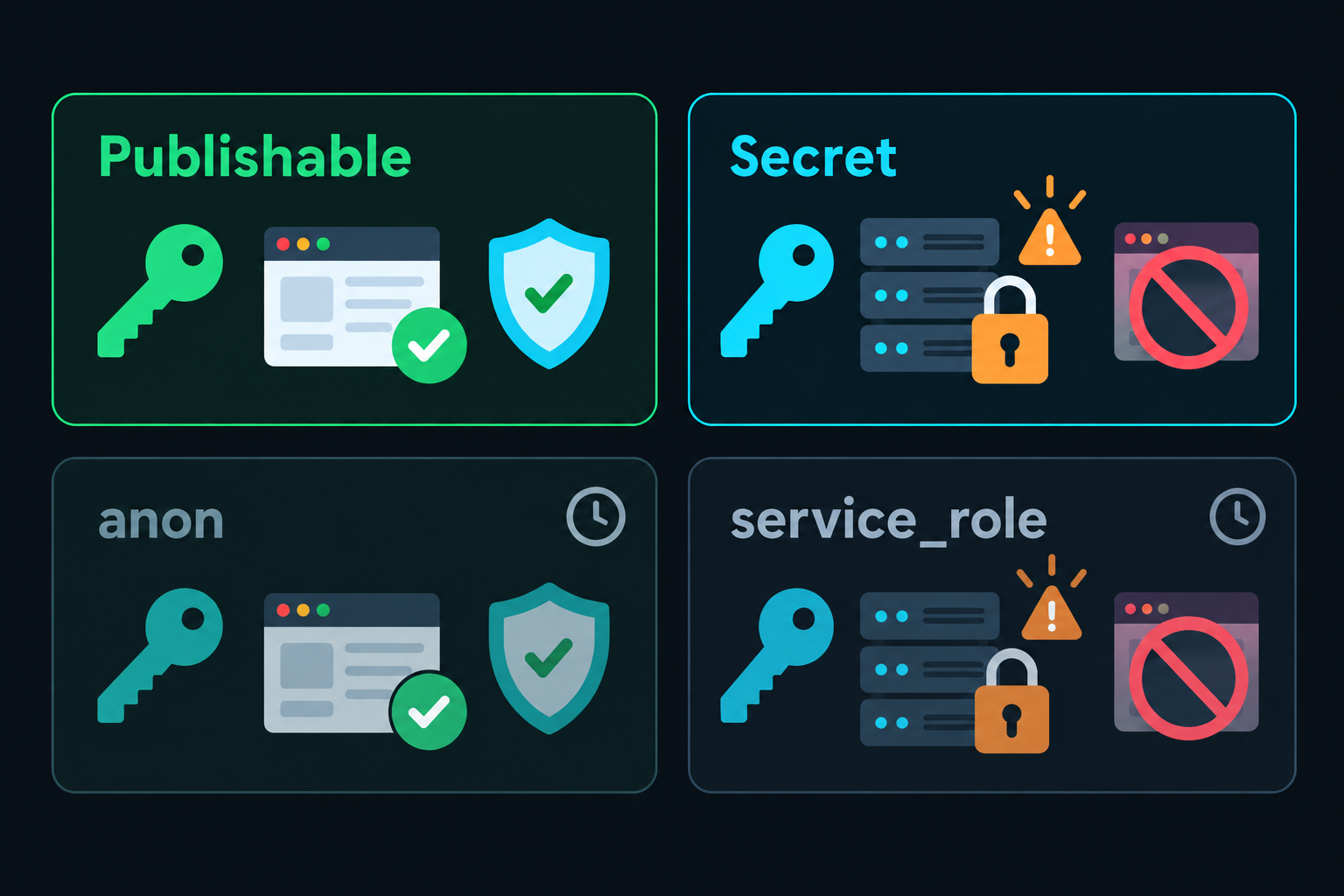
The publishable key is safe in the browser: every request made with it runs through your Row Level Security policies. The secret key (called service_role in older projects) bypasses RLS entirely and belongs on a server, nowhere else.
Supabase's API keys documentation spells out why: secret keys act through the service_role Postgres role, which "has the BYPASSRLS attribute, so it skips every Row Level Security policy you attach." So if the secret key reaches a browser, it doesn't matter how carefully you wrote your policies. They're not being consulted. That holds even with RLS switched on for every table.
Supabase renamed the keys. Here's the map.
Most tutorials, most Stack Overflow answers, and most of your AI assistant's training data use the names anon and service_role. Supabase has replaced both.
| Type | Format | Privileges | Where it may live |
|---|---|---|---|
| Publishable | sb_publishable_... | Low, respects RLS | Browser, mobile app, source control, CLI |
| Secret | sb_secret_... | Bypasses RLS (BYPASSRLS) | Server only. Never anywhere else. |
anon (legacy) | JWT, starts eyJ | Low, respects RLS | Same as publishable — but migrate |
service_role (legacy) | JWT, starts eyJ | Bypasses RLS | Server only — but migrate |
Both systems work today. But Supabase's docs are direct about the timeline: "Supabase is deprecating the anon and service_role keys by the end of 2026." If your project still runs on eyJ... keys, you're on a migration clock whether or not anything has leaked.
The new format also adds a guardrail the old one never had. A secret key "doesn't work in a browser" — Supabase matches on the User-Agent header and returns 401 Unauthorized. That's useful, but read the next sentence in the same docs: "an attacker can still use the key from other tools." The 401 stops your page from working. It does not stop someone who copied the key out of your bundle and runs it from a terminal.
Why your AI reaches for the secret key
You didn't choose to leak it. Your assistant did it to make an error go away, and there are three reasons that's the path of least resistance.
1. It clears an RLS error in one edit. Your app throws new row violates row-level security policy for table "orders". The correct fix is a policy. The fastest fix — one line, no SQL — is a key that ignores policies. The error disappears, the feature works, and the model has technically done what you asked.
2. Its training data is full of service_role. Years of tutorials pass the service role key around casually, often as a NEXT_PUBLIC_ variable "to get things working." The model reproduces that pattern, usually with the legacy eyJ key — the one with no browser block.
3. It can't see where the file runs. A Next.js file with 'use client' at the top ships to every visitor. The model edits the file in front of it without tracking that. We covered the mechanics in how NEXT_PUBLIC_ leaks your keys: the value is typed, in plain text, into a JavaScript file anyone can download.
A typical "fix" looks like this:
// ❌ What your AI wrote — app/orders/new/page.tsx
'use client'

import { createClient } from '@supabase/supabase-js'

// "The insert was failing with an RLS error, so I switched to the
//  service role key, which has full access. It works now!"
const supabase = createClient(
  process.env.NEXT_PUBLIC_SUPABASE_URL!,
  process.env.NEXT_PUBLIC_SUPABASE_SERVICE_ROLE_KEY! // 🚨 inlined into the browser bundle
)

export default function NewOrder() {
  async function save(total: number) {
    // 🚨 no policy runs — this client can also read and delete every order
    await supabase.from('orders').insert({ total })
  }
  return <button onClick={() => save(42)}>Place order</button>
}
It works. It also hands every visitor the master key.
Step 1: Check if you're exposed (3 minutes)
Run these in order. They go from fastest to most thorough.
1. Grep your repo for secret-shaped names.
grep -rn "sb_secret_\|service_role\|SERVICE_ROLE\|SUPABASE_SECRET" \
  --exclude-dir=node_modules --exclude-dir=.next .
Any hit inside a 'use client' file, a component, or a shared lib/ file that client code imports is a problem.
2. Look for the NEXT_PUBLIC_ prefix on anything secret.
grep -rnE "NEXT_PUBLIC_[A-Z_]*(SECRET|SERVICE)" \
  --exclude-dir=node_modules --exclude-dir=.next .
NEXT_PUBLIC_SUPABASE_PUBLISHABLE_KEY and NEXT_PUBLIC_SUPABASE_ANON_KEY are fine. Anything with SECRET or SERVICE after that prefix is already public.
3. Check the deployed site, not just the code. Open your live app → View Source → Ctrl+F for sb_secret_ and eyJ. Then open DevTools → Sources and search the JS bundles too, since most keys hide there rather than in the HTML.
4. Watch a real request. DevTools → Network → click any request to *.supabase.co → look at the apikey request header. That is the key your browser is actually using.
Found an eyJ key? Find out which one it is. Both legacy keys look identical from the outside. The role is written inside the token, and you can decode it locally without pasting a secret into a website:
node -e "console.log(JSON.parse(Buffer.from(process.argv[1].split('.')[1], 'base64url')))" "eyJ...your-key..."
# { iss: 'supabase', ref: '...', role: 'anon', ... }          ← fine
# { iss: 'supabase', ref: '...', role: 'service_role', ... }  ← leaked admin key
Then see what an attacker sees. Pick a table that should be private and query it from your terminal:
# New keys: send on the apikey header only
curl "https://<project>.supabase.co/rest/v1/<table>?select=*" \
  -H "apikey: sb_secret_..."

# Legacy JWT keys: apikey plus Authorization
curl "https://<project>.supabase.co/rest/v1/<table>?select=*" \
  -H "apikey: eyJ..." -H "Authorization: Bearer eyJ..."
Run the same request with your publishable key for comparison. If the key you found returns rows that the publishable key doesn't, that key is bypassing RLS — and it's public.
Step 2: Fix it (15 minutes)
The goal is three clients with three clear jobs, so the secret key physically cannot end up in a browser file.
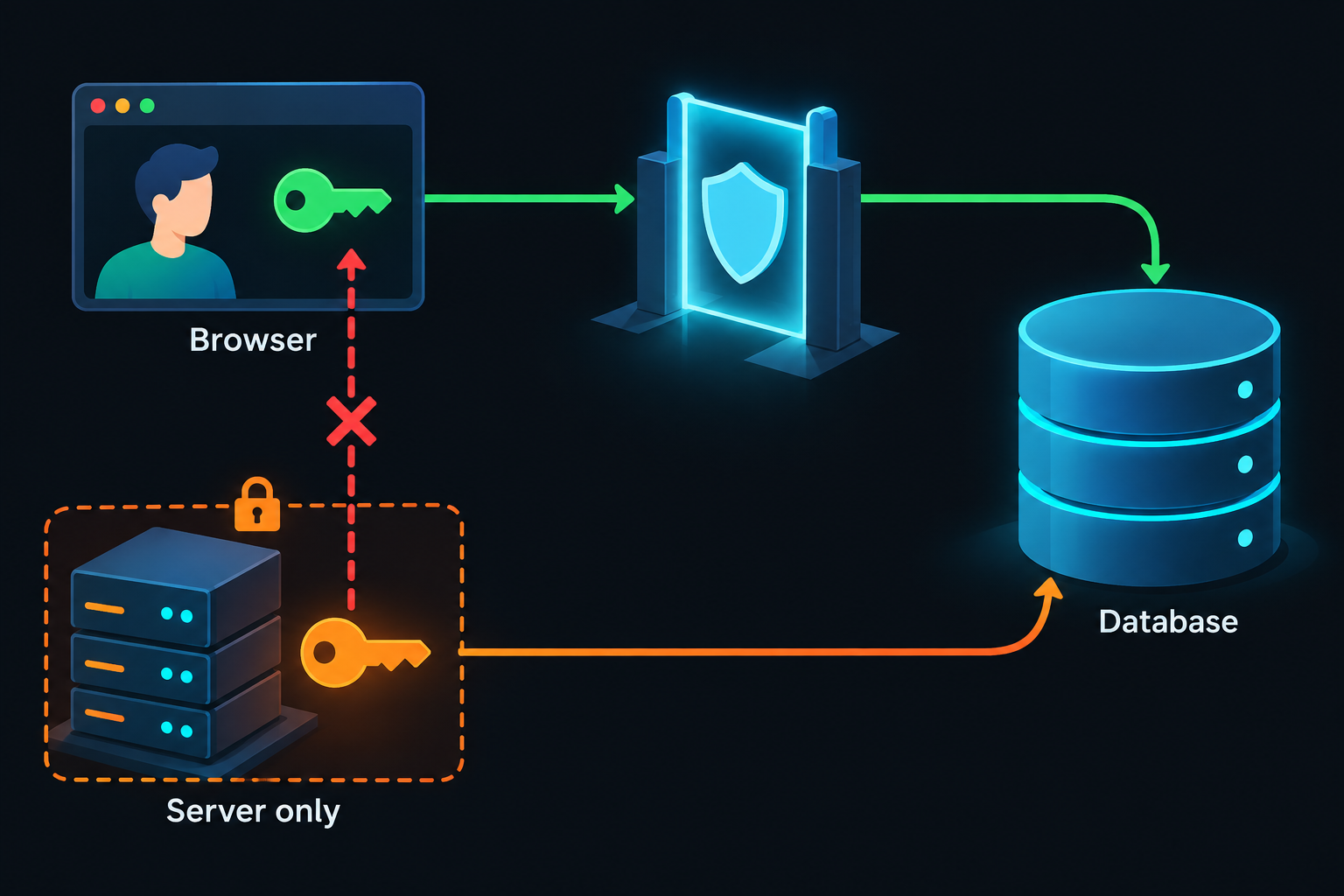
First, rename the variable. No NEXT_PUBLIC_ prefix, ever:
# .env.local
NEXT_PUBLIC_SUPABASE_URL=https://<project>.supabase.co
NEXT_PUBLIC_SUPABASE_PUBLISHABLE_KEY=sb_publishable_...   # browser-safe
SUPABASE_SECRET_KEY=sb_secret_...                          # server only — no prefix
Browser client — publishable key. This is the client for 'use client' components. It's Supabase's own example code:
// ✅ lib/supabase/client.ts
import { createBrowserClient } from '@supabase/ssr'

export function createClient() {
  return createBrowserClient(
    process.env.NEXT_PUBLIC_SUPABASE_URL!,
    process.env.NEXT_PUBLIC_SUPABASE_PUBLISHABLE_KEY! // RLS applies to every request
  )
}
Server client — still the publishable key. This one surprises people. Your Server Components and Route Handlers should also use the publishable key, plus the user's session cookie, so queries run as that user and RLS still applies. Supabase's official server.ts does exactly this — it never touches the secret key. (The cookie wiring is in Supabase's Next.js guide.)
Admin client — secret key, locked to the server. Only the handful of operations that genuinely need to bypass RLS get this client:
// ✅ What it should be — lib/supabase/admin.ts
import 'server-only' // 👈 build fails if any Client Component imports this file

import { createClient } from '@supabase/supabase-js'

export function createAdminClient() {
  return createClient(
    process.env.NEXT_PUBLIC_SUPABASE_URL!,
    process.env.SUPABASE_SECRET_KEY!, // no NEXT_PUBLIC_ prefix → never inlined
    {
      auth: {
        autoRefreshToken: false, // no user session on an admin client
        persistSession: false,
      },
    }
  )
}
That import 'server-only' line is the most important line in this post. Without it, a leak is silent: someone imports admin.ts into a component and the key ships. With it, the same mistake becomes a build error you can't deploy past.
Route elevated work through the server, and re-check who's asking. Say the order form really does need admin rights. Move the write into a Route Handler:
// ✅ app/api/orders/route.ts
import { NextResponse } from 'next/server'
import { createClient } from '@/lib/supabase/server'
import { createAdminClient } from '@/lib/supabase/admin'

export async function POST(req: Request) {
  // 1. Verify the caller with the user-scoped client
  const supabase = await createClient()
  const { data } = await supabase.auth.getClaims()
  const userId = data?.claims?.sub
  if (!userId) {
    return NextResponse.json({ error: 'Unauthorized' }, { status: 401 })
  }

  // 2. Validate input — never forward the body as-is
  const { total } = await req.json()
  if (typeof total !== 'number' || total <= 0) {
    return NextResponse.json({ error: 'Invalid input' }, { status: 400 })
  }

  // 3. The admin client ignores RLS, so YOU set the owner — never trust one from the body
  const admin = createAdminClient()
  const { error } = await admin.from('orders').insert({ total, user_id: userId })
  if (error) {
    return NextResponse.json({ error: 'Could not save order' }, { status: 500 })
  }
  return NextResponse.json({ ok: true })
}
Step 3 is where people get burned a second time. The admin client skips RLS, so the ownership check RLS used to do is now your job, by hand, in every handler. Forget it and you've rebuilt the same bug at the API layer. Honestly, most "I need the service role" moments are a missing policy in disguise. If a logged-in user is inserting their own row, write the insert policy and keep using the normal client.
If it was already exposed: rotate, don't just hide
Deleting the key from your code does nothing on its own. It's still in your git history, still in old deployments and CDN caches, and possibly already in someone's scraper. Anyone scanning launches at scale can find these: one 2026 scan of 20,052 indie-product URLs found Supabase credentials in the frontend of 11% of them. Most were harmless publishable/anon keys. The ones that mattered were service_role and sb_secret_ keys.
The fix depends on which key leaked.
A new sb_secret_ key leaked:
- Create a new secret key in Settings → API Keys.
- Put it in your server env vars (no prefix) and redeploy.
- Confirm the app works on the new key.
- Delete the leaked key. Supabase notes this can't be undone, which is exactly what you want.
Supabase also automatically revokes new-format secret keys found in public GitHub repos. That's a safety net, not a plan: it doesn't cover keys sitting in your deployed JavaScript, and it doesn't cover legacy keys.
A legacy service_role key leaked: you can't rotate it on its own anymore. Supabase's troubleshooting guide says "it is no longer possible to rotate the legacy anon, service and JWT secrets." The way out is the migration you owe anyway:
- Create publishable and secret keys for the project.
- Swap the publishable key into client code and the secret key into server code, then redeploy.
- Deactivate the legacy keys in Settings → API Keys. That kills the leaked
eyJkey. Deactivation is reversible if you missed a client.
Then, for either case: check your tables for rows you didn't create, accounts you don't recognize, and data that changed or vanished during the exposure window. A bypass key can write as well as read.
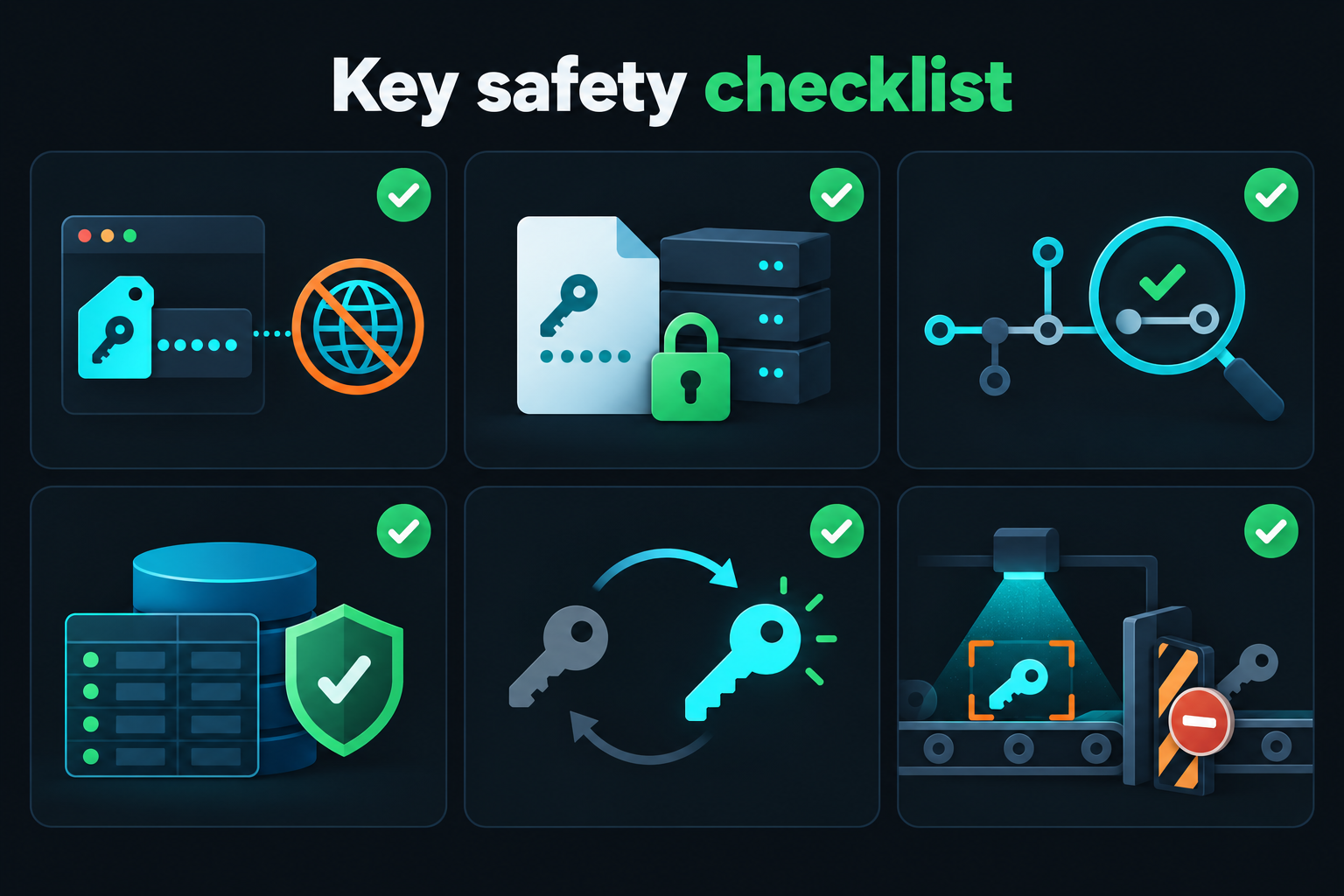
Your key-safety checklist
Copy this into your repo's README or PR template:
- No secret or
service_rolekey in anyNEXT_PUBLIC_variable - The admin client file starts with
import 'server-only' - Secret key not in git history:
git log -S "sb_secret_" --all --onelinereturns nothing - RLS enabled on every table in the
publicschema - Migrated off legacy
eyJkeys, with the legacy pair deactivated - A secret scanner runs in CI and blocks the merge on a hit
For that last item, our roundup of tools that catch leaked API keys covers the free options. If you're also serving user files, check your buckets too — a public storage bucket ignores RLS in the same way. And for the whole map of what AI-written code tends to leave open, start with our vibe coding security guide.
Want a Second Pair of Eyes on Your Supabase Keys?
Not sure which key your production bundle is actually shipping? I run hands-on vibe coding security audits. I'll pull your deployed JavaScript apart the way an attacker would, tell you exactly which Supabase keys are readable and what they can reach, and send back a plain-English list of what to fix and rotate. Email me at [email protected] with your deployed URL.
Key Takeaway
RLS is a lock on every door in your database. The Supabase secret key — service_role in older projects — is the master key that opens all of them at once. Your AI will reach for it the moment an RLS error gets in the way, because it's the fastest way to make the error disappear. Keep it in a server-only admin file behind import 'server-only', never give it a NEXT_PUBLIC_ prefix, and if it has ever shipped to a browser, treat it as stolen: replace it, delete or deactivate the old one, and finish the move off legacy keys before Supabase retires them at the end of 2026.
Key formats, the BYPASSRLS behavior, the browser User-Agent block, rotation steps, and the legacy-key deprecation timeline were verified against Supabase's official documentation in September 2026. Supabase's key system is actively changing, so re-check the API keys docs before acting on the rotation steps.