Prisma Raw Query SQL Injection: The Search Box Your AI Wrote That Dumps Your Whole Database (With Code)
July 27, 2026 · 2339 words
Prisma raw query SQL injection is the bug that turns a harmless-looking search box into a full database dump. You asked your AI assistant for "a search endpoint with sorting," it wrote something with $queryRawUnsafe and a template string, the feature worked perfectly, and you shipped it. What you actually shipped is a text field where anyone on the internet can type SQL and have your database run it.
This guide shows the exact pattern AI assistants produce, explains in plain language why it's dangerous, gives you the fixed code verified against the current Prisma and Drizzle docs, and shows you how to prove the fix works with one curl command.
If you think this is a museum-piece vulnerability, look at what happened three months ago. LiteLLM — a hugely popular open-source AI gateway with 45,000+ GitHub stars — shipped CVE-2026-42208, a CVSS 9.3 SQL injection. The maintainers' own description of the flaw: "A database query used during proxy API key checks mixed the caller-supplied key value into the query text instead of passing it as a separate parameter." That's it. That's the whole bug — the same one in your search route. Attackers were exploiting it in the wild roughly 26 hours after the advisory went public, going straight for the table holding customers' OpenAI and AWS credentials. CISA added it to its Known Exploited Vulnerabilities catalog on May 8, 2026.
What is SQL injection, in plain language?
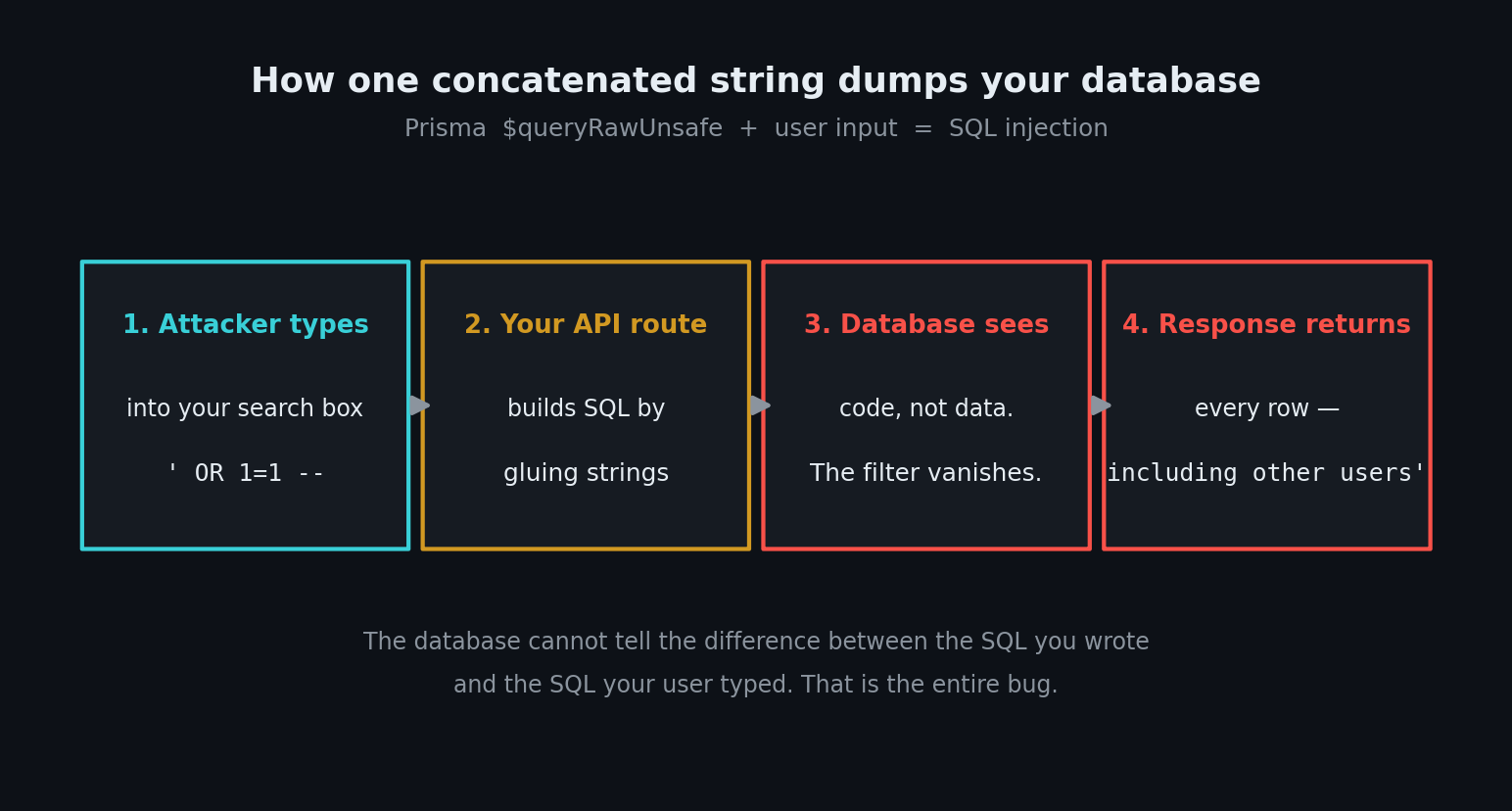
Your database speaks a language called SQL. A query is a sentence: "give me every product whose name contains 'shoes'."
The problem is that your code builds that sentence as text. If what the user typed gets pasted into the middle of it, they aren't filling in a blank — they're writing part of the sentence. The database can't tell "the SQL the developer wrote" apart from "the SQL the visitor typed." It runs the whole thing.
The fix has a name: a parameterized query (also called a prepared statement). Instead of pasting the value in, you send the database two separate things: the sentence with a blank in it, and the value to put in the blank. As OWASP puts it, this means "the database will always distinguish between code and data, regardless of what user input is supplied."
The code your AI wrote
Here's the thing that catches vibe coders out: Prisma normally protects you. Every findMany, findUnique, and create call is parameterized automatically. You could build an entire app and never think about this.
Then you ask for something the query builder can't do neatly — full-text search, a fancy ORDER BY, a COUNT with a weird join — and the AI reaches for raw SQL. This is the pattern that comes back:
// app/api/products/route.ts — the version your AI wrote (INSECURE)
import { NextRequest, NextResponse } from 'next/server'
import { prisma } from '@/lib/db'

export async function GET(req: NextRequest) {
  const { searchParams } = new URL(req.url)
  const q = searchParams.get('q') ?? ''
  const sort = searchParams.get('sort') ?? 'createdAt'

  // Query text and user input are welded into one string
  const products = await prisma.$queryRawUnsafe(
    `SELECT * FROM "Product"
     WHERE name ILIKE '%${q}%'
     ORDER BY "${sort}" DESC
     LIMIT 50`
  )

  return NextResponse.json(products)
}
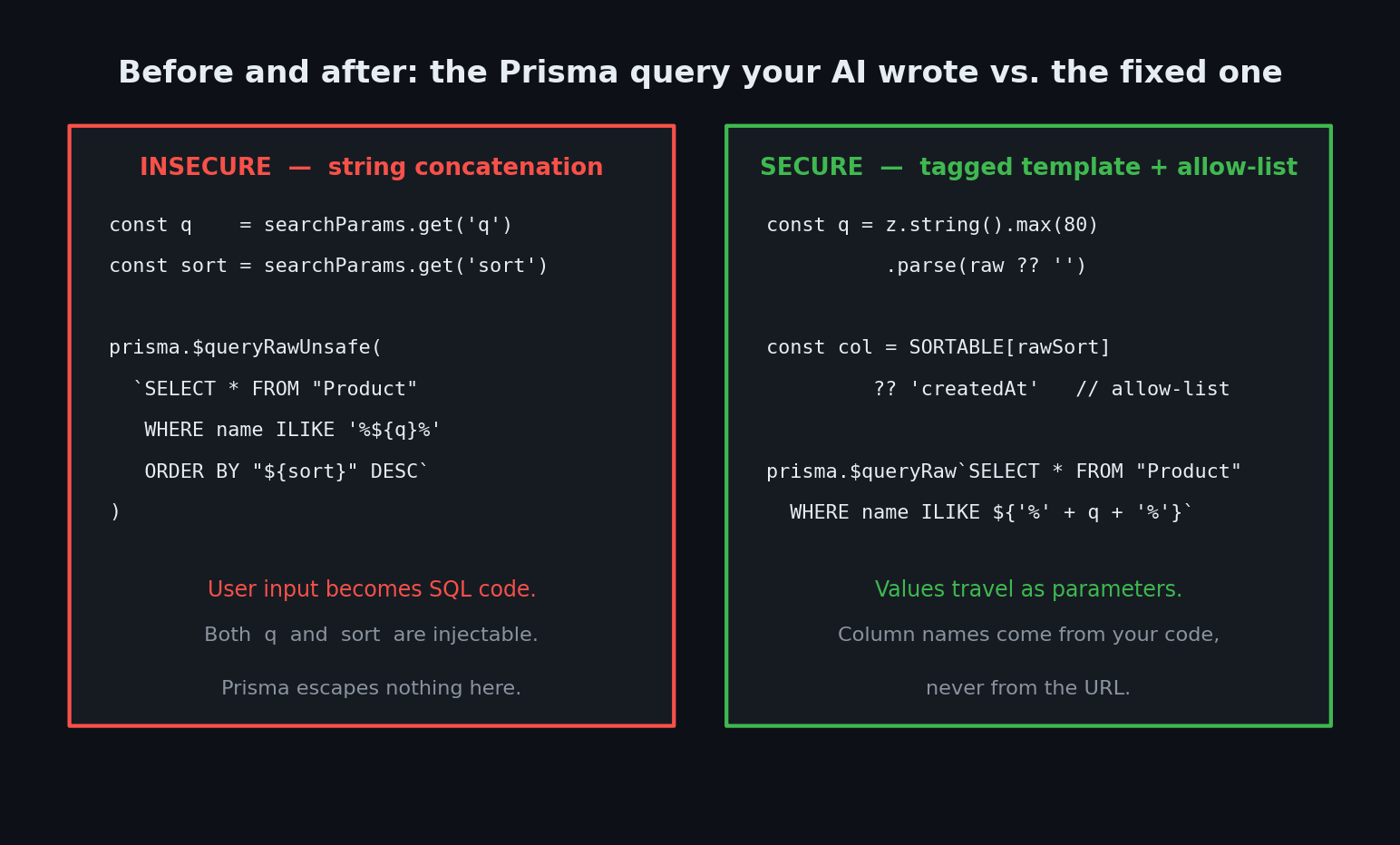
It works. Search works, sorting works, tests pass. And there are two separate injection points in eight lines.
Why this is dangerous
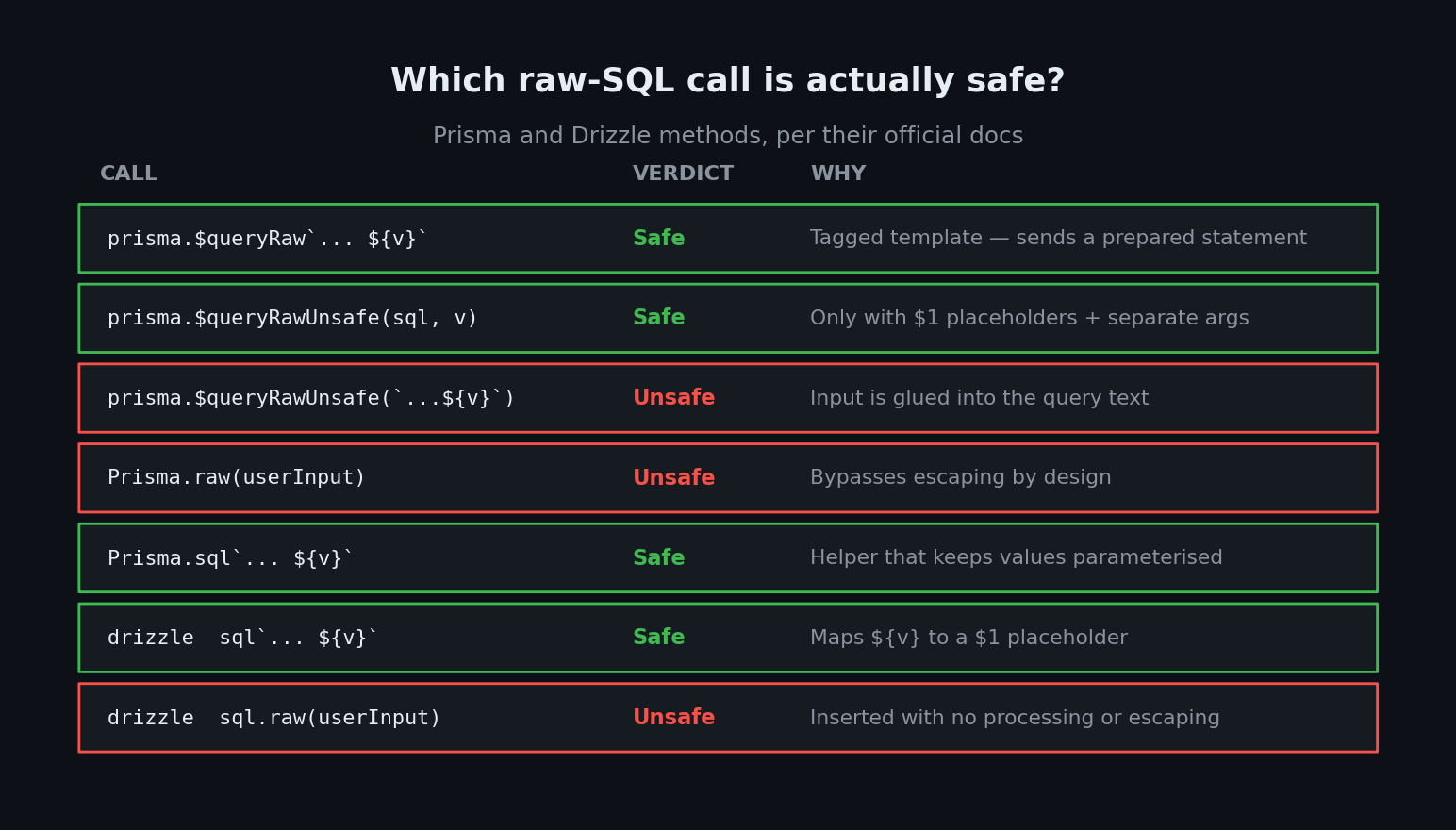
The Prisma docs are unusually blunt about this. Methods with "Unsafe" in the name are, per the official raw queries documentation, "at significant risk of making your code vulnerable to SQL injection." $queryRawUnsafe takes a finished string and hands it to the database. Prisma escapes nothing. The "Unsafe" isn't a style warning; it's a literal description.
Watch what one visitor can do with the q parameter. They type this into your search box:
%' UNION SELECT id, email, "passwordHash", NULL, NULL FROM "User" --
Your string-building turns it into a query that says: "find products matching anything, and also, while you're there, give me every user's email and password hash." The trailing -- comments out the rest of your query so the broken syntax never matters. This is a UNION attack, and it's the first thing any automated scanner tries.
The sort parameter is worse in a subtle way. You cannot fix it with a parameter, ever. Prisma's docs are explicit: "Template variables can only be used for data values... Variables cannot be used for identifiers such as column names, table names or database names, or for SQL keywords." A ? placeholder works for WHERE price = ?. It does not work for ORDER BY ?. So an AI that "fixes" your query by parameterizing it will still leave ORDER BY "${sort}" glued in.
What an attacker gets depends on your database user's permissions: read every table (users, orders, password hashes, API keys), write or delete rows if your app's DB user can, and extract data one character at a time even when your API returns no error text. The LiteLLM attacker used "verbatim Prisma table names" and went straight for the credentials table — they knew exactly what they wanted.
The fix, step by step
Two different problems need two different fixes. Values get parameterized. Identifiers get an allow-list — a hardcoded list of the only strings you'll accept.
Step 1: escape the escape hatch — use the tagged template
Prisma's $queryRaw (no "Unsafe") is a tagged template. It looks like a normal template literal, but Prisma intercepts every ${} and sends it to the database as a separate parameter. Per the docs, this creates "prepared statements that are safe from SQL injections."
Note the backtick directly after the method name — $queryRaw`...` — with no parentheses. That backtick is the entire security control.
Step 2: allow-list the sort column
Since column names can't be parameters, map the user's input to a value that lives in your code. OWASP's guidance for exactly this case: "When table or column names are needed, ideally those values come from the code and not from user parameters." If the input isn't in your map, fall back to a default — don't try to sanitize it.
The fixed route
// app/api/products/route.ts — the fixed version (SECURE)
import { NextRequest, NextResponse } from 'next/server'
import { Prisma } from '@prisma/client'
import { z } from 'zod'
import { prisma } from '@/lib/db'

// Only these strings can ever reach the SQL. Keys = public API, values = real columns.
const SORTABLE = {
  newest: Prisma.sql`"createdAt" DESC`,
  price_low: Prisma.sql`"price" ASC`,
  price_high: Prisma.sql`"price" DESC`,
} as const

const Query = z.object({
  q: z.string().max(80).default(''),
  sort: z.enum(['newest', 'price_low', 'price_high']).default('newest'),
})

export async function GET(req: NextRequest) {
  const { searchParams } = new URL(req.url)
  const parsed = Query.safeParse(Object.fromEntries(searchParams))

  if (!parsed.success) {
    return NextResponse.json({ error: 'Invalid query' }, { status: 400 })
  }

  const { q, sort } = parsed.data

  const products = await prisma.$queryRaw`
    SELECT id, name, price FROM "Product"
    WHERE name ILIKE ${`%${q}%`}
    ORDER BY ${SORTABLE[sort]}
    LIMIT 50
  `

  return NextResponse.json(products)
}
Three things changed:
$queryRawwith backticks. The search term${`%${q}%`}leaves as a parameter, not as text. Note the wildcards go inside the value — the Prisma docs call this out specifically forILIKE.Prisma.sqlfragments in a lookup table.SORTABLE[sort]can only ever return one of three fragments you wrote. There is no path from the URL to arbitrary SQL.- Zod validation up front.
z.enummeans an unknown sort value is rejected with a 400 before it touches the database, andmax(80)caps the search string.
Honestly, the best fix is often stop using raw SQL. prisma.product.findMany({ where: { name: { contains: q, mode: 'insensitive' } } }) does the same job and is parameterized by default. Reach for raw SQL only when the query builder genuinely can't express the query.
Using Drizzle instead?
Same shape, different names. The Drizzle docs confirm the sql template maps ${id} to a $1 placeholder and passes values separately, which "effectively prevents any potential SQL Injection vulnerabilities." But sql.raw() includes your string "without any additional processing or escaping."
import { sql } from 'drizzle-orm'

// SAFE — ${q} becomes a $1 placeholder
await db.select().from(products).where(sql`${products.name} ILIKE ${`%${q}%`}`)

// UNSAFE — never put user input inside sql.raw()
await db.execute(sql.raw(`SELECT * FROM products WHERE name = '${q}'`))
How to test the fix
Send a single quote. That's the classic probe: if the app breaks on a lone ', your input is being treated as code.
# 1. The broken-quote probe
curl -s "https://your-app.vercel.app/api/products?q=%27" | head -c 300

# 2. The always-true payload
curl -s "https://your-app.vercel.app/api/products?q=%25%27%20OR%201%3D1%20--" | head -c 300

# 3. The identifier probe (targets the ORDER BY hole)
curl -i "https://your-app.vercel.app/api/products?sort=x%22%20--"
Before the fix: test 1 returns a 500 with a Postgres syntax error, test 2 returns rows it shouldn't, test 3 either 500s or silently changes behavior.
After the fix: test 1 returns [] — the quote was searched for as literal text. Test 2 also returns []. Test 3 returns a clean 400 Invalid query. No stack traces, no leaked SQL.
| Risk | What can happen | Fix |
|---|---|---|
$queryRawUnsafe with ${} concatenation | Attacker reads any table via UNION SELECT | Use $queryRaw with backticks (tagged template) |
User input in ORDER BY / column names | Can't be parameterized — injection stays open | Allow-list: map input to Prisma.sql fragments you wrote |
Prisma.raw() / sql.raw() on user input | Escaping is bypassed by design | Never pass request data into either function |
SELECT * in raw queries | Password hashes and tokens ride along in a UNION | Select only the columns the UI needs |
| DB user with owner/admin rights | Read-only bug becomes DROP TABLE | Grant least privilege to your app's database user |
| Raw database errors in the response | Leaks table names and schema to attackers | Return a generic 500; log details server-side |
Copy-paste prompt: make your AI fix its own queries
Paste this into Cursor, Claude Code, or Copilot at your project root:
Audit this codebase for SQL injection in raw database queries. Find every use of
$queryRawUnsafe,$executeRawUnsafe,Prisma.raw, andsql.raw. For EACH one: (1) if any request data (query params, body, headers, route params) is concatenated or interpolated into the query string, rewrite it using the$queryRaw/$executeRawtagged template so values become parameters — or use$queryRawUnsafewith$1-style placeholders and separate arguments; (2) for parts that cannot be parameterized — column names, table names, ORDER BY, ASC/DESC — replace the interpolation with a hardcoded allow-list object mapping accepted input keys toPrisma.sqlfragments, and reject anything not in the list with a 400; (3) add Zod validation for every query parameter at the top of the handler; (4) replaceSELECT *with an explicit column list; (5) confirm no raw database error text is returned to the client. Where the Prisma query builder can express the query, replace the raw query entirely. List every file you changed and what was injectable.
Prisma raw query SQL injection checklist
- Grep the repo for
queryRawUnsafe,executeRawUnsafe,Prisma.raw,sql.raw— you should be able to justify every hit - Every raw query uses a tagged template (backticks, no parentheses) or
$1placeholders with separate args - No user input ever reaches a column name, table name, or
ORDER BY— allow-list instead - Every query parameter is validated with Zod (or similar) before it's used
- Raw queries select explicit columns, never
SELECT * - Your app's database user has the minimum privileges it needs — not owner or admin
- Database errors are logged server-side and never returned to the client
- You ran the three
curlprobes above and got[]and400, not 500s
SQL injection is one door among many that AI assistants leave unlocked. The same "never trust what came off the wire" rule governs your file uploads, your webhooks, and your rendered HTML — the full map is in our vibe coding security pillar guide. The database-permissions half of this problem is covered in Supabase Row Level Security for vibe coders, the input-validation sibling is Next.js Server Actions security, and the scanners that catch these patterns automatically are in the security tools roundup.
If you want a second pair of eyes, I run hands-on code security audits of vibe-coded apps — I'll grep every raw query in your repo, run the injection probes above against your staging environment, and hand you a prioritized fix list with the patched code. Email me at [email protected] with your repo or stack and I'll tell you what a scanner would find first.
Key Takeaway
Prisma protects you automatically — right up until your AI reaches for $queryRawUnsafe and glues user input into a string. Two fixes cover it: values go in tagged templates so the database receives them as parameters, and column names come from a hardcoded allow-list because they can never be parameters. Grep your repo for Unsafe and raw today, send a single quote at every search box, and make sure you get an empty array back instead of a stack trace.