Next.js Password Reset Security: The Four Bugs Your AI Ships by Default (With Code)
July 30, 2026 · 2477 words
"Add forgot password to my app" is one of the last prompts you type before launch. Cursor or Claude Code answers in about fifteen seconds: a forgot-password route, a reset-password route, an email, done. You click through it yourself, the email arrives, the new password works. It looks finished.
It isn't. Next.js password reset security is where AI-generated auth quietly falls apart, because the code works perfectly while quietly handing a stranger everything they need. This is not hypothetical: in September 2025 the popular open-source AI-workflow tool Flowise shipped a forgot-password endpoint that returned the reset token straight back in the API response. Anyone who knew your email address could take over your account. It scored 9.8 out of 10 on the CVSS severity scale (GHSA-wgpv-6j63-x5ph / CVE-2025-58434).
That's a real, funded engineering team. Your AI assistant writes the same shape of code, and this guide shows you the exact fix — verified against the current Next.js Route Handlers docs and the OWASP Forgot Password Cheat Sheet.
Plain-language glossary
Three terms, no security background needed.
- Reset token — the long random string in the
?token=...part of the reset link you email. Whoever holds it can change that account's password. It is a temporary key to the account. - User enumeration — an attacker discovering which email addresses have accounts on your site, by watching how your app replies differently to "known" and "unknown" emails. That list becomes the target list for phishing and password-stuffing.
- Hashing — running a value through a one-way function so the stored version can be checked but not read back. Storing a hash of a token means a leaked database doesn't hand over working reset links.
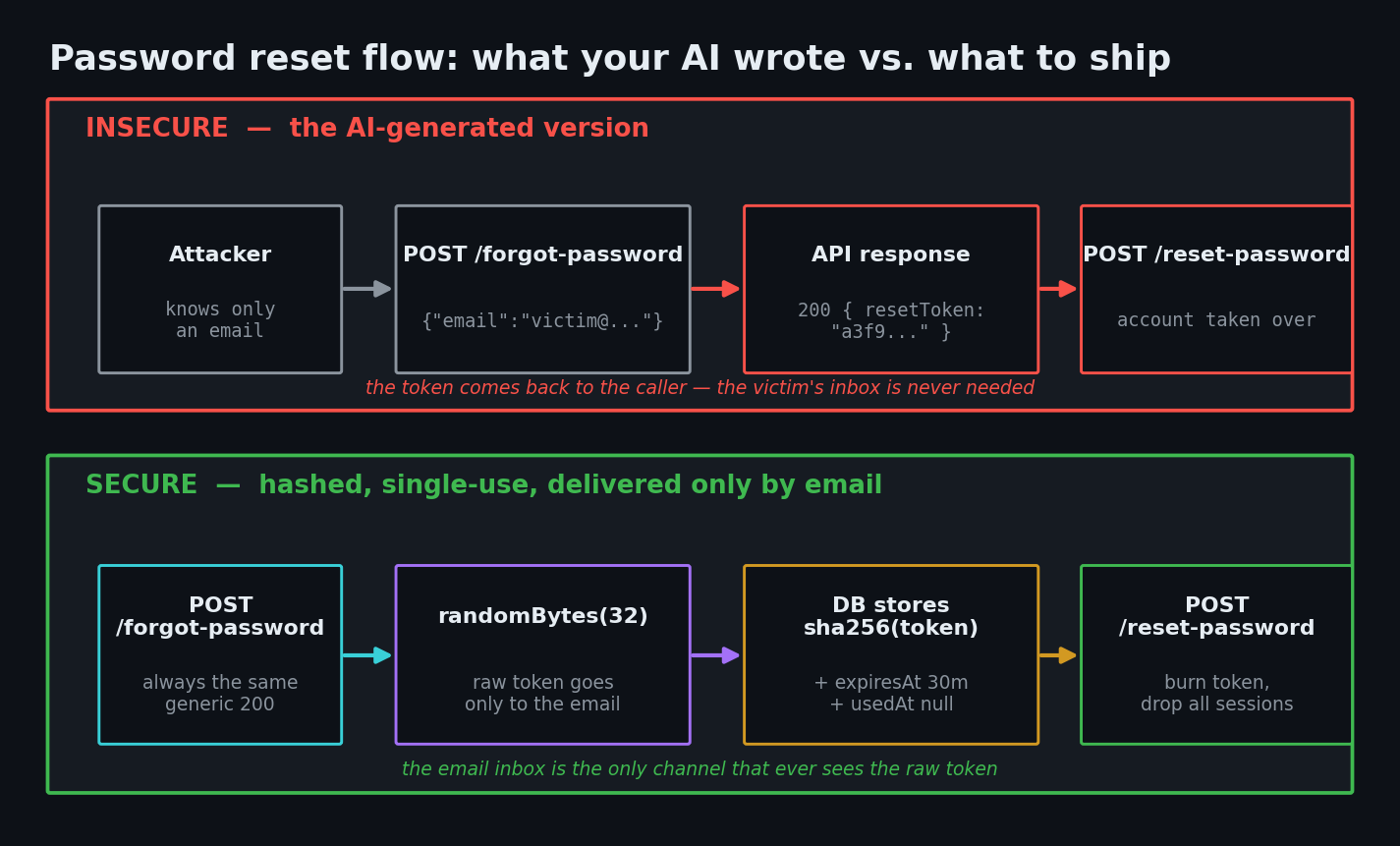
The code your AI wrote
Here is the forgot-password route almost every AI assistant produces. Read it before the explanation — you may recognise it word for word.
// app/api/auth/forgot-password/route.ts — INSECURE, do not ship
import { randomUUID } from 'node:crypto'
import { prisma } from '@/lib/prisma'
import { sendEmail } from '@/lib/email'

export async function POST(request: Request) {
  const { email } = await request.json()

  const user = await prisma.user.findUnique({ where: { email } })
  if (!user) {
    return Response.json({ error: 'No account with that email' }, { status: 404 })
  }

  const token = randomUUID()
  await prisma.user.update({
    where: { id: user.id },
    data: { resetToken: token },
  })

  await sendEmail(email, `Reset here: ${process.env.APP_URL}/reset-password?token=${token}`)

  // "helpful" for debugging — and catastrophic in production
  return Response.json({ message: 'Reset email sent', resetToken: token })
}
Four separate problems, in plain language.
1. It tells strangers who has an account. The 404 No account with that email reply is a yes/no oracle. A script can feed it ten thousand addresses and keep the ones that come back 404-free. That's a verified customer list, handed out for free.
2. It returns the token in the response body. This is the exact Flowise bug. The attacker never needs to read the victim's inbox — the API hands over the key. Anything you return from a route handler is visible to whoever called it.
3. The token is stored in plain text and never expires. randomUUID() is random enough (Node generates it from a cryptographically secure source), but the row sits in your users table forever. A read-only database leak, a leaked backup, a logging integration that dumps rows — any of these become account takeover months later.
4. It's single-column, so it's never single-use. Nothing marks the token as consumed. The link in an email from six months ago still works, and old sessions on stolen devices stay logged in after the reset.
| Risk | What an attacker can actually do | The fix |
|---|---|---|
| User enumeration | Build a verified list of your users' emails for phishing | Return the same generic message for every input |
| Token in API response | Take over any account knowing only the email | Never return the token; email is the only channel |
| Plaintext token in DB | Turn a read-only DB leak into account takeover | Store sha256(token), never the token itself |
| No expiry | Old links from any past inbox still work | Short expiresAt (15–60 minutes) |
| No single-use flag | Reuse a link that was already used | usedAt timestamp, checked and set in a transaction |
| Sessions survive reset | Attacker stays logged in after the victim recovers | Delete all sessions for that user on reset |
| No rate limit | Flood an inbox, or brute-force tokens | Strict limiter on both reset routes |
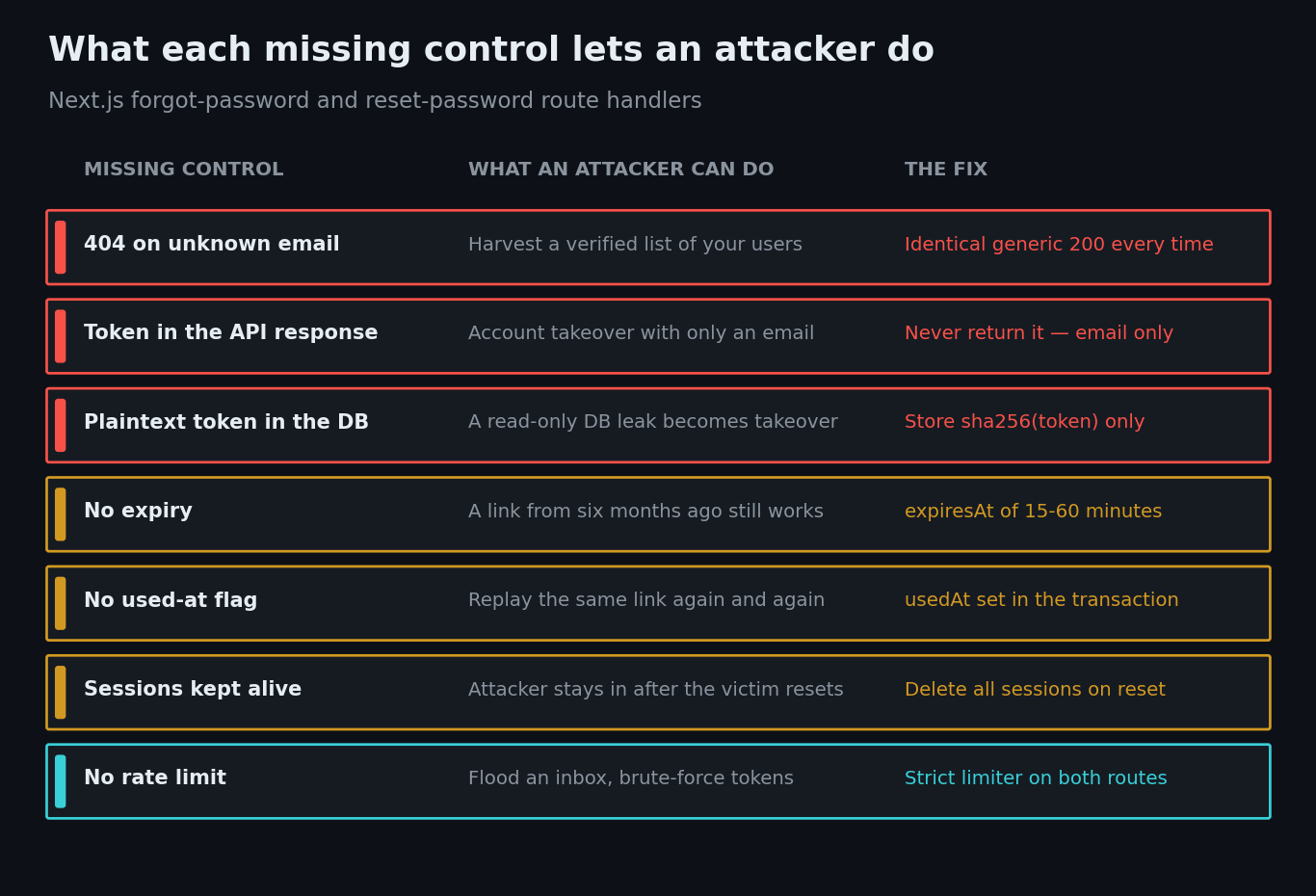
The fix, step by step
Step 1: Give reset tokens their own table
Reset tokens do not belong on the users row. They need an expiry, a used-at marker, and the ability to be deleted in bulk.
// prisma/schema.prisma
model PasswordResetToken {
  id        String    @id @default(cuid())
  tokenHash String    @unique   // sha256 of the token — never the token itself
  userId    String
  expiresAt DateTime
  usedAt    DateTime?
  createdAt DateTime  @default(now())
  user      User      @relation(fields: [userId], references: [id], onDelete: Cascade)

  @@index([userId])
}

// And add the other side of the relation to your existing User model,
// or `prisma generate` will fail with "missing an opposite relation field":
// model User {
//   ...
//   passwordResetTokens PasswordResetToken[]
// }
Step 2: The forgot-password route that says nothing
// app/api/auth/forgot-password/route.ts — SECURE
import { createHash, randomBytes } from 'node:crypto'
import { z } from 'zod'
import { prisma } from '@/lib/prisma'
import { sendPasswordResetEmail } from '@/lib/email'

export const runtime = 'nodejs' // node:crypto is not available on the edge runtime

// Zod 3 syntax below. On Zod 4 this becomes z.object({ email: z.email().max(254) }).
const schema = z.object({ email: z.string().email().max(254) })
const TOKEN_TTL_MS = 30 * 60 * 1000 // 30 minutes

// Same reply, every single time. This one line kills user enumeration.
const GENERIC = {
  message: 'If an account exists for that email, we have sent a reset link.',
}

const sha256 = (value: string) => createHash('sha256').update(value).digest('hex')

export async function POST(request: Request) {
  const parsed = schema.safeParse(await request.json().catch(() => null))
  // Even malformed input gets the generic 200 — no signal leaks out.
  if (!parsed.success) return Response.json(GENERIC, { status: 200 })

  const email = parsed.data.email.toLowerCase()
  const user = await prisma.user.findUnique({ where: { email } })

  if (user) {
    const token = randomBytes(32).toString('hex') // 256 bits of entropy
    await prisma.passwordResetToken.create({
      data: {
        tokenHash: sha256(token),
        userId: user.id,
        expiresAt: new Date(Date.now() + TOKEN_TTL_MS),
      },
    })

    // Build the URL from a trusted env var — never from the request Host header,
    // which an attacker can forge to point the link at their own domain.
    const url = `${process.env.APP_URL}/reset-password?token=${token}`
    await sendPasswordResetEmail(email, url)
  }

  return Response.json(GENERIC, { status: 200 })
}
The important part is what's missing: no 404, no token in the response, no plaintext token in the database. The raw token exists in exactly two places — the email, and the URL the user clicks.
Step 3: The reset route that consumes the token
// app/api/auth/reset-password/route.ts — SECURE
import { createHash } from 'node:crypto'
import { z } from 'zod'
import { hash } from 'bcryptjs'
import { prisma } from '@/lib/prisma'

export const runtime = 'nodejs'

const schema = z.object({
  token: z.string().length(64),        // 32 random bytes as hex
  // bcrypt silently ignores anything past 72 *bytes*; .max(72) counts characters,
  // so it's a close-enough guard rail, not an exact one.
  password: z.string().min(12).max(72),
})

const sha256 = (value: string) => createHash('sha256').update(value).digest('hex')

export async function POST(request: Request) {
  const parsed = schema.safeParse(await request.json().catch(() => null))
  if (!parsed.success) {
    return Response.json({ error: 'Invalid request.' }, { status: 400 })
  }

  const { token, password } = parsed.data
  const record = await prisma.passwordResetToken.findUnique({
    where: { tokenHash: sha256(token) },
  })

  // One message for "wrong", "used" and "expired" — don't help attackers sort them.
  if (!record || record.usedAt || record.expiresAt < new Date()) {
    return Response.json(
      { error: 'This reset link is invalid or has expired.' },
      { status: 400 },
    )
  }

  const passwordHash = await hash(password, 12) // OWASP floor for bcrypt is 10

  await prisma.$transaction([
    prisma.user.update({
      where: { id: record.userId },
      data: { passwordHash },
    }),
    // Burn this token...
    prisma.passwordResetToken.update({
      where: { id: record.id },
      data: { usedAt: new Date() },
    }),
    // ...and every other outstanding one for this user.
    prisma.passwordResetToken.deleteMany({
      where: { userId: record.userId, usedAt: null },
    }),
    // Kick out anyone already signed in as this user, including the attacker.
    prisma.session.deleteMany({ where: { userId: record.userId } }),
  ])

  return Response.json({ message: 'Password updated. Please sign in.' })
}
Three details worth pausing on. The transaction means the password change and the token burn either both happen or neither does. Deleting sessions is the step almost no AI writes, and it's the one that actually evicts an attacker who already got in. And don't log the user in automatically — OWASP recommends sending them through your normal login, because auto-login adds session-handling code that tends to grow its own bugs.
On hashing: the OWASP Password Storage Cheat Sheet now prefers Argon2id for new applications, describing bcrypt as suitable for legacy systems at a work factor of 10 or higher (12 above gives you headroom). bcryptjs is used above because it's what most AI-generated Next.js auth already imports — if you're starting fresh, reach for an Argon2id implementation instead.
Step 4: Rate limit both routes
Without a limiter, an attacker can send a thousand reset emails to one victim's inbox, or grind through token guesses. Both reset routes belong on your strictest limiter — see our guide to rate limiting an AI-built Next.js API for the Redis-backed version that survives serverless.
How to test the fix
Run these against your deployed URL, not localhost.
# 1. A real user and a fake user must produce identical status codes AND bodies.
ask() {
  curl -s -w "\nHTTP %{http_code}\n" -X POST https://yourapp.com/api/auth/forgot-password \
    -H "Content-Type: application/json" -d "{\"email\":\"$1\"}"
}
diff <(ask [email protected]) <(ask [email protected]) \
  && echo "identical — good" || echo "LEAK — responses differ"
# 2. The response must not contain a token. Grep for it.
curl -s -X POST https://yourapp.com/api/auth/forgot-password \
  -H "Content-Type: application/json" -d '{"email":"[email protected]"}' \
  | grep -iE "token|expir" && echo "LEAK — fix this" || echo "clean"
# 3. Reuse a token you already used. It must fail.
curl -s -X POST https://yourapp.com/api/auth/reset-password \
  -H "Content-Type: application/json" \
  -d '{"token":"<the-token-you-just-used>","password":"AnotherPassword123!"}'
# Expect: {"error":"This reset link is invalid or has expired."}
Then one manual check: open your database and look at the reset token row. If you can read a value that also appears in the emailed link, you are still storing plaintext tokens.
One nuance the curl tests won't catch: an unknown email skips the database write and the email send, so it may come back measurably faster. OWASP calls this out — a determined attacker can enumerate on timing alone. Queue the email send as a background job so both paths return at the same speed.
Ask your AI to fix it
Paste this into Cursor, Claude Code, or Copilot as-is.
Audit and rewrite my Next.js App Router password reset flow to be secure.
1. Move reset tokens off the users table into a PasswordResetToken model with
   tokenHash (unique), userId, expiresAt, usedAt, createdAt.
2. In /api/auth/forgot-password: validate the body with Zod, and return the SAME
   generic 200 JSON message for valid emails, unknown emails, and malformed input.
   Never return the token or any user data. Generate it with
   randomBytes(32).toString('hex') and store only createHash('sha256') of it.
   Set expiresAt to 30 minutes. Build the reset URL from process.env.APP_URL,
   never from the request Host header.
3. In /api/auth/reset-password: look the token up by its sha256 hash, reject if
   missing, used, or expired with one identical error message. Hash the new password
   (Argon2id preferred; if bcrypt, work factor 12 — OWASP's floor is 10), then in one transaction:
   update the password, set usedAt, delete the user's other unused tokens, and delete
   all of that user's sessions. Do not auto-login the user.
4. Add export const runtime = 'nodejs' to both routes.
5. Apply my existing rate limiter to both routes at a strict limit.
Show me the diff and the Prisma migration before applying anything.
Password reset security checklist
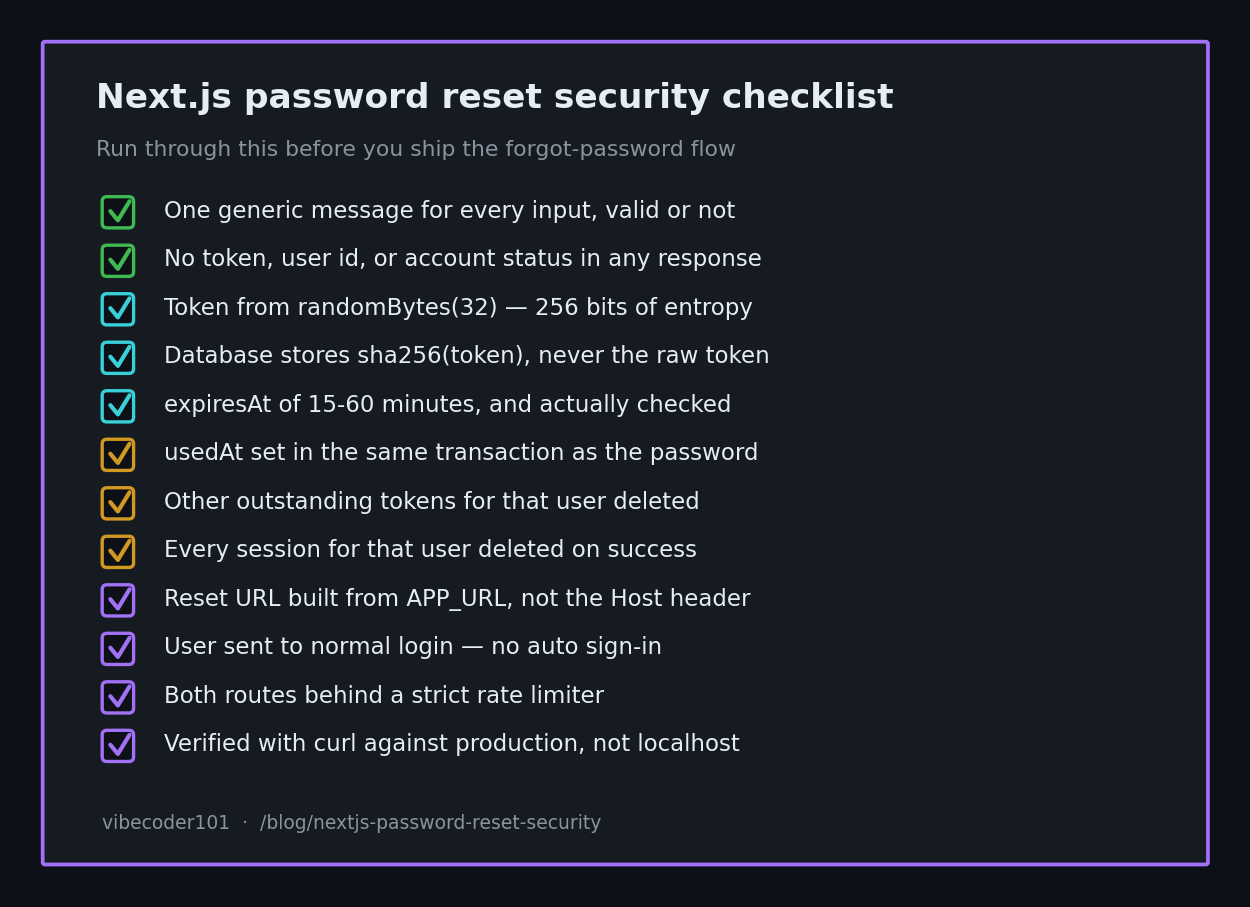
- Forgot-password returns one identical message for every input, including invalid ones
- No token, user ID, email, or account status ever appears in a response body
- Token generated with
randomBytes(32), notMath.random()or a counter - Database stores
sha256(token)only — never the raw token -
expiresAtset to 15–60 minutes and actually checked -
usedAtset inside the same transaction as the password update - All other outstanding tokens for that user deleted on success
- All existing sessions for that user deleted on success
- Reset URL built from
APP_URL, never the requestHostheader - User is sent to normal login, not auto-logged-in
- Both routes behind a strict rate limiter
- A "your password was changed" notification email is sent (never containing the password)
- Verified with the curl checks above against production, not localhost
Password reset is the back door to every account in your app, which makes it the highest-leverage hour of security work you can do — the same server-side-first thinking behind our vibe coding security pillar guide. If you'd rather not build auth yourself at all, our secure authentication tools roundup covers libraries that ship this flow correctly out of the box, and the httpOnly cookie guide covers where the session goes once the user is back in.
Shipped a vibe-coded app with a forgot-password flow you've never actually attacked? I do hands-on code-security audits of AI-built apps — I run the enumeration and token-reuse scripts against your live routes and send back the specific fixes. Email [email protected] with your stack and I'll take a look.
Key Takeaway
An AI-generated password reset flow works on the happy path and fails on every adversarial one. Four changes cover almost all of it: one generic response for everybody, a hashed token in its own table, a short expiry with a used-at flag, and deleting every session when the password changes. Thirty minutes of work standing between a stranger with your users' email addresses and their accounts.