Your AI Put the JWT in localStorage: The Next.js httpOnly Cookie Fix (With Code)
July 29, 2026 · 2243 words
Ask Cursor, Claude Code, or v0 to "add login to my Next.js app" and you will almost certainly get working code within a minute. It signs a JWT, hands it to the browser, and the browser stashes it with localStorage.setItem('token', ...). You log in, the dashboard loads, and it feels finished.
It isn't. That one line means your users' login tokens are readable by any JavaScript running on your page — including JavaScript an attacker gets in. The fix is a Next.js JWT httpOnly cookie: the same token, moved somewhere the browser refuses to show to scripts. This guide shows the exact insecure pattern AI generates, why it's dangerous in plain language, and the full replacement code, verified against the current Next.js and jose docs.
Plain-language glossary
Before the code, three terms. No security background needed.
- JWT (JSON Web Token) — a long string that says "this person is user #42", signed by your server so it can't be edited. Whoever holds it is that user, as far as your app is concerned. Think of it as a hotel keycard.
- localStorage — a small storage box in the browser that JavaScript can read and write freely. Anything you put there, any script on your page can read. Keycard left on the front desk.
- httpOnly cookie — a cookie the browser stores and automatically sends with every request, but which JavaScript cannot read at all. Keycard locked in the safe, where only the hotel staff can reach it.
The whole fix is: stop leaving the keycard on the desk.
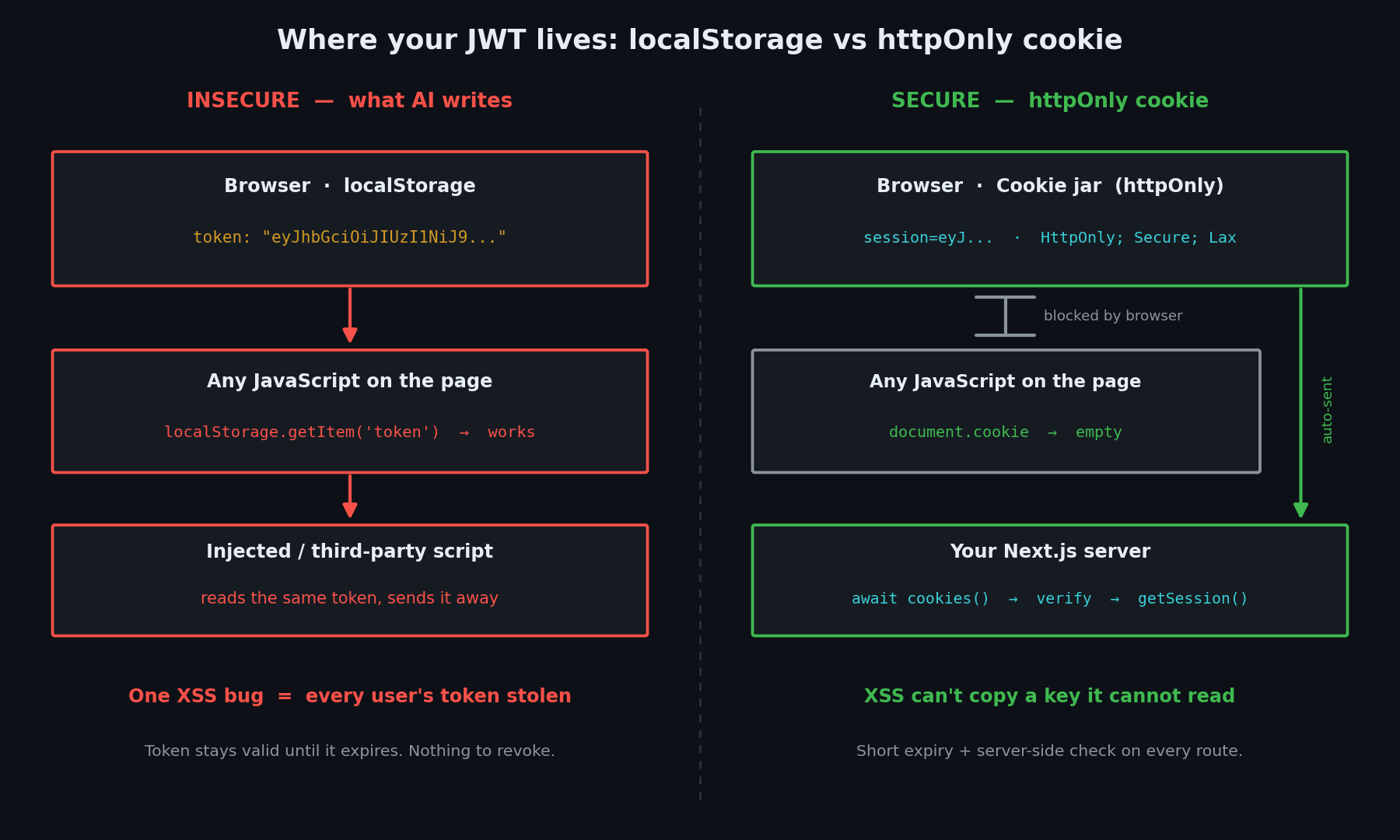
The code your AI wrote
This is the pattern that comes out of nearly every "add auth to my Next.js app" prompt. Two files, both insecure.
// app/api/auth/login/route.ts — returns the token in the response body (insecure)
import { SignJWT } from 'jose'

const key = new TextEncoder().encode(process.env.JWT_SECRET)

export async function POST(request: Request) {
  const { email, password } = await request.json()
  const user = await verifyCredentials(email, password) // your own lookup

  if (!user) {
    return Response.json({ error: 'Invalid credentials' }, { status: 401 })
  }

  const token = await new SignJWT({ userId: user.id, role: user.role })
    .setProtectedHeader({ alg: 'HS256' })
    .setIssuedAt()
    .setExpirationTime('7d')
    .sign(key)

  // The token goes back as JSON, for the client to store however it likes
  return Response.json({ token })
}
// app/login/page.tsx — client component that parks the token in localStorage (insecure)
'use client'
import { useRouter } from 'next/navigation'

export default function LoginPage() {
  const router = useRouter()

  async function handleSubmit(e: React.FormEvent<HTMLFormElement>) {
    e.preventDefault()
    const form = new FormData(e.currentTarget)

    const res = await fetch('/api/auth/login', {
      method: 'POST',
      headers: { 'Content-Type': 'application/json' },
      body: JSON.stringify({
        email: form.get('email'),
        password: form.get('password'),
      }),
    })

    const { token } = await res.json()
    localStorage.setItem('token', token) // ← the whole problem, one line
    router.push('/dashboard')
  }

  return (
    <form onSubmit={handleSubmit}>
      <input name="email" type="email" required />
      <input name="password" type="password" required />
      <button type="submit">Log in</button>
    </form>
  )
}
Every later request then reads the token back out and attaches it by hand: Authorization: Bearer ${localStorage.getItem('token')}.
Why this is dangerous
The danger has a name: XSS, or cross-site scripting. That's when an attacker gets their own JavaScript to run on your page — through a comment field that renders raw HTML, a username shown without escaping, or a compromised npm package pulled in by your build.
Once any script runs on your page, localStorage.getItem('token') works for them exactly as well as it works for you. One line of injected JavaScript and every logged-in visitor's token is sent to a server the attacker controls. The tokens still validate. Your logs show normal, correctly signed requests. There is nothing to revoke, because a stateless JWT stays valid until it expires — and the AI set that to seven days.
This isn't a niche opinion. The OWASP HTML5 Security Cheat Sheet states it flatly: "Do not store session identifiers in local storage as the data is always accessible by JavaScript. Cookies can mitigate this risk using the httpOnly flag." It adds that a single XSS can be used to steal all the data in these objects.
An httpOnly cookie doesn't make XSS harmless. It makes the token itself unreachable. The attacker's script can still act as the user while they're on your page, but it cannot copy the keycard and walk out with it.
| Risk | What can happen | Fix |
|---|---|---|
| Token in localStorage | One XSS bug exports every user's token; attacker logs in as them from anywhere | Move the token into an httpOnly cookie |
| Cookie sent over plain HTTP | Anyone on the same café Wi-Fi reads the token in transit | secure: true in production |
| Cookie sent to other sites | A malicious site triggers actions as your logged-in user (CSRF) | sameSite: 'lax' or 'strict' |
| 7-day token, no revocation | A stolen token works for a week; logout changes nothing | Short expiry (hours) + refresh, or database sessions |
Weak JWT_SECRET | Attacker guesses the secret and forges any user's token | 256-bit random secret, never committed |
| Algorithm not pinned on verify | Token accepted under an algorithm you didn't intend | Pass algorithms: ['HS256'] when verifying |
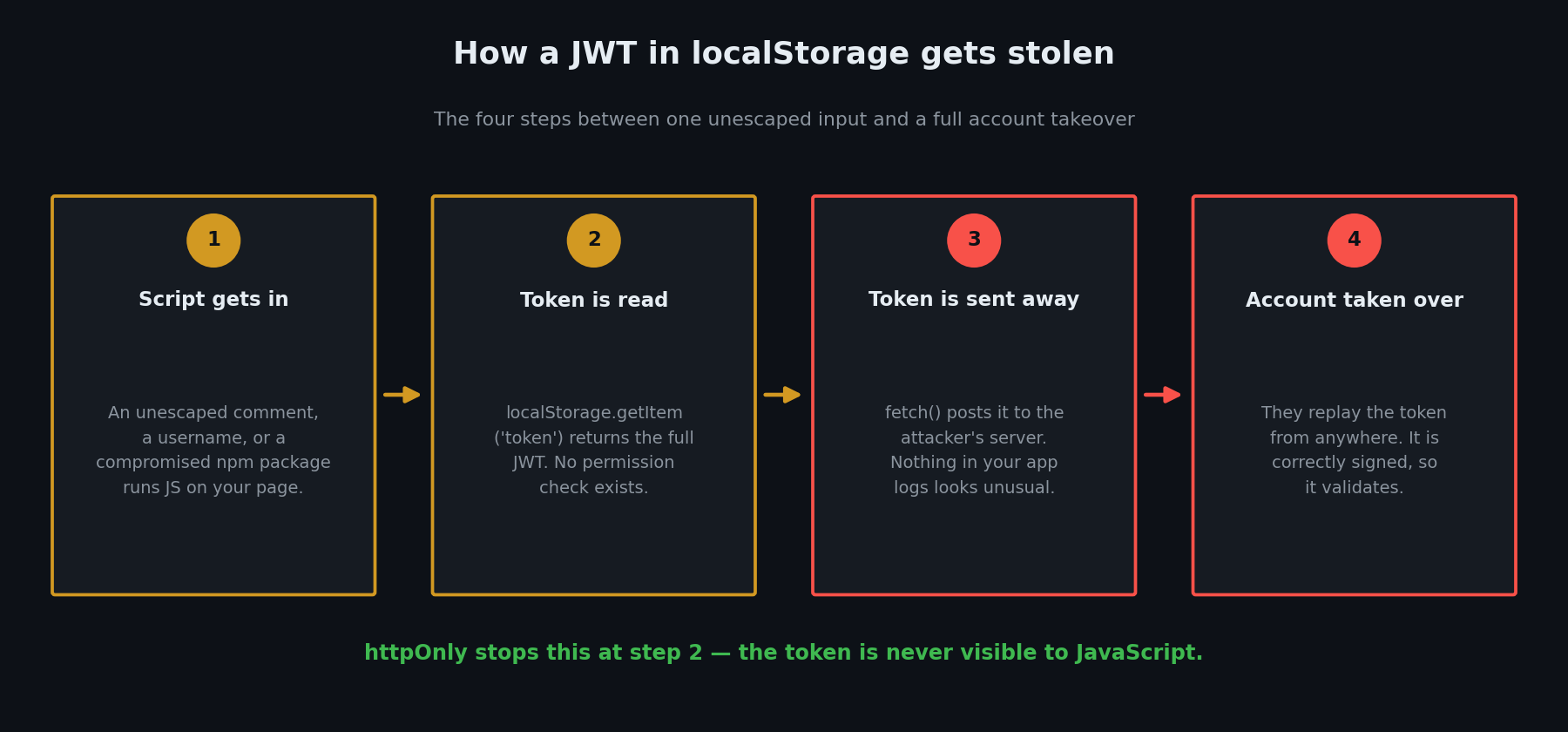
The fix, step by step
Four short steps. The token stays a JWT — only its address changes.
Step 1: Generate a real secret
The OWASP JSON Web Token Cheat Sheet is specific here: for HS256, the secret must be at least as long as the output — 256 bits — generated by a cryptographically secure generator. A passphrase like mySecret2026 is not acceptable.
# Generates a 256-bit random hex secret
openssl rand -hex 32
Put it in .env.local as JWT_SECRET=... and confirm .env.local is in your .gitignore. If you're unsure how Next.js handles env vars — and especially why a NEXT_PUBLIC_ prefix would be catastrophic here — read our guide on Next.js environment variables and security next.
Step 2: One session helper for signing and verifying
// app/lib/session.ts
import { SignJWT, jwtVerify } from 'jose'

const key = new TextEncoder().encode(process.env.JWT_SECRET)

export type SessionPayload = { userId: string; role: string }

export async function encrypt(payload: SessionPayload) {
  return new SignJWT(payload)
    .setProtectedHeader({ alg: 'HS256' })
    .setIssuedAt()
    .setExpirationTime('2h') // short, not 7 days
    .sign(key)
}

export async function decrypt(token: string | undefined) {
  if (!token) return null
  try {
    const { payload } = await jwtVerify<SessionPayload>(token, key, {
      algorithms: ['HS256'], // pin the algorithm — do not accept anything else
    })
    return payload
  } catch {
    // Expired, tampered with, or signed by someone else
    return null
  }
}
Two details worth knowing. Pinning algorithms: ['HS256'] is the documented defence against algorithm-confusion attacks; the jose docs also note that unsecured tokens ({"alg":"none"}) are never accepted by this API. And decrypt returning null instead of throwing means a bad token is simply "not logged in", not a 500 error.
Step 3: Set the cookie on the server, never return the token
The server sets the cookie itself and returns nothing sensitive. cookies() is async in Next.js 15 and later — you must await it, per the official cookies reference.
// app/api/auth/login/route.ts — secure version
import { cookies } from 'next/headers'
import { encrypt } from '@/app/lib/session'

export async function POST(request: Request) {
  const { email, password } = await request.json()
  const user = await verifyCredentials(email, password)

  if (!user) {
    // Same message for wrong email and wrong password — don't leak which
    return Response.json({ error: 'Invalid credentials' }, { status: 401 })
  }

  const token = await encrypt({ userId: user.id, role: user.role })
  const cookieStore = await cookies()

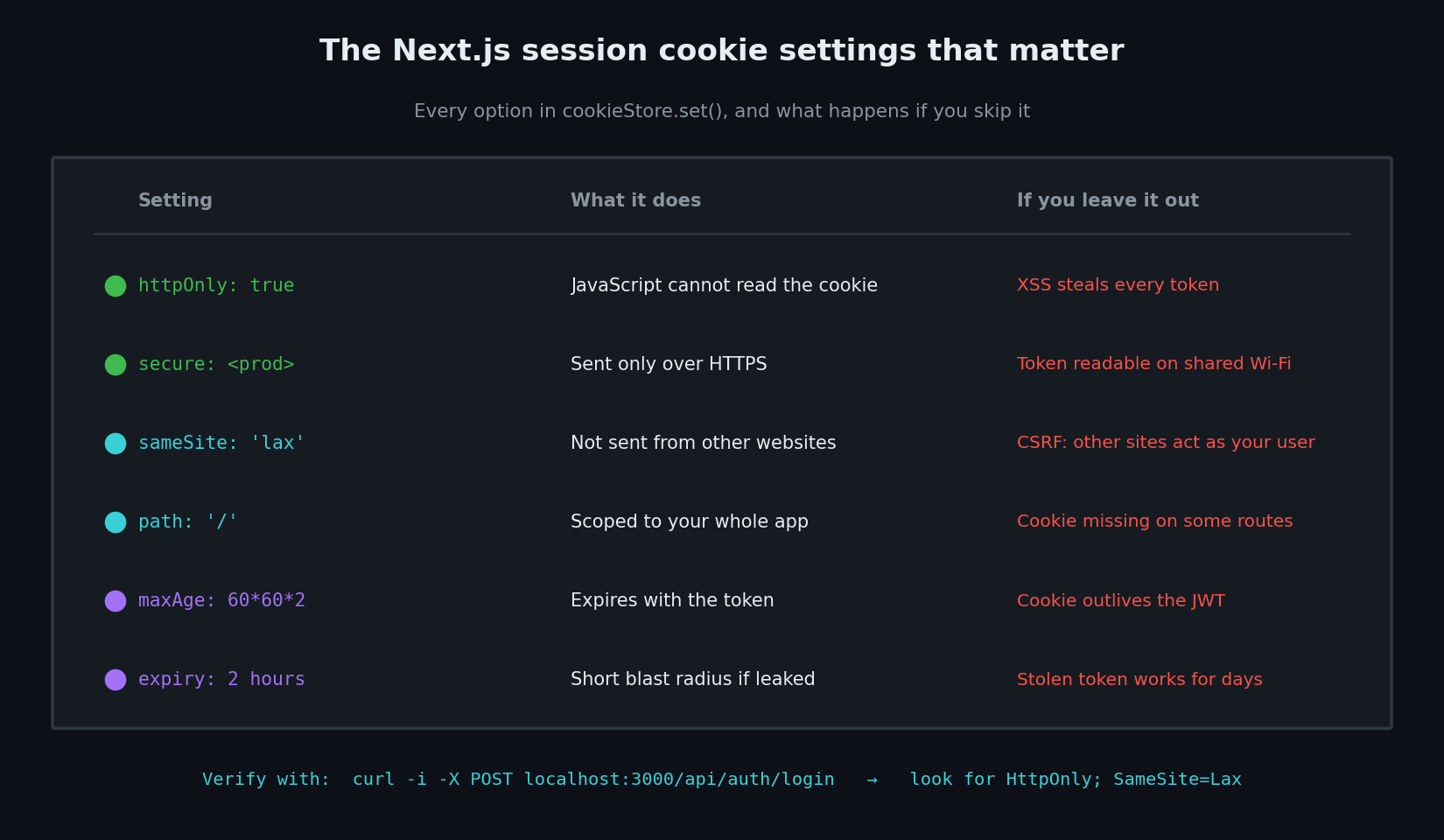
  cookieStore.set('session', token, {
    httpOnly: true,                                  // JavaScript cannot read it
    secure: process.env.NODE_ENV === 'production',    // HTTPS only in prod
    sameSite: 'lax',                                 // not sent from other sites
    path: '/',
    maxAge: 60 * 60 * 2,                             // match the token: 2 hours
  })

  return Response.json({ ok: true }) // no token in the body
}
Your client component now drops the localStorage line entirely. It doesn't touch the token at all — the browser attaches the cookie to every subsequent request automatically.
const res = await fetch('/api/auth/login', {
  method: 'POST',
  headers: { 'Content-Type': 'application/json' },
  body: JSON.stringify({ email, password }),
})
if (res.ok) router.push('/dashboard')
// No localStorage. No token variable. Nothing to steal.
Step 4: Read the session on the server, and log out properly
// app/lib/auth.ts
import { cookies } from 'next/headers'
import { decrypt } from '@/app/lib/session'

export async function getSession() {
  const cookieStore = await cookies()
  return decrypt(cookieStore.get('session')?.value)
}
// app/api/auth/logout/route.ts
import { cookies } from 'next/headers'

export async function POST() {
  const cookieStore = await cookies()
  cookieStore.delete('session')
  return Response.json({ ok: true })
}
Now every protected page or Route Handler calls getSession() and returns 401 when it's null. Do this in each one — not only in middleware. A cookie check in middleware is an optimistic filter, and the Next.js docs are explicit that it "should not be your only line of defense". We covered why that gap is so easy to leave open in Next.js middleware is not enough to protect your routes.
How to test the fix
Three checks, one minute.
1. Confirm JavaScript can't see the token. Log in, open DevTools, and run this in the console:
document.cookie                    // should NOT contain "session"
localStorage.getItem('token')      // should be null
If session appears in document.cookie, the httpOnly flag didn't apply.
2. Confirm the server sends the right flags. Watch the Set-Cookie header on the login response:
curl -i -X POST http://localhost:3000/api/auth/login \
  -H 'Content-Type: application/json' \
  -d '{"email":"[email protected]","password":"your-password"}'
You want a line like Set-Cookie: session=eyJ...; Path=/; HttpOnly; SameSite=Lax — and Secure too, once you're on HTTPS. You want no token in the JSON body.
3. Confirm protected routes reject a missing cookie.
curl -i http://localhost:3000/api/dashboard # expect 401
Ask your AI to fix it
Paste this into Cursor or Claude Code on an existing project:
Audit this Next.js App Router project for insecure session-token storage. Find every place a JWT or auth token is written to or read from
localStorageorsessionStorage, and every endpoint that returns a token in a response body. Replace all of it with anhttpOnlycookie set server-side viacookies()fromnext/headers, usinghttpOnly: true,securein production,sameSite: 'lax',path: '/', and amaxAgematching the token expiry. Usejosefor signing and verification, pinalgorithms: ['HS256']on verify, and set expiry to 2 hours instead of days. Add a server-sidegetSession()helper and call it inside every protected Route Handler and page — do not rely on middleware alone. Show me the diff before applying anything.
Ask for the diff. Reviewing what changed is the habit that catches the next one, too.
Checklist
- No
localStorageorsessionStoragecall anywhere near an auth token - Login endpoint returns no token in its response body
- Cookie set with
httpOnly: true -
secure: truein production -
sameSite: 'lax'or'strict' -
maxAgematches the JWT's expiry — cookie never outlives the token - Token expiry in hours, not days
-
JWT_SECRETis 256-bit random, in.env.local,.gitignored, noNEXT_PUBLIC_prefix -
algorithms: ['HS256']pinned on every verify - Verification failure returns "not logged in", not a crash
- Every protected route calls
getSession()itself - Logout deletes the cookie server-side
Storage is one layer. The broader picture — what else AI leaves out of auth code, and which libraries handle this for you — is in our pillar guide to vibe coding security and our roundup of secure authentication tools for vibe coding.
Want a second pair of eyes on your auth code? If you've shipped a Next.js app with AI-generated login and you're not sure where the token ends up, I'll do a free hands-on review of your session handling — cookie flags, token expiry, secret hygiene, and whether your protected routes actually check. Email [email protected] with your stack and the files you're unsure about.
Key Takeaway
A Next.js JWT httpOnly cookie is a one-file change that removes an entire category of attack. AI assistants default to localStorage because it's the shortest path to working code — but it hands your users' tokens to any script that gets on the page, and OWASP has said not to do it for years. Set the cookie server-side with httpOnly, secure, and sameSite, keep expiry short, pin the algorithm, and check the session in every protected route. Then run the three tests above so you know it worked rather than hoping.
Sources verified July 2026: Next.js cookies API reference, Next.js authentication guide, OWASP HTML5 Security Cheat Sheet, OWASP JSON Web Token Cheat Sheet, and the jose library docs (~7.7k stars, as of July 2026).