Firebase Security Rules for Vibe Coders: Your Database Is Public Until You Write These 20 Lines (With Code)
July 26, 2026 · 2133 words
Firebase security rules are the only thing standing between the internet and every document in your vibe-coded app's database. Not your login page. Not your React code. Not your API key. One rules file. And if you built your app with Cursor, Claude Code, Lovable, or Bolt and clicked through the Firebase console's defaults, there's a real chance that file currently says some version of "let anyone read and write everything."
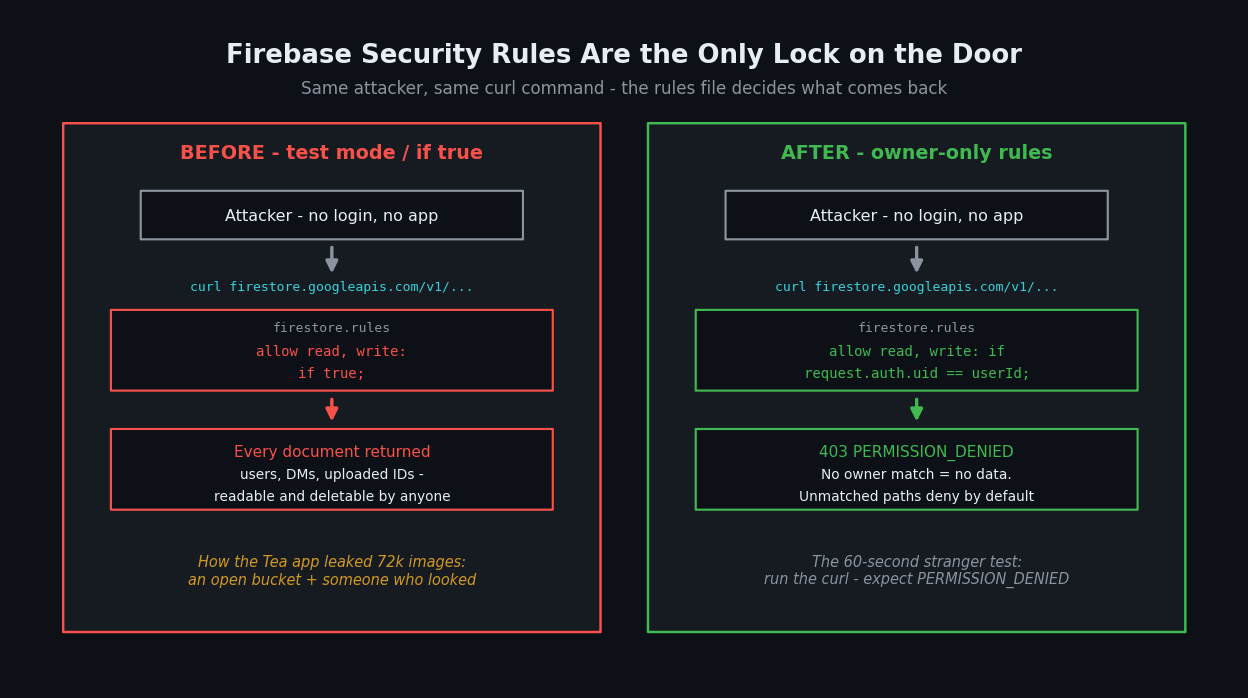
This isn't a hypothetical. In July 2025, the women's dating-safety app Tea — the #1 app on the U.S. App Store that week — had roughly 72,000 user images leaked, including about 13,000 verification selfies and government IDs, after users on 4chan found a publicly accessible Firebase storage bucket with no authentication in front of it, as first reported by 404 Media and confirmed by Engadget; follow-up reporting put around 1.1 million private DMs in the exposure too. Nobody "hacked" anything in the movie sense. The bucket was simply open, and someone checked.
Today you're going to check your app — and fix it. Real rules, copy-paste ready, with a test at the end that proves the door is locked.
Why your Firebase app ships wide open
Firebase's whole appeal for vibe coders is that there's no backend to write: your React or React Native app talks directly to the database (Firestore) and file storage (Cloud Storage) from the user's device. That's also the security catch. The official Firebase docs put it bluntly: "Firebase Security Rules are the only safeguard blocking access for malicious users." There is no server of yours in the middle to catch a bad request.
Two beginner traps make this worse:
Fact 1: Your Firebase API key is not a secret — and it's not protecting you. That apiKey in your firebaseConfig? Google's own documentation says it's fine to ship in your code, because it only identifies your project — it does not control access to your data. Only security rules do. So "my key is hidden" is never the answer here (real secrets in a client bundle are a different fire — see our React Native secure storage guide).
Fact 2: The console's "test mode" is a 30-day open door. When you create a Firestore database, the console offers Locked mode (deny everyone) or Test mode (allow everyone, with an expiry date). Community forums replay the same two panics, weeks apart: first the warning email — one FlutterFlow forum thread is literally titled with the console's own words, "You chose to start developing in Test Mode, which leaves your Cloud Firestore database completely open to the Internet" — then, a month later, threads like the Kodular community's "Firebase rules 30 days test mode expired", when the timer runs out and the app breaks. The fastest way to make that error go away is if true. Which is how test mode becomes production mode, forever.
The rules your AI (and the console) gave you
Open console.firebase.google.com → your project → Firestore Database → Rules. If you see either of these, your database is public:
// firestore.rules — TEST MODE (the console default) — INSECURE
rules_version = '2';
service cloud.firestore {
  match /databases/{database}/documents {
    match /{document=**} {
      // Anyone on the internet can read AND write everything until this date
      allow read, write: if request.time < timestamp.date(2026, 8, 26);
    }
  }
}
// firestore.rules — the "AI made the error go away" version — WORSE
rules_version = '2';
service cloud.firestore {
  match /databases/{database}/documents {
    match /{document=**} {
      allow read, write: if true;
    }
  }
}
The official insecure-rules guide labels this exact pattern with a warning: "NEVER use this ruleset in production; it allows anyone to overwrite your entire database."
There's a third version that looks fixed but isn't:
// The subtle trap: "auth != null" — STILL RISKY
match /{document=**} {
  // ANY signed-in user can read and write EVERY user's data.
  // Sign-up is public. So this is barely a lock at all.
  allow read, write: if request.auth != null;
}
AI assistants love this one because it makes the permission errors stop. But if anyone can create an account (they can), then "any logged-in user" effectively means "anyone" — they just have to sign up first. Firebase's docs call this pattern out by name: if a rule includes auth != null, confirm you really want any logged-in user to have access to that data.
What can actually happen, in plain language
Here's the part that surprises people: an attacker doesn't need your app to read your open database. Firestore has a public REST API. If your rules allow public reads, this one command — with no password, no token, no app — dumps a collection:
# Anyone can run this against your project ID (it's visible in your app's code)
curl "https://firestore.googleapis.com/v1/projects/YOUR_PROJECT_ID/databases/(default)/documents/users"
As the Firebase docs warn, "anyone who guesses your project ID can steal, modify, or delete the data." And nobody has to guess — your project ID ships inside your app's firebaseConfig, and automated scanners test Firebase project IDs from app bundles all day. That's effectively how Tea's bucket was found: a URL in the app, no auth in front of it, national news story.
| Risk | What can happen | Fix |
|---|---|---|
| Test-mode rules in production | Anyone reads/writes all data until expiry; app breaks when it expires | Owner-only rules (below) |
allow read, write: if true | Anyone can dump, modify, or delete your entire database via curl | Owner-only rules (below) |
if request.auth != null on everything | Any stranger signs up, then reads every user's private data | Match request.auth.uid to the data's owner |
| Open Cloud Storage bucket | Uploaded files (IDs, selfies, exports) downloadable by URL — the Tea breach | Owner-only Storage rules (below) |
The fix: owner-only Firestore security rules
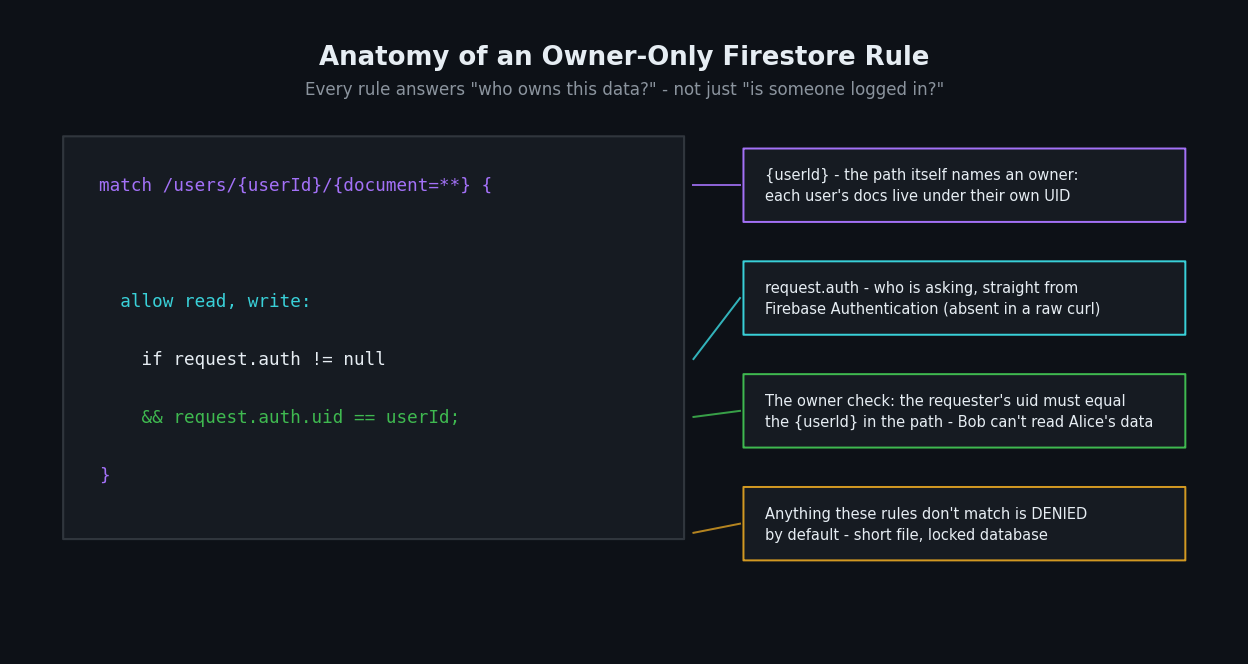
The mental model is one sentence: every rule must answer "who owns this data?" — not just "is someone logged in?" Here's a production-ready starting point for the most common vibe-coded shape: private per-user data plus a public feed. These are the ~20 lines that take your database from "public" to "locked":
// firestore.rules — the fix: owner-only + public-read feed
rules_version = '2';
service cloud.firestore {
  match /databases/{database}/documents {

    // 1) Private user data: only the owner can touch it.
    //    Works because each doc lives under the user's own UID.
    match /users/{userId}/{document=**} {
      allow read, write: if request.auth != null
                         && request.auth.uid == userId;
    }

    // 2) Public posts: anyone can read, only the author can write.
    match /posts/{postId} {
      allow read: if true;
      // On create, the new doc must claim YOU as its author
      allow create: if request.auth != null
                    && request.auth.uid == request.resource.data.author_uid;
      // On update, you must own it before AND after (no ownership transfer)
      allow update: if request.auth.uid == request.resource.data.author_uid
                    && request.auth.uid == resource.data.author_uid;
      // Only the owner can delete
      allow delete: if request.auth.uid == resource.data.author_uid;
    }
  }
}
Three things to understand, in plain terms:
- Anything not matched is denied. Every client request is evaluated against these rules; if no rule allows the path, it fails. Remove the
{document=**}catch-all and collections you never wrote rules for are locked automatically. request.auth.uidis who's asking;resource.datais what's stored;request.resource.datais what they're trying to write. Thecreate/updatesplit stops a sneaky classic: creating a post with someone else'sauthor_uid, or editing a doc to transfer ownership to yourself.- Structure data so ownership is checkable. Private data lives under
/users/{their-uid}/...; shared docs carry anauthor_uidfield. If ownership isn't in the path or the document, rules have nothing to check. (Same "the database defends itself" philosophy as our Supabase RLS guide.)
Deploy from the console's Rules editor, or from your repo with the Firebase CLI: firebase deploy --only firestore:rules.
Don't forget Storage rules — that's what burned Tea
The Tea breach wasn't Firestore — it was Cloud Storage, where the app kept verification selfies. Storage has its own rules file with the same logic. Lock uploads to their owner:
// storage.rules — files live at: user/<uid>/filename
rules_version = '2';
service firebase.storage {
  match /b/{bucket}/o {
    match /user/{userId}/{fileName} {
      allow read, write: if request.auth != null
                         && request.auth.uid == userId;
    }
  }
}
Deploy with firebase deploy --only storage. For files that should be public (avatars, post images), give that folder allow read; and keep write owner-only — the pattern is in Firebase's basic rules guide. ID documents and private uploads must never be publicly readable.
How to test that the door is actually locked
Test 1 — the stranger test (60 seconds). Run the curl from earlier against your own project, logged in as nobody:
curl "https://firestore.googleapis.com/v1/projects/YOUR_PROJECT_ID/databases/(default)/documents/users"
Before the fix, this returns your users' documents as JSON. After the fix, you should get a 403 with PERMISSION_DENIED. If JSON comes back, you are still public.
Test 2 — the wrong-user test. In the Firebase console's Rules tab, open the Rules Playground: simulate a get on /users/alice/private/doc1 as an authenticated user whose UID is bob. It must be denied. This catches the auth != null trap that Test 1 misses.
Test 3 — before future deploys. The Firebase Emulator Suite runs your rules locally, so you (or your AI) can unit-test them instead of finding out in production.
Ask your AI to fix it
Paste this into Cursor, Claude Code, or Copilot:
"Audit my Firebase security rules for production. Replace any
allow read, write: if true, test-moderequest.time < timestamp.date(...)rules, or blanketrequest.auth != nullrules. Restructure to owner-only access: private data matched at/users/{userId}/{document=**}allowing access only whenrequest.auth.uid == userId; shared collections must verifyrequest.auth.uidagainst the document'sauthor_uidon create, update (both existing and incoming data), and delete, so ownership can't be forged or transferred. Remove any global{document=**}allow rule so unmatched paths default to deny. Do the same for storage.rules with files underuser/{userId}/. Then show me how each collection is used in my app code so we confirm nothing legitimate breaks, and give me thefirebase deploycommands for just the rules."
Your Firebase security rules checklist
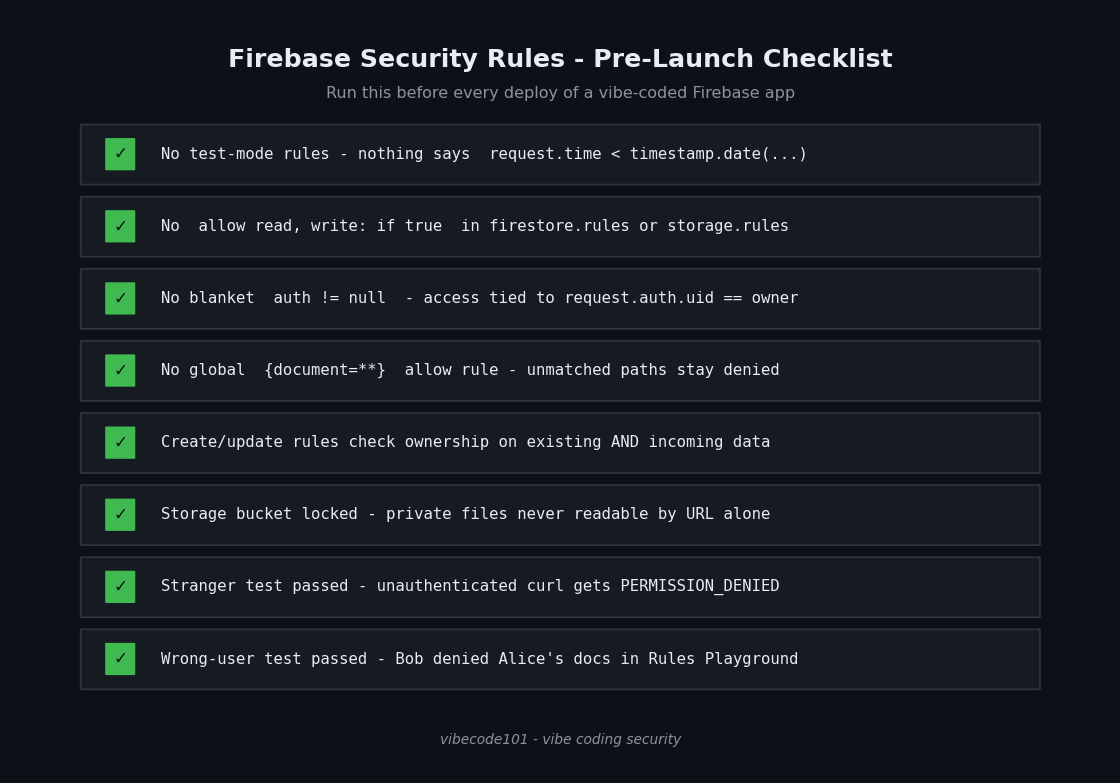
- No test-mode rules in production — nothing that says
request.time < timestamp.date(...). - No
allow read, write: if trueanywhere infirestore.rulesorstorage.rules. - No blanket
request.auth != null— every rule ties access torequest.auth.uidmatching an owner. - No global
{document=**}allow rule — unmatched paths stay denied by default. - Create/update rules check ownership on both
request.resource.dataandresource.data. - Storage bucket locked — private files readable only by their owner, never by URL alone.
- The stranger test returns
PERMISSION_DENIED— the unauthenticated curl gets nothing. - The wrong-user test fails in Rules Playground — Bob cannot read Alice's documents.
If your login flow itself was AI-generated, harden that layer too with our secure authentication guide — rules can only trust request.auth if your auth setup is sound.
Not sure what your rules file actually allows? I run hands-on security audits of vibe-coded Firebase and Supabase apps — I read every rule, run the stranger and wrong-user tests against your real project, check your Storage buckets the way the Tea researchers did, and hand you a prioritized fix list. Email [email protected] with your stack, and I'll tell you what an attacker's curl would see today.
Key Takeaway
Firebase gives your users' browsers a direct line to your database, so the rules file isn't a config detail — it is your backend security. Test mode, if true, and auth != null are three spellings of the same open door, and the Tea breach showed how that story ends: no exploit, just a public bucket and someone who looked. Write rules that name an owner for every read and write, lock Storage the same way, and prove it with the stranger test. Twenty lines. Ship them before your next feature.
New to shipping AI-generated code safely? Start with our pillar guide on vibe coding security.