Vibe Coding Security: 6 Free Tools That Stop AI From Installing Malicious Packages (Slopsquatting)
July 15, 2026 · 1860 words
Vibe coding security has a blind spot most beginners never think about: the packages your AI tells you to install. You ask an AI to build a feature, it writes code that imports some library, you run npm install or pip install — and you never once check that the library is real, safe, or even exists. That single habit is now being weaponized by attackers, and this guide shows you six free tools that catch a bad package before it lands on your machine.
Here's the scary part, and it's well documented. AI coding assistants regularly hallucinate package names — they confidently suggest libraries that don't exist. In a widely cited study covered by The Register, researchers found that about 5.2% of package suggestions from commercial AI models didn't exist, versus 21.7% from open-source models — and when the same prompt was re-run ten times, 43% of the fake names showed up every single time. Attackers noticed. They register the fake name, upload malware under it, and wait for the next person's AI to recommend it. Security researchers named this attack slopsquatting ("slop" being slang for AI output). This post is part of our vibe coding security series, and today we're locking down your software supply chain.
Slopsquatting in plain English (and the words you need)
Let's define the key terms once, simply:
- A package (or dependency) is a bundle of pre-written code you install instead of writing it yourself. npm is the store for JavaScript packages; PyPI is the store for Python packages.
- Your supply chain is all that third-party code your app pulls in. A supply-chain attack is when someone hides malware inside one of those pieces so it runs on your computer or your users'.
- A hallucinated package is a name the AI invented that isn't a real library.
- Slopsquatting is when an attacker registers that hallucinated name for real and fills it with malware, so installing the AI's suggestion silently installs the attack.
- A known vulnerability (often given a CVE ID — a public catalog number for one specific security hole) is a reported flaw in a real package that you should patch.
Why does AI-generated code hit this so hard? Because vibe coding tools generate whole files fast, and a rushed developer copies the block, runs the install command, and moves on. As Socket's CEO put it in that same Register report, "you paste it into your terminal and the install fails — or worse, it doesn't fail, because someone has slop-squatted that exact package name." The tools below are your seatbelt.
The Vibe Coding Supply-Chain Tools at a Glance
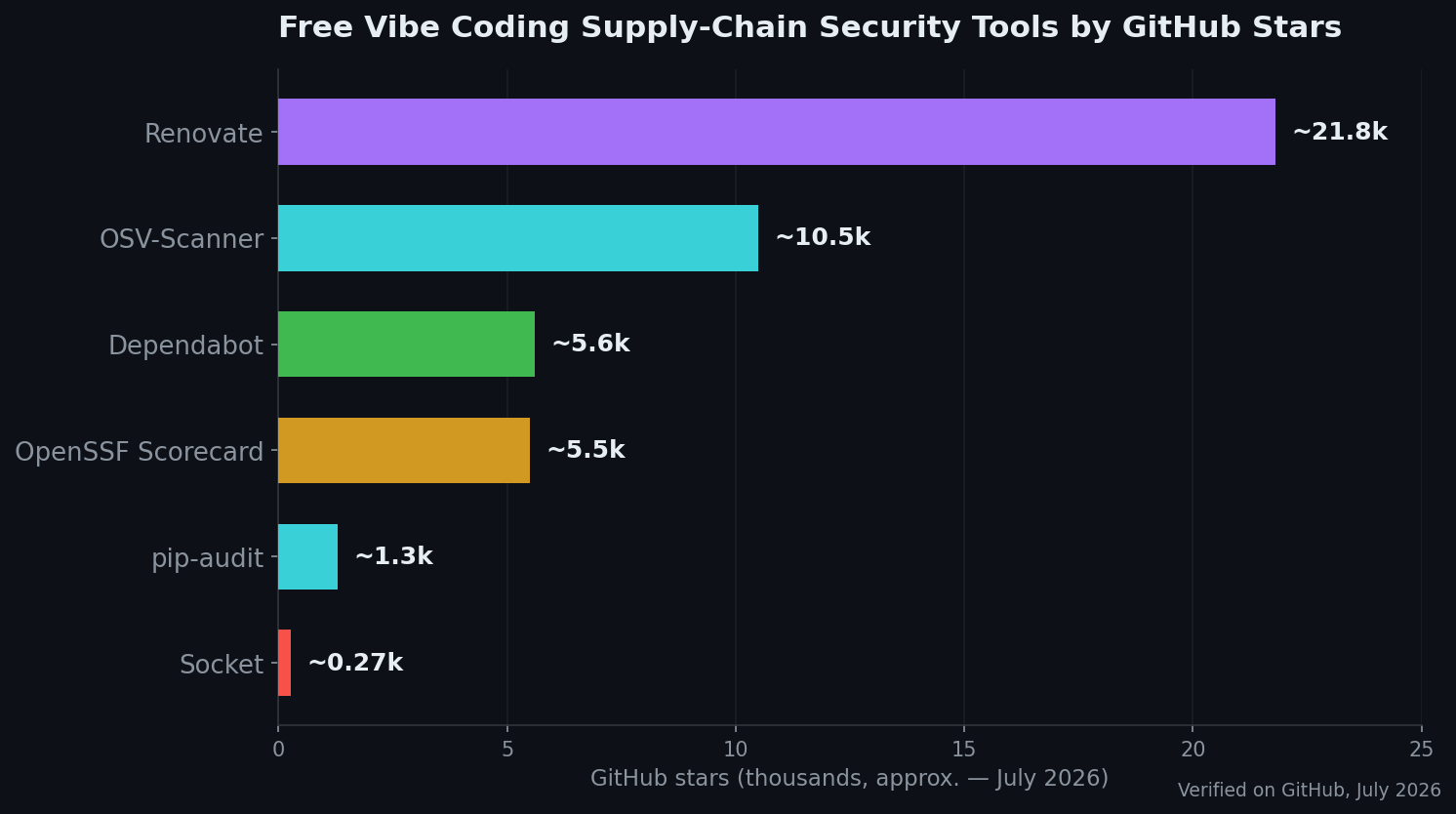
Every tool below is free, real, and was verified as active on GitHub in July 2026. Star counts are approximate.
| Tool | Stars (~, Jul 2026) | Catches | Language | License |
|---|---|---|---|---|
| Socket | ~270 | Malicious & typosquatted packages | TypeScript | MIT |
| OSV-Scanner | ~10.5k | Known-vulnerable dependency versions | Go | Apache-2.0 |
| Dependabot | ~5.6k | Vulnerable deps + auto-fix PRs | Ruby | Custom (free on GitHub) |
| Renovate | ~21.8k | Outdated deps (auto-update PRs) | TypeScript | AGPL-3.0 |
| pip-audit | ~1.3k | Known-vulnerable Python packages | Python | Apache-2.0 |
| OpenSSF Scorecard | ~5.5k | Risky / unmaintained package health | Go | Apache-2.0 |
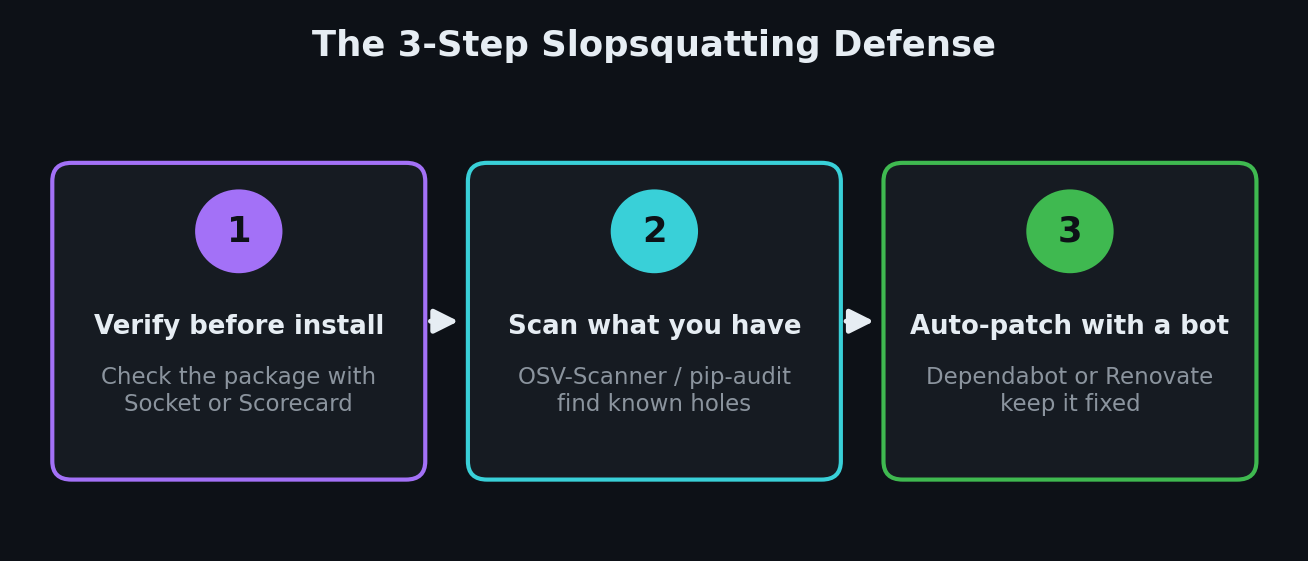
The defense is a simple three-step habit: check a package before you install it, scan the ones you already have, and let a bot keep them patched. You don't have to understand the malware — the tools read it for you.
1. Socket — the direct answer to slopsquatting
Socket is the tool built for exactly this threat. Instead of only checking a list of known-bad packages, it reads what a package actually does — looking for red flags like hidden install scripts, network calls, obfuscated code, or attempts to read your environment variables (where secrets live). That means it can flag a brand-new malicious package that no database has caught yet. The CLI is MIT-licensed (~270 stars on GitHub, but backed by a well-known security company).
Why it matters for vibe coders: slopsquatted packages are new by design, so a plain vulnerability list misses them. Socket judges behavior, which is what you want when your AI just invented a library name.
Try it — check a package before you install it:
npm install -g socket
socket package npm/[email protected]
Or let it audit an install as it happens: socket npm install <package-name>.
2. OSV-Scanner — find known-vulnerable dependencies
OSV-Scanner, from Google, checks every package in your project against OSV.dev, a huge open database of known vulnerabilities across npm, PyPI, Go, and 10+ other ecosystems. It's Apache-2.0, written in Go, at roughly 10.5k stars, and still shipping releases in 2026. Point it at your folder and it tells you which installed versions have reported security holes — and which upgrade fixes them.
Why it matters for vibe coders: AI often pins old package versions it "remembers." Old versions are exactly where the public, already-patched vulnerabilities live. This catches them.
Try it on your project folder:
brew install osv-scanner
osv-scanner scan source -r .
3. Dependabot — free, built into GitHub, fixes things for you
Dependabot is the easiest option because it's already inside GitHub and completely free on every plan. Turn it on and it watches your dependencies, opens a pull request when one has a security fix, and even bumps the version for you. Its core logic is open source (~5.6k stars, Ruby); the license is custom but free to use on GitHub.
Why it matters for vibe coders: you don't run anything locally. Flip one switch in your repo and a robot keeps your supply chain patched while you sleep.
Try it — add this file at .github/dependabot.yml (this example watches an npm project weekly):
version: 2
updates:
  - package-ecosystem: "npm"
    directory: "/"
    schedule:
      interval: "weekly"
You can also just enable it under Repo → Settings → Code security → Dependabot.
4. Renovate — the powerful auto-updater
Renovate does what Dependabot does, but for 90+ package managers and with far more control over how and when updates land. It's the most-starred tool here at roughly 21.8k stars (AGPL-3.0), and the hosted Mend Renovate app installs on your GitHub repo in one click, free for open source. Keeping dependencies current is one of the cheapest ways to shrink your attack surface.
Why it matters for vibe coders: if you're juggling npm, Docker, and Python in one project, Renovate handles them all and batches the updates so your inbox doesn't explode.
Try it — run a preview against your repo without installing anything permanently:
npx --yes renovate --dry-run=full --platform=local
For real use, install the free Renovate app from the GitHub Marketplace.
5. pip-audit — the Python-specific check
pip-audit is the official tool from the Python Packaging Authority (PyPA), maintained with support from Trail of Bits and Google. It scans your installed Python packages and your requirements.txt against the Python advisory database and reports anything with a known vulnerability — and it can try to fix them for you. It's Apache-2.0, ~1.3k stars, and actively maintained.
Why it matters for vibe coders: if your AI built you a Python backend or a data script, this is the fastest "am I running anything dangerous?" check for that ecosystem.
Try it:
pip install pip-audit
pip-audit
6. OpenSSF Scorecard — vet a package before you trust it
OpenSSF Scorecard, from the Open Source Security Foundation, looks at a project's health rather than its code: is it maintained, does it review changes, is it signed, has it had recent security issues? It runs 18+ checks and gives a score from 0 to 10 (~5.5k stars, Apache-2.0, Go). Think of it as a background check for a library before you let it into your app.
Why it matters for vibe coders: when your AI suggests an unfamiliar package, a low Scorecard score is a plain-English "maybe don't." It's how you tell an abandoned or sketchy dependency from a trustworthy one.
Try it on any repo (needs a free GitHub token in GITHUB_AUTH_TOKEN):
brew install scorecard
scorecard --repo=github.com/expressjs/express
Prefer no setup? Paste a repo URL into the hosted viewer at scorecard.dev.
How to Choose Your First Supply-Chain Tool
You don't need all six. Here's the beginner path:
- Worried your AI is naming fake or malicious packages? Start with Socket and check a package before every install.
- Want a free robot to just handle it on GitHub? Turn on Dependabot — two minutes, zero local setup.
- Need more control or many ecosystems? Use Renovate instead.
- Want to scan what you already have? Run OSV-Scanner (any language) or pip-audit (Python).
- Unsure whether to trust a library at all? Check its OpenSSF Scorecard.
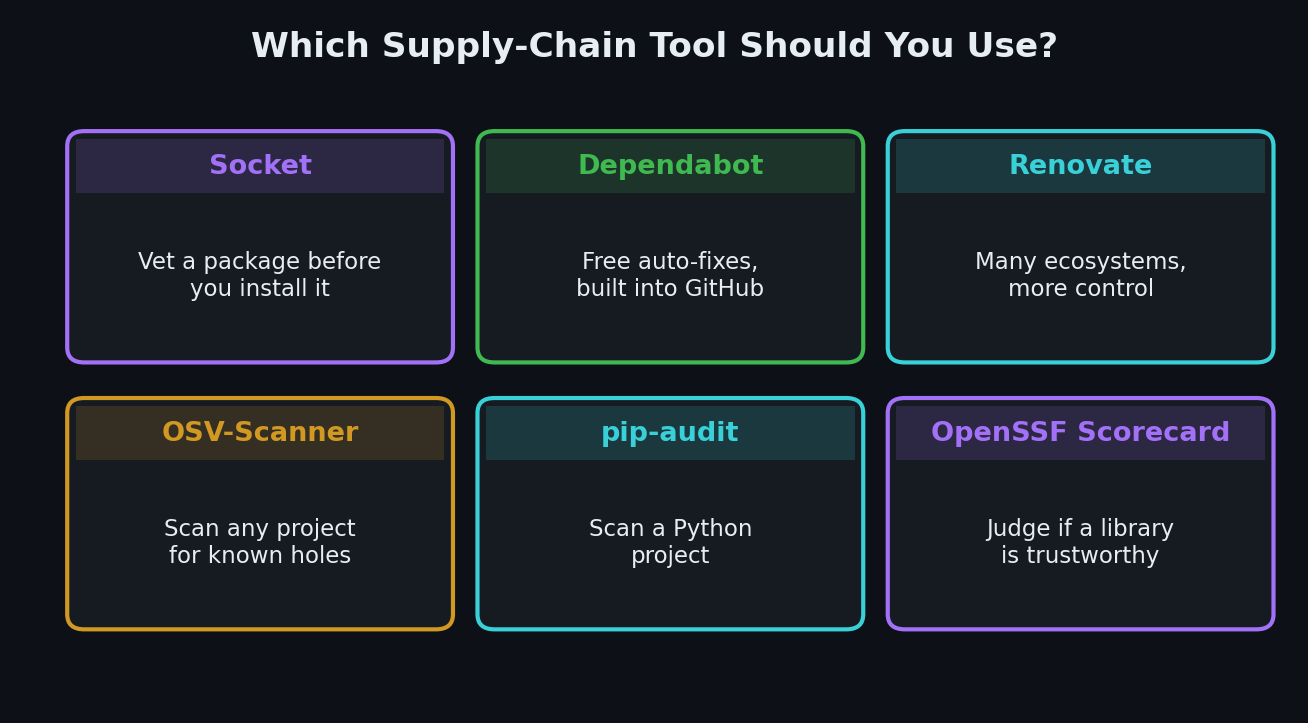
A great starter combo: check new packages with Socket, then turn on Dependabot so everything stays patched afterward. That covers both "don't install malware today" and "don't rot into a known hole tomorrow." For catching leaked keys too, pair it with our free secret-scanning tools, and to spot risky changes in review, see our AI code review tools roundup.
Want a Second Pair of Eyes on Your Code?
Not sure which packages in your vibe-coded app are safe? I run hands-on vibe coding security audits — I'll review your dependencies for malicious or abandoned packages, known vulnerabilities, and the risky install habits above, then send back a plain-English fix list. Email me at [email protected] and I'll take a look.
Key Takeaway
Slopsquatting turns your AI's biggest weakness — making things up — into a live attack on your machine. The fix is a habit, not a security degree: verify a package before you install it, scan what you already have, and let a bot keep it patched. Use Socket to judge new packages, OSV-Scanner or pip-audit to scan, Dependabot or Renovate to auto-update, and OpenSSF Scorecard to vet trust. For the full picture on shipping safe AI code, start with our pillar guide to vibe coding security.
Star counts, licenses, and release details are approximate and were verified on GitHub in July 2026. The 5.2% / 21.7% hallucination figures come from research reported by The Register; treat all such figures as study estimates, not guarantees. Tools help, but always sanity-check what your app installs and exposes before going live.