Run LLMs Locally: 6 Best Open-Source Tools for Vibe Coders in 2026
July 11, 2026 · 1764 words
Run LLMs locally and you get private, offline, pay-once AI you fully control — no per-token bill, no data leaving your machine, and a model you can point your coding agent at. This roundup covers the six best open-source tools to run LLMs locally in 2026, compared by GitHub stars, license, language, and the exact job each one is best at, so you can build your local stack without wading through a dozen READMEs. Every repo below was verified directly on GitHub, and star counts are approximate as of July 2026.
Why bother when cloud APIs are one line away? Three reasons vibe coders keep coming back to local-first AI: privacy (your prompts and code never leave the box), cost (inference is free after the download), and control (you pick the model, the quantization, and the API surface). The catch is that "run a model locally" actually means several different jobs — raw inference, an easy runner, a chat UI, a production server — and each tool below owns a different one.
The Local LLM Tools at a Glance
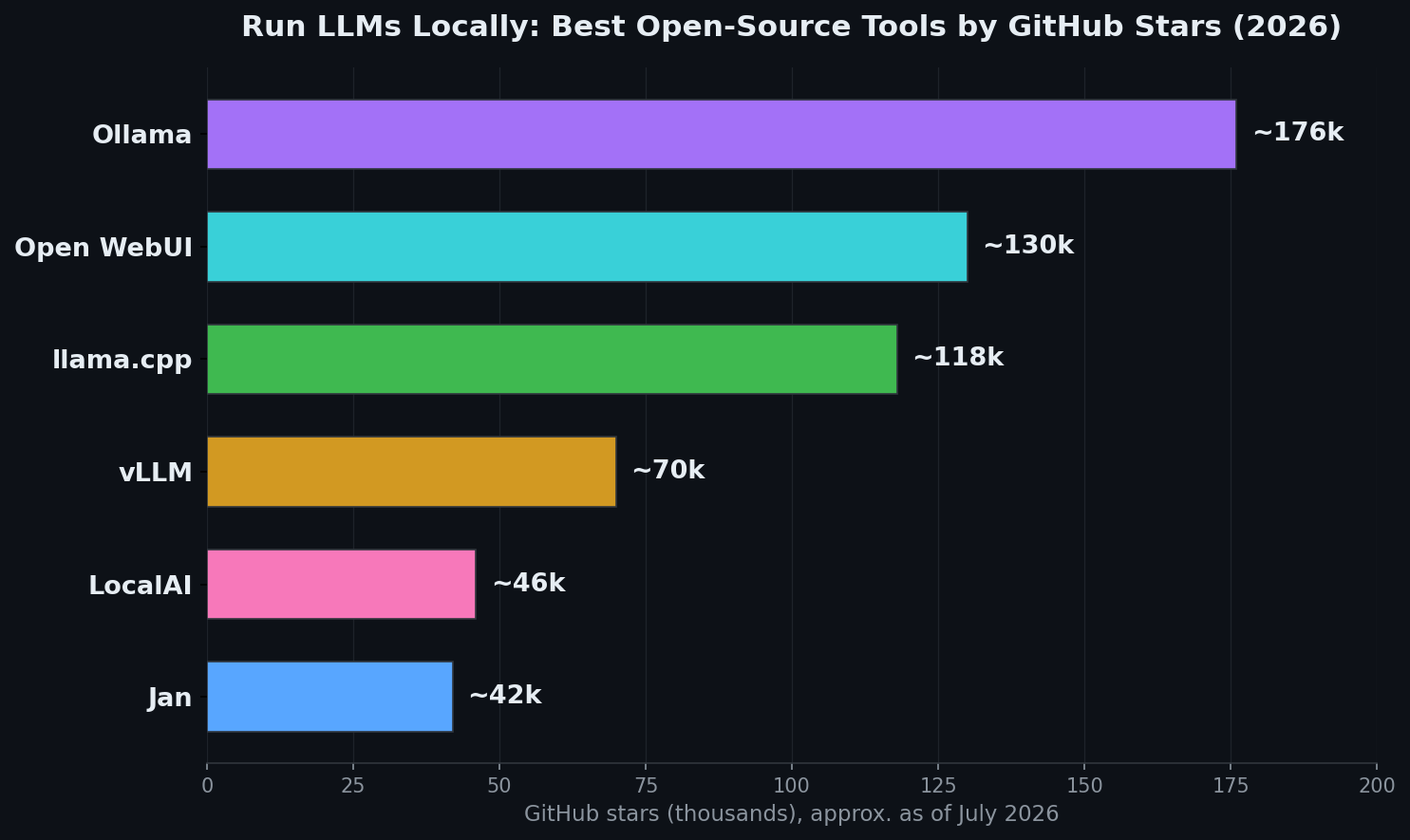
Here's the full lineup, sorted by GitHub stars. Skim it as a cheat sheet, then jump to whichever section matches your setup.
| Tool | Stars (2026) | Best for | Language | License |
|---|---|---|---|---|
| Ollama | ~176k | Easiest local model runner + API | Go | MIT |
| Open WebUI | ~130k | Self-hosted ChatGPT-style interface | Svelte / Python | Open WebUI License (BSD-3 based) |
| llama.cpp | ~118k | Raw control, quantized GGUF, CPU & Apple Silicon | C/C++ | MIT |
| vLLM | ~70k | High-throughput production serving | Python | Apache-2.0 |
| LocalAI | ~46k | Drop-in OpenAI-compatible multimodal backend | Go | MIT |
| Jan | ~42k | Privacy-first offline desktop app | TypeScript | Apache-2.0 |
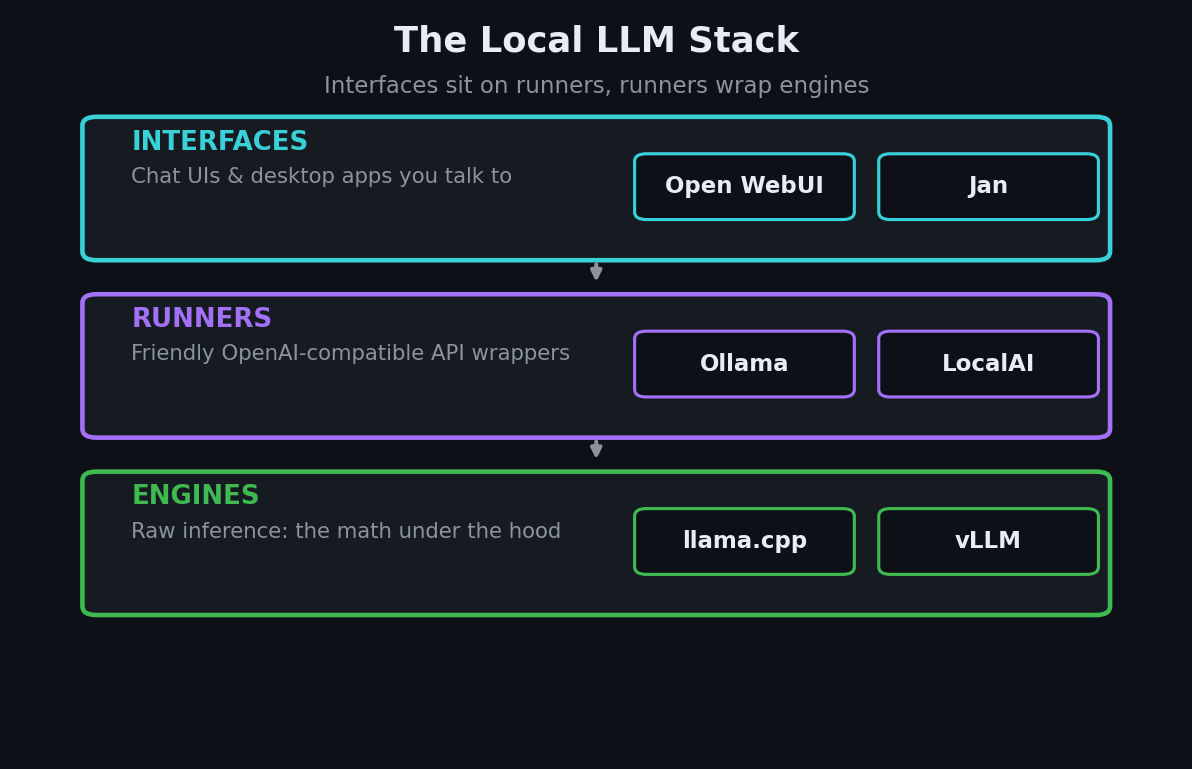
These tools stack into layers: engines (llama.cpp, vLLM) do the raw math, runners (Ollama, LocalAI) wrap an engine in a friendly API, and interfaces (Open WebUI, Jan) give you a place to chat. You'll usually run two or three together.
1. Ollama — the easiest way to run LLMs locally
Ollama is the most-starred tool in this space at roughly 176k stars, MIT-licensed, and written in Go. It does for local models what Docker did for containers — one command pulls a model and gets it running with an OpenAI-compatible API at localhost:11434. Its founders, in fact, previously helped build Docker Desktop, and in July 2026 the company raised a $65M Series B on the back of nearly 9 million monthly developers.
Why it matters to vibe coders: the OpenAI-compatible endpoint means coding agents that speak that API (Cline, Aider, and friends) can talk to a local model with a one-line base-URL swap. It's the fastest on-ramp to local-first development, full stop.
When to use it: you want the least-friction path to a working local model and a stable API to build against. Get started:
curl -fsSL https://ollama.com/install.sh | sh
ollama run llama3.2
# API is now live at http://localhost:11434/v1
If you plan to wire a local model into an agent, pair this with our roundup of open-source AI coding agents — most of them accept a custom OpenAI base URL.
2. Open WebUI — a self-hosted ChatGPT you own
Open WebUI is the most popular self-hosted AI interface on GitHub, at roughly 130k stars. It's a polished, extensible, fully offline web app that connects to Ollama or any OpenAI-compatible backend and adds the features you actually miss from ChatGPT: multi-user accounts, chat history, RAG over your own documents, and a plugin system. Note its license is the custom Open WebUI License (BSD-3-based with a branding-preservation clause), not plain MIT.
Why it matters to vibe coders: it turns a bare local endpoint into a shareable product-grade interface in minutes — handy for demoing an internal tool to your team, or giving non-technical stakeholders a private chat over company docs.
When to use it: you have a model running (say, via Ollama) and want a real UI in front of it. Spin it up with pip or Docker:
pip install open-webui
open-webui serve
# then open http://localhost:8080
3. llama.cpp — the engine everything else is built on
llama.cpp is the foundational inference engine of the local LLM world, at roughly 118k stars, MIT-licensed, and written in pure C/C++ with no heavy dependencies. It reads the GGUF file format and supports aggressive quantization — squeezing 16-bit weights down to 8, 6, 5, 4, 3, or even 2 bits so a big model fits on a laptop. Both Ollama and LM Studio run on top of it.
Why it matters to vibe coders: when you need deep control — CPU-only inference, squeezing max performance out of Apple Silicon, or picking an exact quantization to fit your VRAM — this is the level you drop down to. It's less beginner-friendly, but it's the reference implementation the whole ecosystem depends on.
When to use it: you want raw control over how a model is loaded and run, or you're on hardware the friendlier tools don't optimize for. On macOS:
brew install llama.cpp
# run any GGUF model you've downloaded
llama-cli -m ./model.gguf -p "Write a haiku about local LLMs"
4. vLLM — production-grade serving throughput
vLLM is the go-to open-source serving engine for throughput, at roughly 70k stars and Apache-2.0 licensed. Its signature innovation, PagedAttention, manages the KV cache in fixed-size blocks the way an OS pages memory, cutting fragmentation and packing far more concurrent requests onto the same GPU — often 2–4x the throughput of naive serving.
Why it matters to vibe coders: the moment your side project has real users hitting a model, single-request tools fall over. vLLM is built for concurrency, so it's the piece you reach for when a local prototype graduates into something you actually serve.
When to use it: you're serving a model to multiple users or an app backend and need high throughput on a GPU. Install and serve:
pip install vllm
vllm serve Qwen/Qwen2.5-7B-Instruct
# OpenAI-compatible server on http://localhost:8000
5. LocalAI — a drop-in OpenAI replacement for any hardware
LocalAI, created by Ettore Di Giacinto (mudler), is a ~46k-star, MIT-licensed engine that bills itself as a complete drop-in replacement for OpenAI, Anthropic, and ElevenLabs APIs — running on consumer hardware with no GPU required. Crucially, it's not just text: LocalAI handles LLMs, image generation, audio, voice cloning, and video behind one consistent API, and 2026 releases added agentic orchestration and an Anthropic-compatible endpoint.
Why it matters to vibe coders: if your app already calls the OpenAI SDK, LocalAI lets you point it at localhost and keep the exact same code — then quietly add local image or audio generation through the same interface. One backend, many modalities, zero vendor lock-in.
When to use it: you want a single self-hosted API that mirrors the big providers across text, image, and audio. Install with the official script:
curl https://localai.io/install.sh | sh
# then browse the model gallery at http://localhost:8080
6. Jan — a private, offline desktop app
Jan is the friendliest desktop option, at roughly 42k stars, Apache-2.0, and built in TypeScript by Menlo Research. It's an open-source alternative to ChatGPT that runs 100% offline: download a model from Hugging Face, chat with it in a clean native app, and — if you want — flip into hybrid mode to route to OpenAI or Anthropic when you need a bigger brain. It also exposes its own OpenAI-compatible API at localhost:1337.
Why it matters to vibe coders: it's the no-terminal entry point. When you want to try local models, compare a few, or hand a private assistant to a teammate who won't touch a CLI, Jan is the install-and-go choice — with no telemetry and no Pro-tier upsell.
When to use it: you want a desktop app rather than a server, and privacy is the priority. Download from jan.ai, or on macOS:
brew install --cask jan
How to Choose the Right Local LLM Tool
There's no single winner — you'll mix a couple of these depending on the job. Use this quick decision guide:
- You just want a model running with an API, fast: start with Ollama. It's the easiest on-ramp and the default backend everything else plugs into.
- You want a ChatGPT-style UI you host yourself: put Open WebUI in front of Ollama.
- You need deep control or unusual hardware: drop down to llama.cpp and its GGUF quantizations.
- You're serving real users on a GPU: run vLLM for throughput.
- You want one API for text, image, and audio that mirrors OpenAI: choose LocalAI.
- You want a private desktop app with zero setup: install Jan.
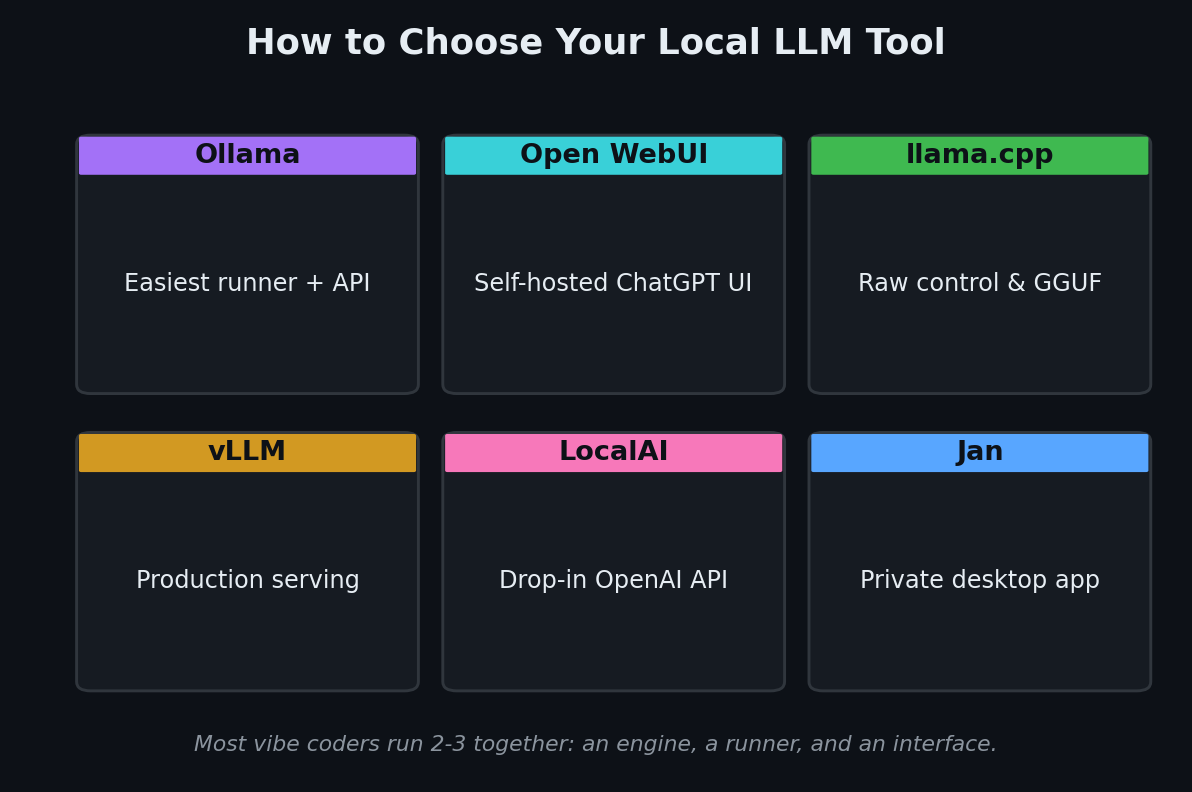
A common, powerful setup is Ollama for the engine, Open WebUI for the interface, and your coding agent pointed at Ollama's endpoint — all local, all free after the download.
Key Takeaway
Running LLMs locally in 2026 is no longer a hobbyist stunt — it's a practical, private, cost-free foundation for vibe coding. Ollama leads on ease and adoption, Open WebUI gives you a self-hosted ChatGPT, llama.cpp is the engine underneath it all, vLLM handles production throughput, LocalAI is your multimodal OpenAI stand-in, and Jan is the friendliest desktop door in. Pick the layer you need — engine, runner, or interface — confirm it's actively maintained, and you get AI you own end to end. Once your local model is live, feed it good prompts with the workflow in our guide on how to prompt for vibe coding.
Star counts and project details are approximate and were verified on GitHub in July 2026. This space moves fast — check each repo's latest release and license before you build on it.