Next.js SSRF: The fetch(userUrl) Your AI Wrote Can Read Your Cloud Credentials (With Code)
August 3, 2026 · 3182 words
You asked Cursor for a link preview feature. "When a user pastes a URL, show the page title and image." You got a route handler in about four seconds. It works. You shipped it.
That route handler is now a machine that makes HTTP requests to any address a stranger types in — from inside your server, behind your firewall, with your server's network access. Next.js SSRF from an unvalidated fetch is the single easiest hole to open in a vibe-coded app, because the vulnerable version is the obvious version. There is nothing clever about fetch(url). That's the problem.
This guide shows the code your AI wrote, what an attacker gets out of it, and the guard function that fixes it — verified this week against the OWASP SSRF Prevention Cheat Sheet and the current Next.js image configuration docs.
Plain-language glossary
- SSRF (Server-Side Request Forgery) — you trick someone else's server into making a request for you. The request comes from their machine, so it reaches things you never could.
- Metadata service — a magic IP address (
169.254.169.254) that cloud servers on AWS, GCP, and Azure can call to ask "who am I?" It answers with the machine's identity, and often with temporary access keys. It has no password, because "you can reach it" is the password. - Private IP range — addresses like
10.x.x.x,192.168.x.x,127.0.0.1that only exist inside a network. Your database, your Redis, your admin panel probably live on one. - Allowlist — a short, fixed list of what's permitted. The opposite of a denylist, which is a list of what's banned and is always missing something.
Where your AI put this in your app
You probably have at least one of these. All three are the same bug:
- A link preview / unfurl route —
/api/preview?url=...fetches a page and scrapes its<title>andog:image. - A proxy or CORS-workaround route —
/api/proxy?url=..., usually added to make a browser CORS error go away. (If that's why yours exists, read the CORS guide first — you probably don't need the proxy at all.) - An "import from URL" or avatar-by-URL feature — the user gives you an image or CSV address and your server downloads it.
There's a fourth one you didn't write: next/image with a loose remotePatterns. More on that below.
The code your AI wrote
// app/api/preview/route.ts — the version Cursor gives you. Do not ship this.
export async function GET(request: Request) {
  const { searchParams } = new URL(request.url)
  const url = searchParams.get('url')            // <-- a stranger types this

  if (!url) {
    return Response.json({ error: 'url required' }, { status: 400 })
  }

  const res = await fetch(url)                   // <-- your server, any address
  const html = await res.text()

  const title = html.match(/<title>(.*?)<\/title>/i)?.[1] ?? ''
  return Response.json({ title, html })
}
Ten lines. Reads perfectly. Passes review from anyone who isn't specifically looking for this.
Now watch what happens when the URL isn't a blog post:
curl "https://yourapp.com/api/preview?url=http://169.254.169.254/latest/meta-data/iam/security-credentials/"
On a cloud host with the older metadata service enabled, that returns your server's IAM role name. One more request returns temporary AWS access keys. Your app dutifully wraps them in JSON and hands them back over the public internet.
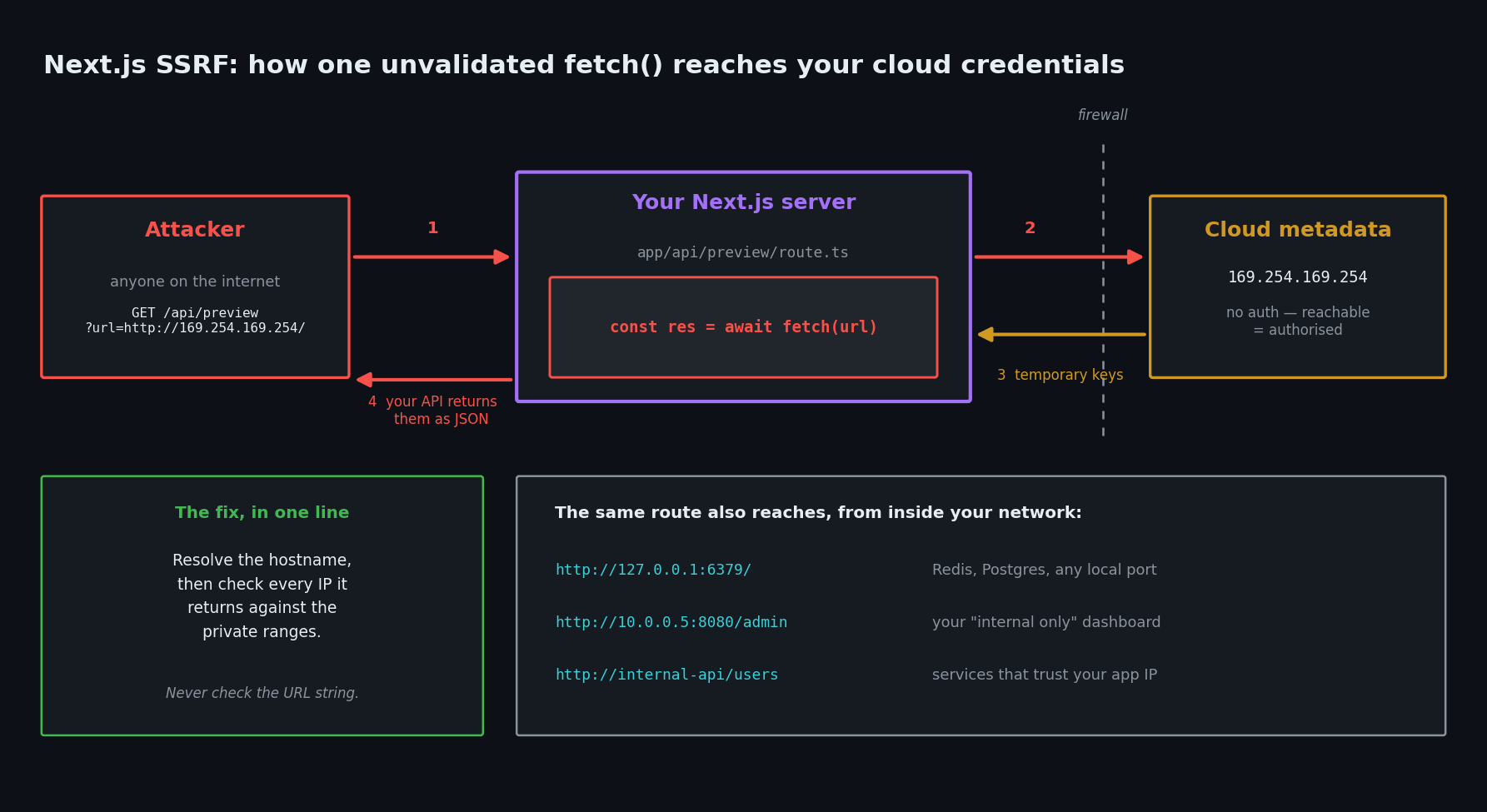
The metadata endpoint is the famous one, but it's not the only target. The same route reaches:
http://localhost:5432and every other port on your own server — a port scan of your machine, one request at a time, with the error messages telling the attacker what's listening.http://10.0.1.42:8080/admin— the internal dashboard you never exposed publicly because "it's on a private network."http://your-supabase-project.internal/...or any service that trusts requests from your app's IP.file:///etc/passwd— Node'sfetchrejectsfile:, but if any part of your chain uses a different HTTP client, non-HTTP schemes come back into play.
And SSRF works even when you never show the response. If your route fetches the URL and returns only "ok", an attacker still learns whether an internal host exists by timing the response. That's called blind SSRF, and it's enough to map your private network.
| What the attacker asks for | What your server returns | Severity |
|---|---|---|
http://169.254.169.254/latest/meta-data/ | Cloud role name, then temporary keys | Critical — full account takeover |
http://127.0.0.1:6379/ | Redis banner, admin panel HTML, service versions | High — internal recon |
http://10.0.0.5:8080/admin | Your unprotected internal dashboard | High |
http://internal-api/users | Data from a service that trusts your app's IP | High |
| Any internal host, response hidden | Nothing visible — but response timing leaks existence | Medium — blind SSRF |
http://attacker.com/log | Nothing useful, but confirms the hole is open | Low — the probe |
Why the obvious fixes don't work
Your AI's second attempt, if you ask it to "make the preview route safe," is usually this:
// Still broken. Four separate bypasses.
const blocked = ['localhost', '127.0.0.1', '169.254.169.254']
if (blocked.some((b) => url.includes(b))) {
  return Response.json({ error: 'blocked' }, { status: 400 })
}
Here is what gets through, all verified with Node's URL parser:
http://2130706433/— that's127.0.0.1written as a single decimal number. So ishttp://0x7f.0x0.0x0.0x1/in hex. Your string check sees neither.http://[email protected]/— the part before@is a username, not a host. The real hostname isevil.com. AstartsWith('https://api.stripe.com')check waves this straight through.http://my-internal-thing/— a bare internal hostname with no dots, resolving to a private IP. It matches no pattern on your list.- A redirect.
https://totally-fine.com/xreturns302 Location: http://169.254.169.254/. Node'sfetchfollows redirects by default, so your allowlist is checked once and then bypassed on hop two.
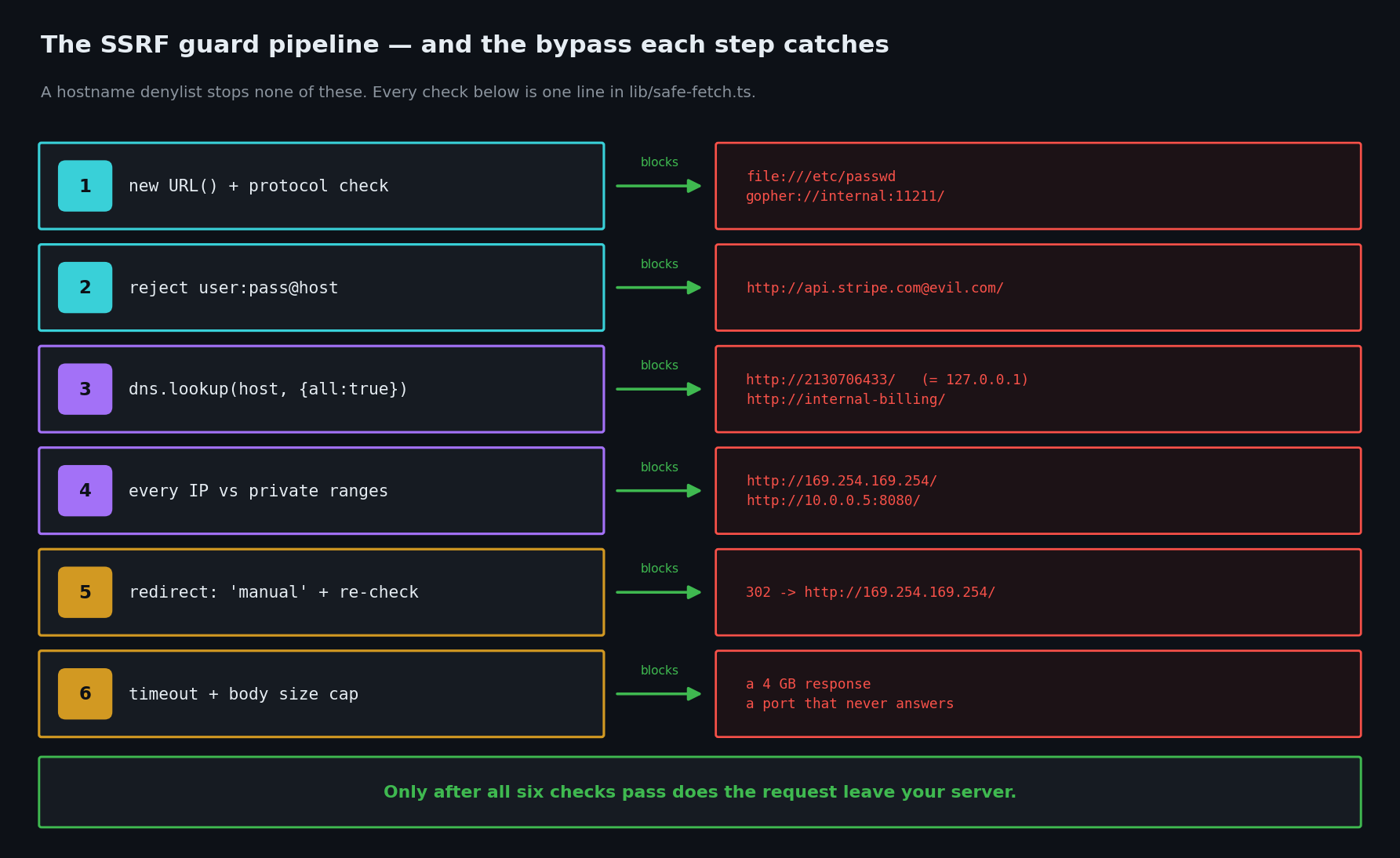
OWASP is direct about this: denylists are "bypass-prone," and complete URLs from users are best not accepted at all — "if network related information is really needed then only accept a valid IP address or domain name."
The fix
Step 1: Ask whether you need a URL at all
The strongest fix is deleting the parameter. If your feature is "fetch the user's Stripe invoice," take an invoice ID and build the URL yourself on the server. No user-supplied URL means no SSRF. This handles more cases than people expect — most "proxy" routes in vibe-coded apps exist to paper over a CORS error, and the real fix is a relative /api/... path on the frontend.
Only continue if the URL genuinely has to be arbitrary, like a real link-preview feature.
Step 2: Write one guard function
Put this in lib/safe-fetch.ts and never call bare fetch() on user input again.
// lib/safe-fetch.ts
import dns from 'node:dns/promises'
import net from 'node:net'

// Optional. Leave empty for a true "any public site" preview feature;
// fill it in if you know exactly which hosts you talk to (much safer).
const ALLOWED_HOSTS = new Set<string>([])

function ipv4ToInt(ip: string): bigint {
  return ip.split('.').reduce((acc, octet) => acc * 256n + BigInt(octet), 0n)
}

// Private, loopback, link-local, carrier-grade NAT, benchmarking, multicast.
const BLOCKED_V4 = [
  ['0.0.0.0', '0.255.255.255'],
  ['10.0.0.0', '10.255.255.255'],
  ['100.64.0.0', '100.127.255.255'],
  ['127.0.0.0', '127.255.255.255'],
  ['169.254.0.0', '169.254.255.255'], // <-- cloud metadata lives here
  ['172.16.0.0', '172.31.255.255'],
  ['192.0.0.0', '192.0.0.255'],
  ['192.168.0.0', '192.168.255.255'],
  ['198.18.0.0', '198.19.255.255'],
  ['224.0.0.0', '255.255.255.255'],
].map(([lo, hi]) => [ipv4ToInt(lo), ipv4ToInt(hi)] as const)

function isBlockedIp(ip: string): boolean {
  if (net.isIPv4(ip)) {
    const n = ipv4ToInt(ip)
    return BLOCKED_V4.some(([lo, hi]) => n >= lo && n <= hi)
  }
  const v6 = ip.toLowerCase()
  if (v6.startsWith('::ffff:')) return isBlockedIp(v6.slice(7)) // IPv4-mapped
  return v6 === '::1' || v6 === '::' || /^(fc|fd|fe8|fe9|fea|feb|ff)/.test(v6)
}

export async function assertSafeUrl(raw: string): Promise<URL> {
  let url: URL
  try {
    url = new URL(raw)
  } catch {
    throw new Error('Invalid URL')
  }

  // 1. HTTP(S) only. Kills file:, gopher:, data:, ftp:.
  if (url.protocol !== 'https:' && url.protocol !== 'http:') {
    throw new Error('Only http and https are allowed')
  }

  // 2. No user:pass@host — that is the classic allowlist bypass.
  if (url.username || url.password) {
    throw new Error('Credentials in URL are not allowed')
  }

  // new URL() strips the brackets convention for IPv6: [::1] -> we remove them.
  const host = url.hostname.replace(/^\[|\]$/g, '')

  if (ALLOWED_HOSTS.size > 0 && !ALLOWED_HOSTS.has(host)) {
    throw new Error('Host is not on the allowlist')
  }

  // 3. Resolve the name ourselves and check EVERY address it points to.
  //    This is what catches http://2130706433/ and internal hostnames.
  const addresses = net.isIP(host)
    ? [{ address: host }]
    : await dns.lookup(host, { all: true })

  if (addresses.length === 0) throw new Error('Host does not resolve')
  for (const { address } of addresses) {
    if (isBlockedIp(address)) {
      throw new Error('Host resolves to a private address')
    }
  }

  return url
}

export async function safeFetch(raw: string): Promise<Response> {
  const url = await assertSafeUrl(raw)

  const res = await fetch(url, {
    method: 'GET',
    redirect: 'manual',                  // never auto-follow; see below
    signal: AbortSignal.timeout(5000),   // no hanging on internal ports
    headers: { 'User-Agent': 'MyAppPreviewBot/1.0' },
  })

  // Follow redirects yourself, re-validating each hop.
  if (res.status >= 300 && res.status < 400) {
    const location = res.headers.get('location')
    if (!location) throw new Error('Redirect without location')
    return safeFetch(new URL(location, url).toString()) // re-runs every check
  }

  return res
}
Two details that most AI-generated versions miss:
redirect: 'manual'. This is the whole ballgame. Validating the first URL and letting the HTTP client chase a 302 into 169.254.169.254 is a bypass, not a fix. OWASP explicitly calls out disabling redirect following. Here we follow them by hand, so every hop goes back through assertSafeUrl.
Resolving DNS ourselves. Checking the string 169.254.169.254 is trivially defeated by writing it as a decimal integer. Checking the resolved IP is not. This also blocks the bare hostname case — http://internal-billing/ resolves to 10.x.x.x and gets rejected on the address, not the name.
One honest limitation: between our DNS lookup and Node's own lookup at connection time, an attacker with a hostile DNS server can swap the answer. That's DNS rebinding, and closing it fully means pinning the connection to the IP you validated (a custom undici dispatcher). For most vibe-coded apps, the guard above plus the network rule in Step 4 is the right amount of effort. For anything touching money or cloud credentials, add the network rule and treat it as the real boundary.
Step 3: Use it in the route
// app/api/preview/route.ts — fixed
import { safeFetch } from '@/lib/safe-fetch'
import { auth } from '@/lib/auth'

export async function GET(request: Request) {
  const session = await auth()
  if (!session) return Response.json({ error: 'unauthorized' }, { status: 401 })

  const url = new URL(request.url).searchParams.get('url')
  if (!url) return Response.json({ error: 'url required' }, { status: 400 })

  let res: Response
  try {
    res = await safeFetch(url)
  } catch {
    // Deliberately vague. A detailed error is a free port scanner.
    return Response.json({ error: 'That URL cannot be fetched' }, { status: 400 })
  }

  const type = res.headers.get('content-type') ?? ''
  if (!type.includes('text/html')) {
    return Response.json({ error: 'Not an HTML page' }, { status: 400 })
  }

  // Cap the body. Otherwise a 4 GB response is a free denial of service.
  const body = (await res.text()).slice(0, 500_000)
  const title = body.match(/<title>(.*?)<\/title>/i)?.[1] ?? ''

  return Response.json({ title }) // never echo the raw body back
}
Three additions worth naming. The auth check means only your logged-in users can aim your server at anything, which shrinks the attack surface enormously — and it belongs on the route, the same way it does for any other API route. The generic error stops the endpoint from becoming a network scanner that reports back. And not echoing the body turns a full-read SSRF into a blind one even if something slips through.
Step 4: Lock down next/image too
next/image fetches remote URLs server-side, which makes it an SSRF surface you didn't write. The current Next.js docs are explicit that omitting protocol, port, pathname, or search implies a ** wildcard, and that this "may allow malicious actors to optimize urls you did not intend."
// next.config.js
module.exports = {
  images: {
    remotePatterns: [
      {
        protocol: 'https',
        hostname: 'cdn.myapp.com',   // never '**' and never a bare domains: []
        port: '',
        pathname: '/uploads/**',
        search: '',
      },
    ],
    maximumRedirects: 0,             // default is 3, and they skip remotePatterns
    dangerouslyAllowLocalIP: false,  // default; keep it
    dangerouslyAllowSVG: false,      // default; SVG can carry script
  },
}
maximumRedirects is the one to actually change. The docs note that redirects followed by the image optimizer "do not need to satisfy remotePatterns" — so an allowed host that redirects can send the optimizer anywhere. Set it to 0 unless you know you need it. Note also that domains: [] has been deprecated since Next.js 14 in favor of remotePatterns, and AI assistants still write it constantly.
Step 5: Add the network rule
Application code is one layer. If your host lets you, block outbound traffic from your app to 169.254.169.254 and to your own private ranges, and enable IMDSv2 on AWS (it requires a token header, which a plain SSRF can't send). This is defense in depth: it's the layer that still holds when someone adds a new fetch next month.
How to test the fix
Run these against your deployed URL. Every one must be refused.
# 1. Cloud metadata. The big one.
curl -s "https://yourapp.com/api/preview?url=http://169.254.169.254/latest/meta-data/" | head -c 300
# 2. Decimal-encoded localhost. Beats every string denylist.
curl -s "https://yourapp.com/api/preview?url=http://2130706433/" | head -c 300
# 3. The credentials-in-URL bypass.
curl -s "https://yourapp.com/api/preview?url=http://[email protected]/" | head -c 300
# 4. Your own private network.
curl -s "https://yourapp.com/api/preview?url=http://10.0.0.1/" | head -c 300
# 5. The redirect bypass — the test that fails on "fixed" code.
#    Point it at any public redirector that lands on an internal address.
curl -s "https://yourapp.com/api/preview?url=https://your-own-test-host.com/redirect-to-metadata" | head -c 300
# 6. A real public page must still work.
curl -s "https://yourapp.com/api/preview?url=https://example.com/" | head -c 300
Tests 1–5 should all return {"error":"That URL cannot be fetched"} and test 6 should return a title. If test 2 or test 5 succeeds, your fix is string-based and hasn't landed.
Ask your AI to fix it
Audit my Next.js App Router project for SSRF (server-side request forgery).

1. Find every place a server-side fetch() or axios call uses a URL that came
   from a request: route handlers, Server Actions, getServerSideProps, and any
   lib/ helper they call. List them before changing anything.
2. For each one, first tell me whether the user-supplied URL can be replaced
   with an ID that the server turns into a fixed URL. Prefer that fix.
3. Where an arbitrary URL is genuinely required, create lib/safe-fetch.ts that:
   - parses with new URL() and rejects anything that is not http: or https:
   - rejects URLs containing a username or password (the user@host bypass)
   - resolves the hostname with dns.lookup(host, { all: true }) and rejects if
     ANY resolved address is loopback, private, link-local (169.254.0.0/16),
     CGNAT, or IPv4-mapped IPv6 — check resolved IPs, never the URL string
   - uses redirect: 'manual' and re-validates every redirect hop
   - sets AbortSignal.timeout() and caps the response body size
   Do not use a denylist of hostname substrings; it is bypassable with decimal
   and hex IP encodings.
4. Make each route return a single generic error for all failures so it cannot
   be used as a port scanner, and stop it echoing raw fetched bodies back.
5. In next.config.js, tighten images.remotePatterns to explicit protocol,
   hostname, pathname and search (no wildcards, no deprecated domains:), and
   set maximumRedirects: 0.
6. Show me the diff and list every endpoint that changed.
Next.js SSRF checklist
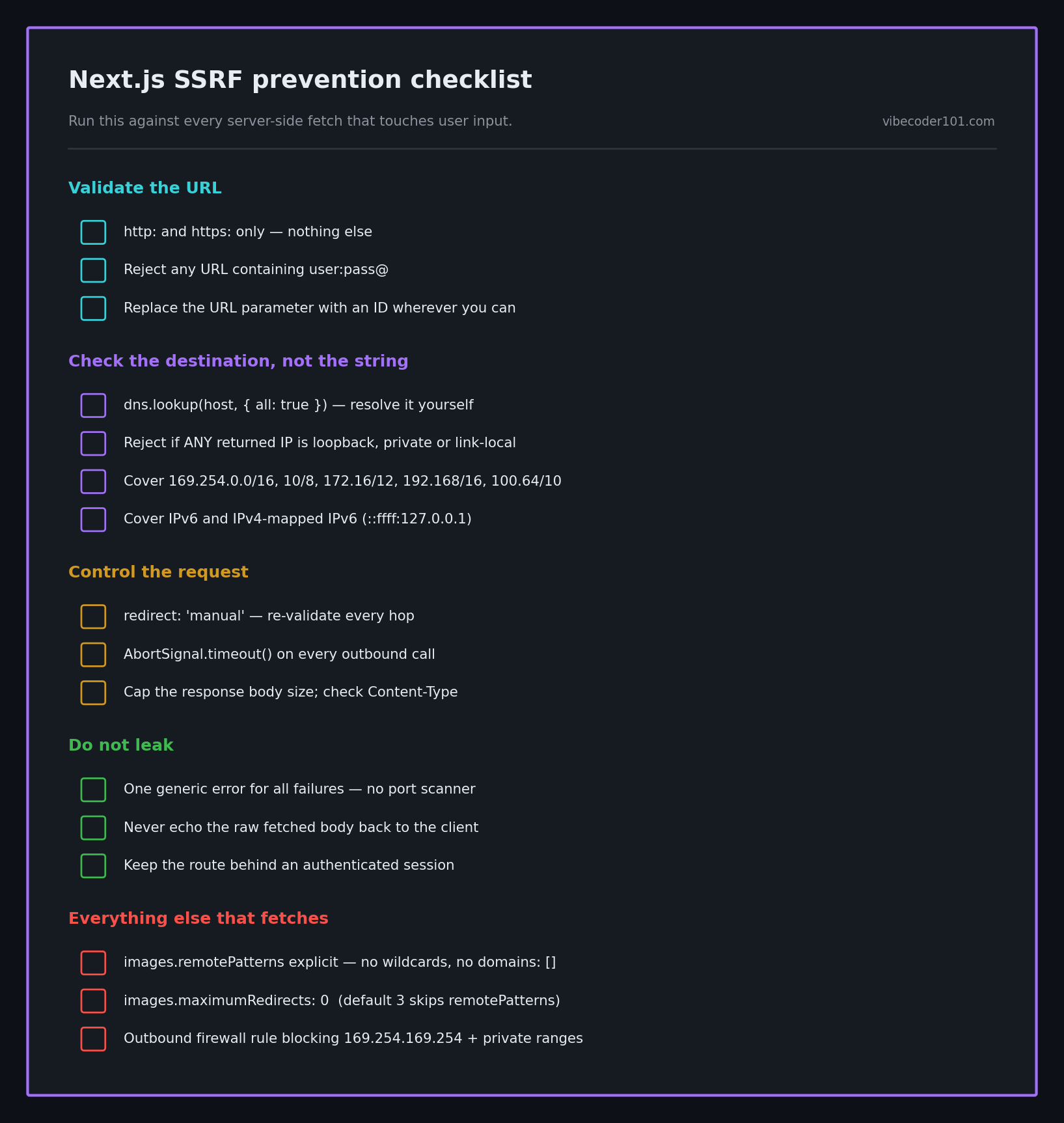
- Every server-side
fetchon user input goes through one guard function - An ID replaced the URL parameter wherever that was possible
- Only
http:andhttps:accepted - URLs containing
user:pass@rejected - Hostnames resolved with DNS, and every returned address checked
- Loopback, private, link-local (
169.254.0.0/16) and CGNAT ranges blocked - IPv6 and IPv4-mapped IPv6 (
::ffff:127.0.0.1) blocked too -
redirect: 'manual', with each hop re-validated -
AbortSignal.timeout()set, and response body size capped - Content-Type checked before parsing
- One generic error message for all failures
- Raw fetched response bodies never echoed to the client
- The route still requires an authenticated session
-
images.remotePatternsexplicit;maximumRedirects: 0; nodomains: [] - Outbound network rule blocks
169.254.169.254and private ranges - All six curl tests above run against production
SSRF belongs to the same family as the rest of the vibe coding security pillar: the AI writes the code that satisfies the feature request, and the feature request never mentioned "and don't let strangers use my server as a proxy into my own network."
If you have a Next.js app with a preview, proxy, webhook, or import-from-URL route that an AI wrote and nobody has audited, I do hands-on code-security reviews of vibe-coded apps. I run the metadata, decimal-IP, and redirect-chain tests against your live endpoints and send back the exact diff. Email [email protected] with your stack.
Key Takeaway
fetch(url) where url came from a user is a remote control for your server's network position. Blocking hostname strings does not work — decimal IPs, user@host, bare internal names, and redirects all walk straight past it. Resolve the hostname, check every IP it returns against the private ranges, refuse to follow redirects blindly, and cap what comes back. Then, if you can, delete the URL parameter entirely and take an ID instead.